Avamar Windows Client AV+DD backup failure with SSL library error
Résumé: Avamar Windows Client AV+DD backup failure with SSL library error. Data Domain server "XXXX.com" open failed DDR result code: 5341, desc: SSL library error.
Cet article concerne
Cet article ne concerne pas
Cet article n’est associé à aucun produit spécifique.
Toutes les versions du produit ne sont pas identifiées dans cet article.
Symptômes
Avamar Windows Client AV DD backup failing with SSL library error.

Error Message : Data Domain server "XXXX.com" open failed DDR result code: 5341, desc: SSL library error.
Cause
Verified that all required ports for backup are open and connectivity (ping, telnet on port 28001,30001, 30003, 29000 and 27000, forward/reverse nslookup) from client to Avamar server and also connectivity (ping, telnet on port 111, 2049, 2051 , 2052, forward/reverse nslookup) from client to Data Domain server working fine. The backup was failing because by default high encryption and Auth module is enabled for Data Domain connectivity.
Résolution
There are 2 methods to fix this issue:
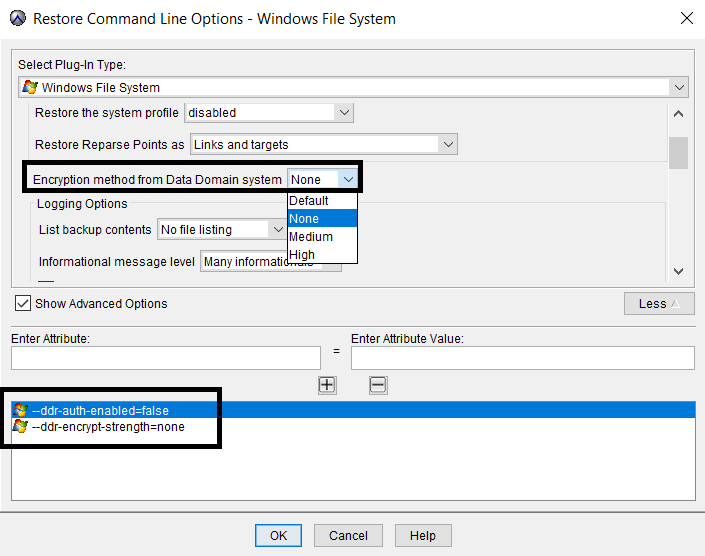
1st Method : For the problematic Windows client add the following entries in its dataset. This will disable SSL encryption for backups.
--ddr-auth-enabled=false
--ddr-encrypt-strength=none

If you are using these parameters for backups use it for restores also for that client. Along with these parameter you also need to change "Encryption method from Data Domain system" option in the dataset from "Default" to "None"
2nd Method : Disable Avamar security features.
1st Method : For the problematic Windows client add the following entries in its dataset. This will disable SSL encryption for backups.
--ddr-auth-enabled=false
--ddr-encrypt-strength=none
If you are using these parameters for backups use it for restores also for that client. Along with these parameter you also need to change "Encryption method from Data Domain system" option in the dataset from "Default" to "None"
2nd Method : Disable Avamar security features.
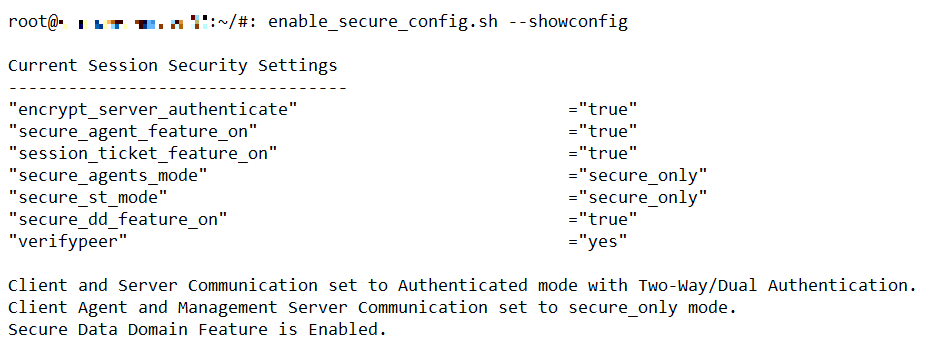
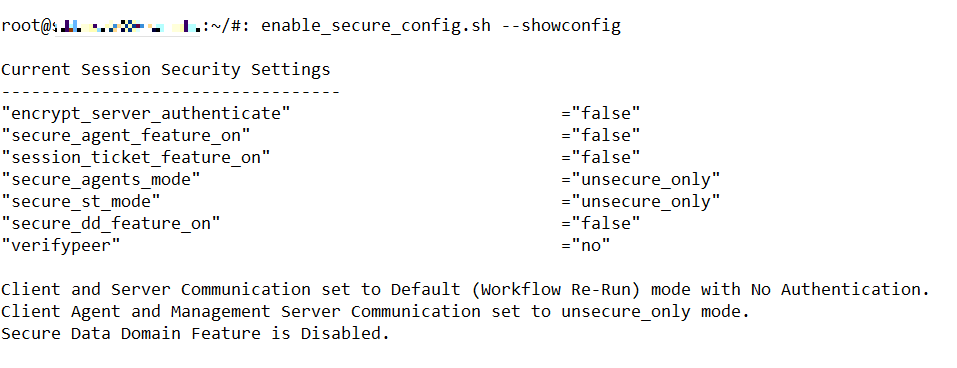
- Check the current security settings using the below command (run as root): ## enable_secure_config.sh --showconfig
- Disable security settings using the below command (run as root):## enable_secure_config.sh --enable-all --undo
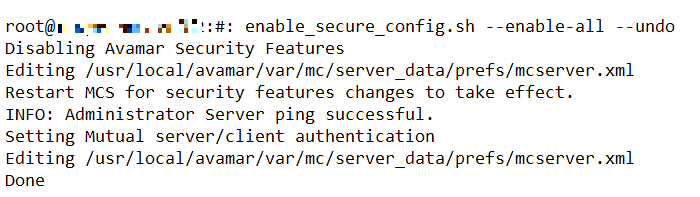
- Restart MCS service (run as admin): ## mcserver.sh --restart
- Verify that security setting is disabled (run as root): ## enable_secure_config.sh --showconfig
Produits concernés
AvamarProduits
AvamarPropriétés de l’article
Numéro d’article: 000071493
Type d’article: Solution
Dernière modification: 05 Sep 2025
Version: 3
Trouvez des réponses à vos questions auprès d’autres utilisateurs Dell
Services de support
Vérifiez si votre appareil est couvert par les services de support.