NetWorker: Apache and tomcat versions in different NetWorker versions
Riepilogo: List of the Apache and tomcat versions which are part of the different NetWorker Management Console (NMC) and NetWorker server versions.
Questo articolo si applica a
Questo articolo non si applica a
Questo articolo non è legato a un prodotto specifico.
Non tutte le versioni del prodotto sono identificate in questo articolo.
Sintomi
Apache with NetWorker and NetWorker Management Console (NMC):
- How are Apache and Tomcat used by NetWorker?
- Which vulnerabilities do exist with the Apache or Tomcat versions used by NetWorker?
- Is there any way to upgrade Apache or Tomcat versions on NetWorker?
Causa
Identify which versions of Apache and Tomcat NetWorker is bundled with.
Risoluzione
Apache is used for hosting a landing site for a Java application that opens the NetWorker Management Console (NMC) authentication at startup. After NMC is launched, Apache is no longer needed or used and NetWorker authentication takes over. Apache is not used by the Client, Storage Node, or NetWorker Server after this point.
NetWorker bundles a locked down Apache server that has as few vulnerabilities as possible. NetWorker updates the version of Apache with each major release of NetWorker.
The NetWorker Management Console server uses Embedded Apache server software for only two things:
- Download of the Console jar files.
- Start-up of the Console server daemon or service
Below are the different Apache HTTPD versions used by the NetWorker Management Console server:
- NMC version 19.10.0.0 has Apache httpd
2.4.56 - NMC version 19.10.0.2 has Apache httpd
2.4.58 - NMC version 19.11.0.1 has Apache httpd
2.4.59 - NMC versions 19.10.0.5, 19.11.0.2 and 19.12.0.0 have Apache httpd
2.4.62 - NMC versions 19.13.0.0 , 19.12.0.1 and 19.11.0.5 have Apache httpd
2.4.63 - NMC version 19.13.0.2 and 19.14.0.0 has Apache httpd
2.4.65 - NMC version 19.14.0.1 and 19.15 will have Apache https
2.4.68
Below are the different Apache Tomcat versions included on a NetWorker (NW) server:
- NW versions 19.10.0.0 has Apache Tomcat
9.0.76 - NW versions 19.10.0.1 has Apache tomcat
9.0.82 - NW versions 19.10.0.3 has Apache tomcat
9.0.85 - NW version 19.11.0.1 has Apache tomcat
9.0.86 - NW versions 19.10.0.5, 19.11.0.2 and 19.12.0.0 have Apache tomcat
9.0.90 - NW version 19.13.0.0 has Apache tomcat
10.1.26 - NW version 19.13.0.1 has Apache tomcat
10.1.41 - NW version 19.14.0.0 and 19.13.0.2 have Apache tomcat
10.1.44 - NW version 19.13.0.3 has Apache tomcat
10.1.49 - NW version 19.14.0.1 will have Apache tomcat
10.1.55(or newer) - NW version 19.15 will have Apache tomcat
10.1.57(or newer)
To find your installed HTTPD version on Linux/UNIX, run:
strings /opt/lgtonmc/apache/bin/httpd | grep 'Apache/'
To find your installed HTTPD version on Windows, perform the following:
- Go to
C:\Program Files\EMC NetWorker\Management\GST\apache\bin - Hover your cursor over the
httpd.exe. The version is shown as seen here:
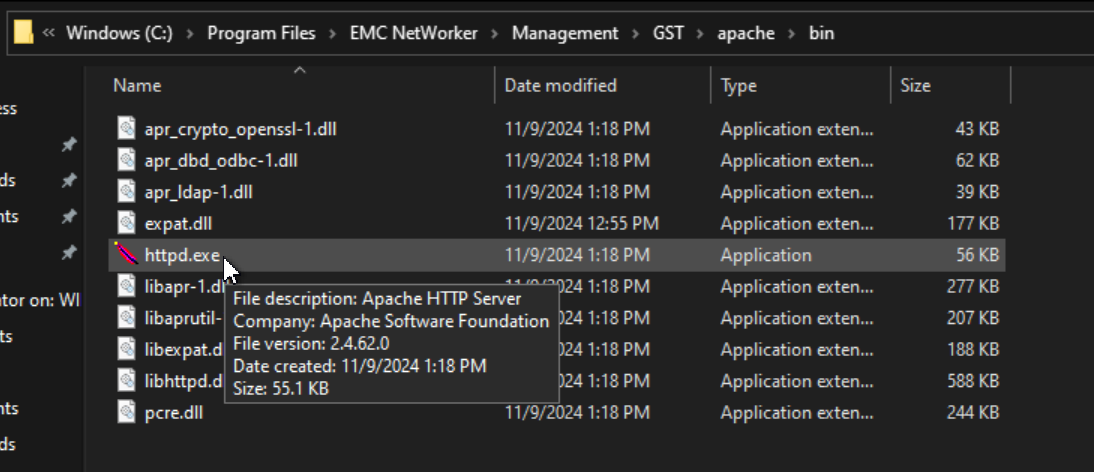
To find your installed Tomcat version, see: NetWorker: How to determine the Apache version used by NetWorker server.
To check the existence of vulnerabilities on any Apache or Tomcat version check the following URLs:
https://httpd.apache.org/security_report.html
https://www.cvedetails.com/vulnerability-list/vendor_id-45/product_id-66/Apache-Http-Server.html
https://tomcat.apache.org/security-9.html
https://httpd.apache.org/security_report.html
https://www.cvedetails.com/vulnerability-list/vendor_id-45/product_id-66/Apache-Http-Server.html
https://tomcat.apache.org/security-9.html
NOTE: Apache tomcat cannot be upgraded manually. To benefit from an upgraded version, find the NetWorker version that includes the specific Apache Tomcat version you want to upgrade to.
Prodotti interessati
NetWorkerProdotti
NetWorker, NetWorker SeriesProprietà dell'articolo
Numero articolo: 000033070
Tipo di articolo: Solution
Ultima modifica: 24 lug 2026
Versione: 21
Trova risposta alle tue domande dagli altri utenti Dell
Support Services
Verifica che il dispositivo sia coperto dai Servizi di supporto.