Avamar: VM image backups fail "No Proxy" due to proxies not resolving in DNS
Riepilogo: Avamar VM image backups fail with "No Proxy" error due to proxies not resolving in DNS.
Questo articolo si applica a
Questo articolo non si applica a
Questo articolo non è legato a un prodotto specifico.
Non tutte le versioni del prodotto sono identificate in questo articolo.
Sintomi
The Activity Monitor in the Avamar UI shows 'No Proxy'
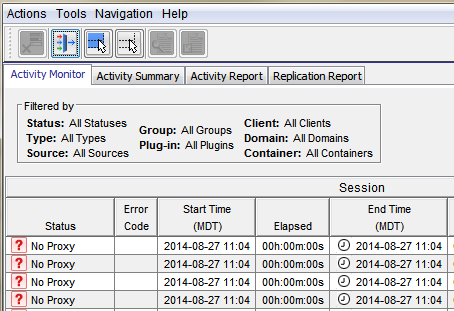
On-demand VMware Image backup fails with:
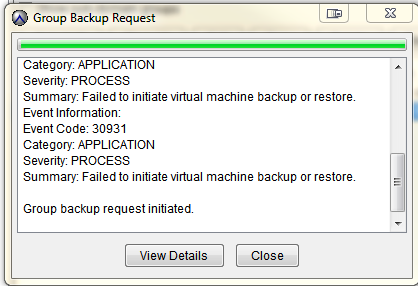
Category: APPLICATION
Severity: PROCESS
Summary: Failed to initiate virtual machine backup or restore.
Event Information:
Event Code: 30931
Category: APPLICATION
Severity: PROCESS
Summary: Failed to initiate virtual machine backup or restore.
If a group backup request is initiated.
Causa
The proxies are not resolving to DNS.
Opening a putty session to the proxy shows the hostname: localhost
Opening a putty session to the proxy shows the hostname: localhost
Risoluzione
- Open a putty to the proxy - Note if the hostname shows 'localhost'
- Verify that the proxy can resolve its FQDN, shortname, and reverse IP lookup to the DNS server by running:
- nslookup proxydnhostname .domain.com
- nslookup ###.###.###.###
- *Also verify that the Avamar Utility Node can resolve the proxies FQDN, shortname, and reverse IP lookup
- If the proxy cannot resolve its hostname to DNS, verify that there are no DNS issues or network-related issues with the IP or gateway.
- After the DNS issues are resolved, try re-registering the proxy. See the Avamar VMware users guide.
Informazioni aggiuntive
The following articles discuss issues which have the same generic "No Proxy" error.
- Avamar VM image backups fail with "No Proxy" because no proxy servers are configured to protect the datastore holding the client’s VMDKs
- Avamar VM image backups fails with "No Proxy" error due to an interruption to the vCenter connection
- Avamar VM image backups fails with "No Proxy" error due to the VM not having any hard disks
- Avamar VM image backups fails with "No Proxy" error due to the proxy being powered off in vCenter
- Avamar VM image backups fails with "No Proxy" error due to the proxies not resolving in DNS
Prodotti interessati
AvamarProdotti
AvamarProprietà dell'articolo
Numero articolo: 000033551
Tipo di articolo: Solution
Ultima modifica: 05 feb 2025
Versione: 4
Trova risposta alle tue domande dagli altri utenti Dell
Support Services
Verifica che il dispositivo sia coperto dai Servizi di supporto.