BAD_SYSTEM_CONFIG_INFO of SESSION3_INITIALIZATION_FAILURE fout op een Dell Encryption Endpoint
Riepilogo: Dell Encryption Enterprise en Dell Encryption Personal BAD_SYSTEM_CONFIG_INFO en SESSION3_INITIALIZATION_FAILURE fouten kunnen worden opgelost door deze instructies te volgen.
Questo articolo si applica a
Questo articolo non si applica a
Questo articolo non è legato a un prodotto specifico.
Non tutte le versioni del prodotto sono identificate in questo articolo.
Sintomi
Betreffende producten:
- Dell Encryption Enterprise
- Dell Data Protection | Enterprise Edition
- Dell Data Protection | Mobile Edition
- Dell Encryption Personal
- Dell Data Protection | Mobile Edition
Een eindpunt dat wordt beschermd met Dell Encryption Enterprise (voorheen Dell Data Protection | Enterprise Edition) of Dell Encryption Enterprise Personal (voorheen Dell Data Protection | Personal Edition) kan een foutmelding weergeven van:
BAD_SYSTEM_CONFIG_INFO (stop code 0x00000074)Na wijziging of manipulatie van system32-bestanden of hardware-checksumsSESSION3_INITIALIZATION_FAILURE (stop code 0x0000006f)na wijziging of sabotage van het Windows-register
Causa
Deze fouten zijn een bijproduct van Dell Encryption Enterprise of Dell Encryption Personal die het eindpunt beschermen tegen ongeoorloofde sabotage.
Risoluzione
BAD_SYSTEM_CONFIG_INFO of SESSION3_INITIALIZATION_FAILURE Optreden tijdens het opstarten als a:
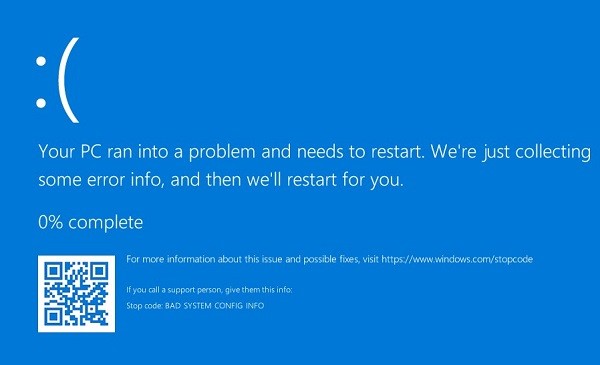
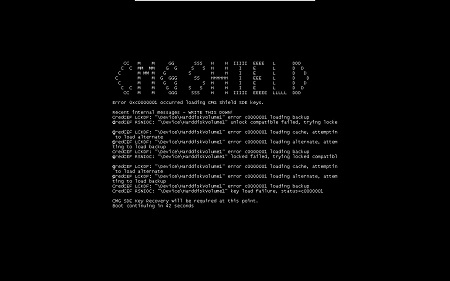
Opmerking: De fout kan er op uw eindpunt iets anders uitzien.
Als de checksums of registerwijzigingen opzettelijk waren, kan een Local Security Administrator (LSA)-herstel worden uitgevoerd om het blauwe of zwarte scherm op te lossen. Voor meer informatie over het downloadproces verwijzen we u naar Dell Encryption Enterprise of Dell Encryption Personal downloaden.
Prodotti interessati
Dell EncryptionProprietà dell'articolo
Numero articolo: 000126735
Tipo di articolo: Solution
Ultima modifica: 30 lug 2026
Versione: 12
Trova risposta alle tue domande dagli altri utenti Dell
Support Services
Verifica che il dispositivo sia coperto dai Servizi di supporto.