Latitude 5410: Keyboard Function Key Guide
Riepilogo: The following guide lists the keyboard shortcuts available and the functions they perform on the Dell Latitude 5410 Laptop.
Questo articolo si applica a
Questo articolo non si applica a
Questo articolo non è legato a un prodotto specifico.
Non tutte le versioni del prodotto sono identificate in questo articolo.
Sintomi
Keyboard Shortcut Key Functions
The below table is a list of combination short-cut key functions available on the Latitude 5410 laptop.
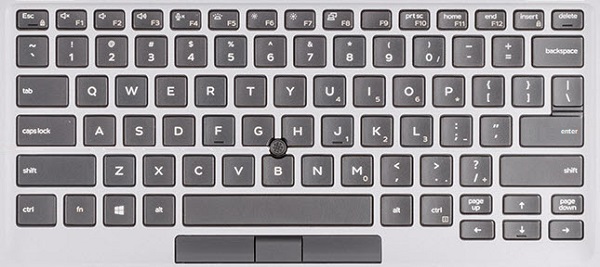
(Figure.1 Latitude 5410 US Keyboard Layout)
Causa
| Keys | Primary behavior | Secondary behavior (Fn + Key) |
|---|---|---|
| Fn + Esc | Escape |
Toggle Fn-key lock |
| Fn + F1 |
Mute audio |
F1 |
| Fn + F2 |
Decrease volume |
F2 |
| Fn + F3 |
Increase volume |
F3 |
| Fn + F4 |
Mute microphone |
F4 |
| Fn + F5 |
Turn on/off keyboard backlight |
F5 |
| Fn + F6 |
Decrease brightness |
F6 |
| Fn + F7 |
Increase brightness |
F7 |
| Fn + F8 |
Switch to external display |
F8 |
| Fn + F10 |
Print screen |
F10 |
| Fn + F11 |
Home |
F11 |
| Fn + 12 |
End |
F12 |
| Fn + Ctrl |
Open application menu |
-- |
Risoluzione
 Visit our Keyboard knowledge base for additional resources and information.
 For additional articles and information visit our Touchpad support page.
 Additional articles and information can also be found on our Mouse support page.
Prodotti interessati
Latitude 5410Proprietà dell'articolo
Numero articolo: 000133658
Tipo di articolo: Solution
Ultima modifica: 29 apr 2026
Versione: 7
Trova risposta alle tue domande dagli altri utenti Dell
Support Services
Verifica che il dispositivo sia coperto dai Servizi di supporto.