Latitude 5410: Toetsenbordfunctietoetsgids
Riepilogo: De volgende handleiding bevat de beschikbare sneltoetsen en de functies die ze verrichten op de Dell Latitude 5410 laptop.
Questo articolo si applica a
Questo articolo non si applica a
Questo articolo non è legato a un prodotto specifico.
Non tutte le versioni del prodotto sono identificate in questo articolo.
Sintomi
Sneltoetsfuncties
De onderstaande tabel bevat een lijst met beschikbare sneltoetsfuncties op de Latitude 5410 laptop.
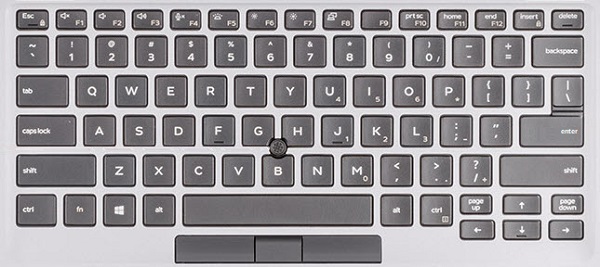
(Afbeelding 1 Latitude 5410 US toetsenbordindeling)
Causa
| Toetsen | Primair gedrag | Secundair gedrag (Fn + toets) |
|---|---|---|
| Fn + Esc | Escape |
Functietoetsvergrendeling in-/uitschakelen |
| Fn + F1 |
Audio dempen |
F1 |
| Fn + F2 |
Volume verlagen |
F2-toets |
| Fn + F3 |
Volume verhogen |
F3 |
| Fn + F4 |
Microfoon dempen |
F4 |
| Fn + F5 |
Achtergrondverlichting toetsenbord in-/uitschakelen |
F5 |
| Fn + F6 |
Helderheid verlagen |
F6 |
| Fn + F7 |
Helderheid verhogen |
F7 |
| Fn + F8 |
Overschakelen naar extern beeldscherm |
F8 |
| Fn + F10 |
Print Screen |
F10 |
| Fn + F11 |
Home |
F11 |
| Fn + 12 |
End |
F12-toets |
| Fn + Ctrl |
Applicatiemenu openen |
-- |
Risoluzione
 Ga naar onze Knowledge Base voor toetsenborden voor meer informatie.
 Meer artikelen en informatie kunt u vinden op onze touchpad supportpagina.
 U kunt ook meer artikelen en informatie vinden op onze Supportpagina voor de muis.
Prodotti interessati
Latitude 5410Proprietà dell'articolo
Numero articolo: 000133658
Tipo di articolo: Solution
Ultima modifica: 29 apr 2026
Versione: 7
Trova risposta alle tue domande dagli altri utenti Dell
Support Services
Verifica che il dispositivo sia coperto dai Servizi di supporto.