Driver Detection Not Available During Drivers Scan for Computers with SupportAssist and Dell Command Update Installed
Riepilogo: Customers are unable to run Automated Drivers Scan and results in "Driver Detection Not Available" which is an issue with Dell Command | Update.
Questo articolo si applica a
Questo articolo non si applica a
Questo articolo non è legato a un prodotto specifico.
Non tutte le versioni del prodotto sono identificate in questo articolo.
Sintomi
Affected Products:
- Dell Command | Update
When running Automated Drivers Scan, a customer gets a Driver Detection Not Available message which is due to a No Available Catalog error. This can occur when the SupportAssist and Dell Command | Update are installed on the computer.
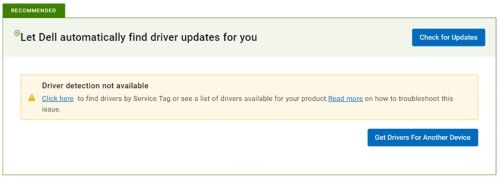
Figure 1: (English Only) Drive detection not available
Causa
Error is observed only when the below condition is fulfilled (all three conditions should be present):
- Applicable only if SupportAssist and Dell Command | Update are both installed on the machine (Open Control Panel from Start Menu > Click Programs > Search Dell SupportAssist).
- The computer has Dell Command | Update v4.5 or earlier and updating to v4.6 or later (Open Control Panel from Start Menu > Click Programs > Search Dell Command Update).
- Dell Command | Update must have an offline catalog that is configured (Open Dell Command | Update application > Settings (right top of the application) > General:
- The default Source Location (dell.com) is cleared.
- Location is configured to offline catalog.
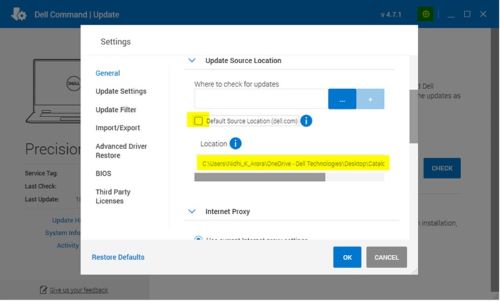
Figure 2: (English Only) Dell Command | Update Settings
Risoluzione
- Remove offline catalog location updated.
- Check Default Source Location (dell.com) and click OK.
- Update to the latest Dell Command | Update version.
Or
- Uninstall the existing Dell Command | Update version (which should be 4.5 or earlier).
- Install the latest Dell Command | Update version from Dell.com.
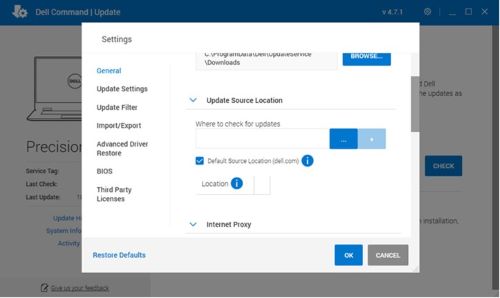
Figure 3: (English Only) Dell Command | Update Settings
Prodotti interessati
Dell Command | UpdateProprietà dell'articolo
Numero articolo: 000207301
Tipo di articolo: Solution
Ultima modifica: 16 set 2025
Versione: 5
Trova risposta alle tue domande dagli altri utenti Dell
Support Services
Verifica che il dispositivo sia coperto dai Servizi di supporto.