Dell Unity: Replicatieoverdrachten werken niet meer (op te lossen door gebruiker)
Riepilogo: Omgaan met een gebeurtenis waarbij replicatieoverdracht is gestopt.
Questo articolo si applica a
Questo articolo non si applica a
Questo articolo non è legato a un prodotto specifico.
Non tutte le versioni del prodotto sono identificate in questo articolo.
Sintomi
Hoewel automatische synchronisatie door RPO is ingesteld in replicatie, wordt er geen overdracht uitgevoerd en is de laatste synchronisatietijd nog steeds verouderd.
Hoewel de overdracht niet wordt uitgevoerd, is de synchronisatiestatus inactief en is de status OK.
Hoewel de overdracht niet wordt uitgevoerd, is de synchronisatiestatus inactief en is de status OK.
Causa
De volgende oorzaken zijn mogelijk.
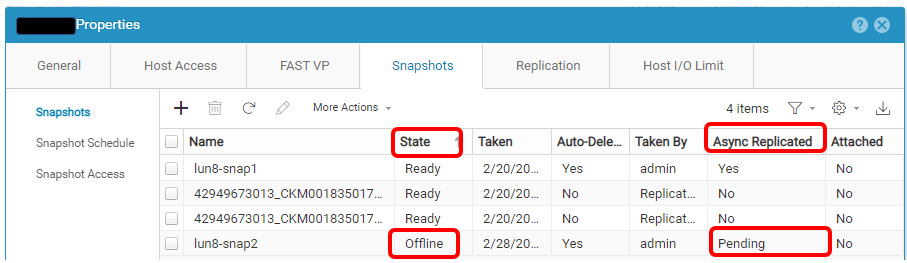
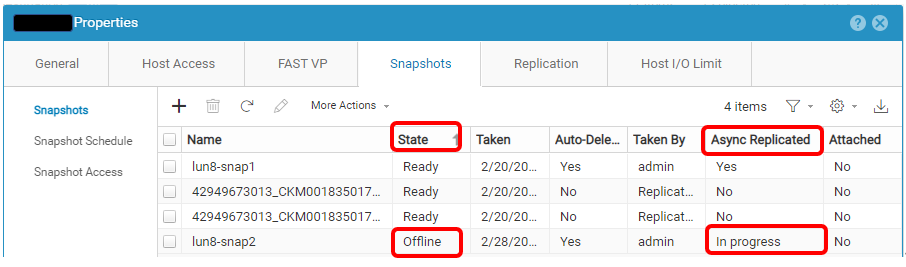
(1) Er is een probleem met de snapshot die moet worden overgebracht.
(2) Wanneer het wissen van de taak van een TAAK in handmatige synchronisatie wordt uitgevoerd.
(1) Er is een probleem met de snapshot die moet worden overgebracht.
(2) Wanneer het wissen van de taak van een TAAK in handmatige synchronisatie wordt uitgevoerd.
Risoluzione
(1) Voer de volgende stappen uit om de problematische snapshot uit de Unisphere UI te verwijderen.
Replicatie onderbreken > een snapshot verwijderen > replicatie hervatten
(2) Pauzeer en hervat de replicatie.
Replicatie onderbreken > een snapshot verwijderen > replicatie hervatten
OPMERKING: Neem contact op met De Technische Support van Dell als er een fout optreedt tijdens een van de stappen.
(2) Pauzeer en hervat de replicatie.
Informazioni aggiuntive
Hier is een voorbeeld van een problematische snapshot.
Prodotti interessati
Dell EMC Unity, Dell Unity 300, Dell EMC Unity 300F, Dell EMC Unity 350F, Dell EMC Unity XT 380, Dell EMC Unity XT 380F, Dell EMC Unity 400, Dell EMC Unity 400F, Dell EMC Unity 450F, Dell EMC Unity XT 480, Dell EMC Unity XT 480F, Dell EMC Unity 500
, Dell EMC Unity 500F, Dell EMC Unity 550F, Dell EMC Unity 600, Dell EMC Unity 600F, Dell EMC Unity 650F, Dell EMC Unity XT 680, Dell EMC Unity XT 680F, Dell EMC Unity XT 880, Dell EMC Unity XT 880F, Dell EMC Unity Family |Dell EMC Unity All Flash, Dell EMC Unity Family, Dell EMC Unity Hybrid, Dell EMC UnityVSA Professional Edition/Unity Cloud Edition
...
Proprietà dell'articolo
Numero articolo: 000210066
Tipo di articolo: Solution
Ultima modifica: 31 dic 2025
Versione: 2
Trova risposta alle tue domande dagli altri utenti Dell
Support Services
Verifica che il dispositivo sia coperto dai Servizi di supporto.