Dell Unity : L’une des raisons pour lesquelles l’état de la réplication est Inconnu (corrigible par l’utilisateur)
Riepilogo: Cet article de la base de connaissances décrit l’une des causes de l’état Inconnu de la réplication.
Questo articolo si applica a
Questo articolo non si applica a
Questo articolo non è legato a un prodotto specifico.
Non tutte le versioni del prodotto sono identificate in questo articolo.
Sintomi
L’état de la réplication s’affiche comme Inconnu.

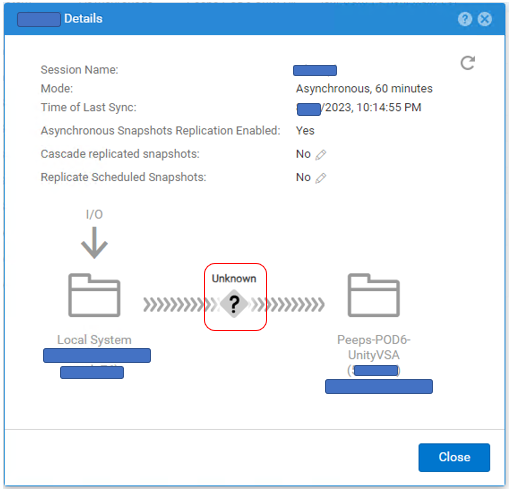
# uemcli -no /prot/rep/session -name XXXXXXXXXX show
1:    ID                   = 1717986919XX_VIRT1615KVBXXX_0000_1717986919XX_VIRT2213XBSXXX_0000
      Name                 = XXXXXXXXXX
      Session type         = file
      Synchronization type = auto
      RPO                  = 1h 00m
      Sync State           = idle
      Health state         = Unknown (0)
      Operational status   = Unknown (0x0)
      Time of last sync    = 2023-MM-DD 02:14:55
      Sync status          =
      Element pairs        = N/A
Causa
Cet événement se produit lorsque les deux conditions suivantes sont remplies.
(1) L’instantané utilisateur est défini sur Réplication.
(2) L’instantané utilisateur a atteint son maximum côté destination et un nouvel instantané ne peut pas être créé.
(1) L’instantané utilisateur est défini sur Réplication.
(2) L’instantané utilisateur a atteint son maximum côté destination et un nouvel instantané ne peut pas être créé.
Risoluzione
Si le problème est dû au nombre de snapshots, suivez les étapes ci-dessous pour améliorer l’état de la réplication.
(1) Supprimez les snapshots inutiles du côté Destination.
(2) Suspendre et reprendre la réplication.
(1) Supprimez les snapshots inutiles du côté Destination.
(2) Suspendre et reprendre la réplication.
Informazioni aggiuntive
- Le nombre maximal de snapshots pouvant être créés est décrit dans la Matrice de support.
https://elabnavigator.dell.com/vault/pdf/EMC_Unity_ESSM.pdf exemple:
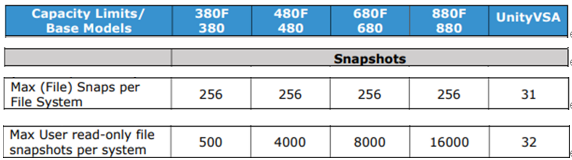
- Le nombre maximal de snapshots et le nombre actuel de snapshots pour Unity peuvent être vérifiés à l’aide de la commande suivante.
svc_storagecheck --list |grep « CheckpointSnaps"
Exemple de sortie:
https://elabnavigator.dell.com/vault/pdf/EMC_Unity_ESSM.pdf exemple:
- Le nombre maximal de snapshots et le nombre actuel de snapshots pour Unity peuvent être vérifiés à l’aide de la commande suivante.
svc_storagecheck --list |grep « CheckpointSnaps"
Exemple de sortie:
svc_storagecheck --list |grep "CheckpointSnaps"
MaxCheckpointSnaps                 : 500
CountCheckpointSnaps               : 500
Prodotti interessati
Dell EMC Unity, Dell EMC Unity 300F, Dell EMC Unity 350F, Dell EMC Unity 400, Dell EMC Unity 400F, Dell EMC Unity 450F, Dell EMC Unity 500, Dell EMC Unity 500F, Dell EMC Unity 550F, Dell EMC Unity 600Prodotti
Dell Unity 450F DC, Dell Unity 300, Dell Unity 300 DC, Dell Unity 350F DC, Dell EMC Unity XT 380, Dell EMC Unity XT 380F, Dell Unity 400 DC, Dell EMC Unity XT 480, Dell EMC Unity XT 480F, Dell EMC Unity 600F, Dell EMC Unity 650F
, Dell EMC Unity XT 680, Dell EMC Unity XT 680F, Dell EMC Unity XT 880, Dell EMC Unity XT 880F, Dell EMC Unity Family |Dell EMC Unity All Flash, Dell EMC Unity Family, Dell EMC Unity Hybrid, Dell Unity Operating Environment (OE), Dell EMC UnityVSA Professional Edition/Unity Cloud Edition
...
Proprietà dell'articolo
Numero articolo: 000216468
Tipo di articolo: Solution
Ultima modifica: 18 mag 2026
Versione: 5
Trova risposta alle tue domande dagli altri utenti Dell
Support Services
Verifica che il dispositivo sia coperto dai Servizi di supporto.