Dell Unity: Ein Grund, warum der Replikationsstatus unbekannt ist (vom Nutzer korrigierbar)
Riepilogo: Dieser Wissensdatenbank-Artikel beschreibt eine der Ursachen für den Status "Unbekannt" der Replikation.
Questo articolo si applica a
Questo articolo non si applica a
Questo articolo non è legato a un prodotto specifico.
Non tutte le versioni del prodotto sono identificate in questo articolo.
Sintomi
Der Replikationsstatus wird als Unbekannt angezeigt.

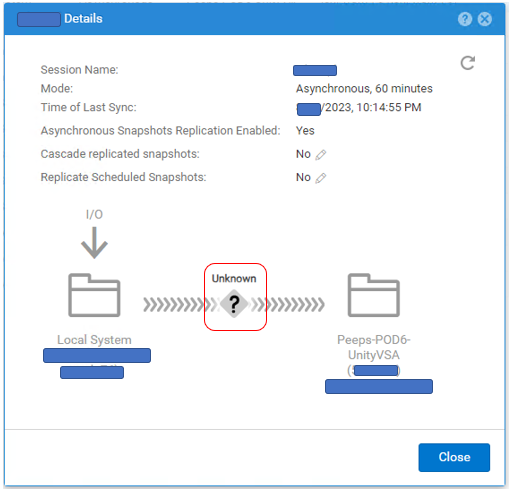
# uemcli -no /prot/rep/session -name XXXXXXXXXX show
1:    ID                   = 1717986919XX_VIRT1615KVBXXX_0000_1717986919XX_VIRT2213XBSXXX_0000
      Name                 = XXXXXXXXXX
      Session type         = file
      Synchronization type = auto
      RPO                  = 1h 00m
      Sync State           = idle
      Health state         = Unknown (0)
      Operational status   = Unknown (0x0)
      Time of last sync    = 2023-MM-DD 02:14:55
      Sync status          =
      Element pairs        = N/A
Causa
Dieses Ereignis tritt auf, wenn die folgenden beiden Bedingungen erfüllt sind.
(1) Benutzer-Snapshot ist auf Replikation eingestellt.
(2) Der Benutzer-Snapshot hat auf der Zielseite sein Maximum erreicht und es kann kein neuer Snapshot erstellt werden.
(1) Benutzer-Snapshot ist auf Replikation eingestellt.
(2) Der Benutzer-Snapshot hat auf der Zielseite sein Maximum erreicht und es kann kein neuer Snapshot erstellt werden.
Risoluzione
Wenn das Problem auf die Anzahl der Snapshots zurückzuführen ist, führen Sie die folgenden Schritte aus, um den Replikationsstatus zu verbessern.
(1) Löschen Sie unnötige Snapshots auf der Zielseite.
(2) Halten Sie die Replikation an und setzen Sie sie fort.
(1) Löschen Sie unnötige Snapshots auf der Zielseite.
(2) Halten Sie die Replikation an und setzen Sie sie fort.
Informazioni aggiuntive
Die maximale Anzahl der Snapshots, die erstellt werden können, wird in der Supportmatrix beschrieben.
https://elabnavigator.dell.com/vault/pdf/EMC_Unity_ESSM.pdf Beispiel:
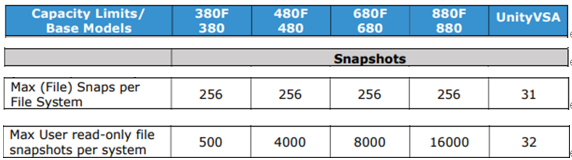
Die maximale Anzahl von Snapshots und die aktuelle Anzahl der Snapshots für Unity können mit dem folgenden Befehl geprüft werden.
svc_storagecheck --list |grep "CheckpointSnaps"
Beispielausgabe:
https://elabnavigator.dell.com/vault/pdf/EMC_Unity_ESSM.pdf Beispiel:
Die maximale Anzahl von Snapshots und die aktuelle Anzahl der Snapshots für Unity können mit dem folgenden Befehl geprüft werden.
svc_storagecheck --list |grep "CheckpointSnaps"
Beispielausgabe:
svc_storagecheck --list |grep "CheckpointSnaps"
MaxCheckpointSnaps                 : 500
CountCheckpointSnaps               : 500
Prodotti interessati
Dell EMC Unity, Dell EMC Unity 300F, Dell EMC Unity 350F, Dell EMC Unity 400, Dell EMC Unity 400F, Dell EMC Unity 450F, Dell EMC Unity 500, Dell EMC Unity 500F, Dell EMC Unity 550F, Dell EMC Unity 600Prodotti
Dell Unity 450F DC, Dell Unity 300, Dell Unity 300 DC, Dell Unity 350F DC, Dell EMC Unity XT 380, Dell EMC Unity XT 380F, Dell Unity 400 DC, Dell EMC Unity XT 480, Dell EMC Unity XT 480F, Dell EMC Unity 600F, Dell EMC Unity 650F
, Dell EMC Unity XT 680, Dell EMC Unity XT 680F, Dell EMC Unity XT 880, Dell EMC Unity XT 880F, Dell EMC Unity Family |Dell EMC Unity All Flash, Dell EMC Unity Family, Dell EMC Unity Hybrid, Dell Unity Operating Environment (OE), Dell EMC UnityVSA Professional Edition/Unity Cloud Edition
...
Proprietà dell'articolo
Numero articolo: 000216468
Tipo di articolo: Solution
Ultima modifica: 18 mag 2026
Versione: 5
Trova risposta alle tue domande dagli altri utenti Dell
Support Services
Verifica che il dispositivo sia coperto dai Servizi di supporto.