Dell Unity: Eén reden om de replicatiestatus onbekend te maken (op te lossen door gebruiker)
Riepilogo: Dit KB-artikel beschrijft een van de oorzaken van de onbekende status van replicatie.
Questo articolo si applica a
Questo articolo non si applica a
Questo articolo non è legato a un prodotto specifico.
Non tutte le versioni del prodotto sono identificate in questo articolo.
Sintomi
De replicatiestatus wordt weergegeven als Onbekend.

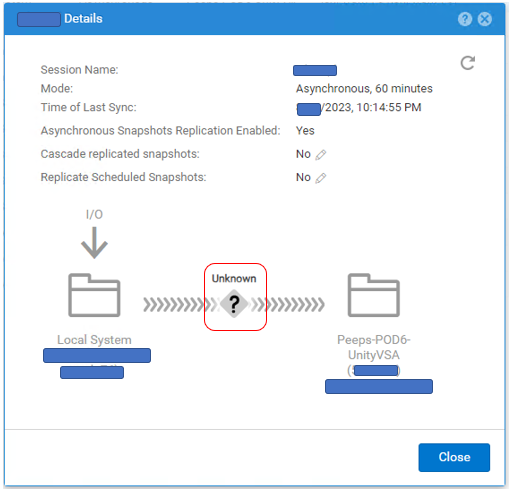
# uemcli -no /prot/rep/session -name XXXXXXXXXX show
1:    ID                   = 1717986919XX_VIRT1615KVBXXX_0000_1717986919XX_VIRT2213XBSXXX_0000
      Name                 = XXXXXXXXXX
      Session type         = file
      Synchronization type = auto
      RPO                  = 1h 00m
      Sync State           = idle
      Health state         = Unknown (0)
      Operational status   = Unknown (0x0)
      Time of last sync    = 2023-MM-DD 02:14:55
      Sync status          =
      Element pairs        = N/A
Causa
Deze gebeurtenis treedt op wanneer aan de volgende twee voorwaarden wordt voldaan.
(1) User Snapshot is ingesteld op Replicatie.
(2) User Snapshot heeft het maximum aan de doelzijde bereikt en er kan geen nieuwe snapshot worden gemaakt.
(1) User Snapshot is ingesteld op Replicatie.
(2) User Snapshot heeft het maximum aan de doelzijde bereikt en er kan geen nieuwe snapshot worden gemaakt.
Risoluzione
Als het probleem te wijten is aan het aantal snapshots, volgt u de onderstaande stappen om de replicatiestatus te verbeteren.
(1) Verwijder onnodige snapshots aan de doelzijde.
(2) Pauzeer en hervat de replicatie.
(1) Verwijder onnodige snapshots aan de doelzijde.
(2) Pauzeer en hervat de replicatie.
Informazioni aggiuntive
- Het maximale aantal snapshots dat kan worden gemaakt, wordt beschreven in de supportmatrix.
https://elabnavigator.dell.com/vault/pdf/EMC_Unity_ESSM.pdf voorbeeld:
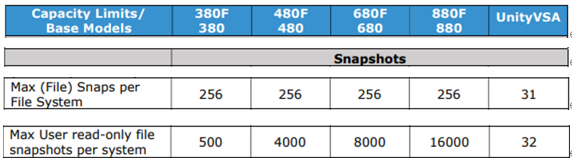
- Het maximale aantal snapshots en het huidige aantal snapshots voor Unity kan worden gecontroleerd met de volgende opdracht.
svc_storagecheck --list |grep "CheckpointSnaps"
Voorbeelduitvoer:
https://elabnavigator.dell.com/vault/pdf/EMC_Unity_ESSM.pdf voorbeeld:
- Het maximale aantal snapshots en het huidige aantal snapshots voor Unity kan worden gecontroleerd met de volgende opdracht.
svc_storagecheck --list |grep "CheckpointSnaps"
Voorbeelduitvoer:
svc_storagecheck --list |grep "CheckpointSnaps"
MaxCheckpointSnaps                 : 500
CountCheckpointSnaps               : 500
Prodotti interessati
Dell EMC Unity, Dell EMC Unity 300F, Dell EMC Unity 350F, Dell EMC Unity 400, Dell EMC Unity 400F, Dell EMC Unity 450F, Dell EMC Unity 500, Dell EMC Unity 500F, Dell EMC Unity 550F, Dell EMC Unity 600Prodotti
Dell Unity 450F DC, Dell Unity 300, Dell Unity 300 DC, Dell Unity 350F DC, Dell EMC Unity XT 380, Dell EMC Unity XT 380F, Dell Unity 400 DC, Dell EMC Unity XT 480, Dell EMC Unity XT 480F, Dell EMC Unity 600F, Dell EMC Unity 650F
, Dell EMC Unity XT 680, Dell EMC Unity XT 680F, Dell EMC Unity XT 880, Dell EMC Unity XT 880F, Dell EMC Unity Family |Dell EMC Unity All Flash, Dell EMC Unity Family, Dell EMC Unity Hybrid, Dell Unity Operating Environment (OE), Dell EMC UnityVSA Professional Edition/Unity Cloud Edition
...
Proprietà dell'articolo
Numero articolo: 000216468
Tipo di articolo: Solution
Ultima modifica: 18 mag 2026
Versione: 5
Trova risposta alle tue domande dagli altri utenti Dell
Support Services
Verifica che il dispositivo sia coperto dai Servizi di supporto.