Dell Unity: Én årsak til at replikeringsstatusen er ukjent (kan korrigeres av brukeren)
Riepilogo: Denne KB-en beskriver én av årsakene til ukjent status for replikering.
Questo articolo si applica a
Questo articolo non si applica a
Questo articolo non è legato a un prodotto specifico.
Non tutte le versioni del prodotto sono identificate in questo articolo.
Sintomi
Replikeringsstatus vises som Unknown (Ukjent).

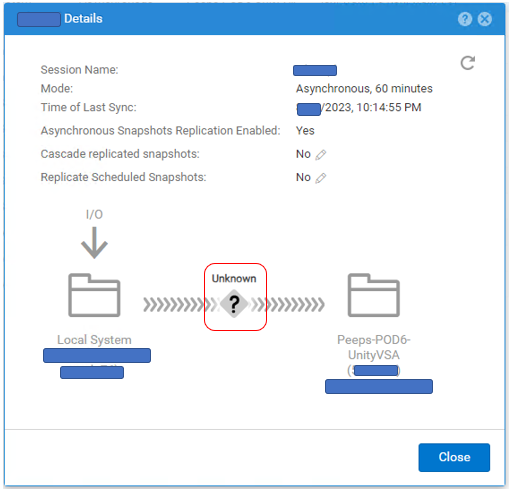
# uemcli -no /prot/rep/session -name XXXXXXXXXX show
1:    ID                   = 1717986919XX_VIRT1615KVBXXX_0000_1717986919XX_VIRT2213XBSXXX_0000
      Name                 = XXXXXXXXXX
      Session type         = file
      Synchronization type = auto
      RPO                  = 1h 00m
      Sync State           = idle
      Health state         = Unknown (0)
      Operational status   = Unknown (0x0)
      Time of last sync    = 2023-MM-DD 02:14:55
      Sync status          =
      Element pairs        = N/A
Causa
Denne hendelsen oppstår når følgende to betingelser er oppfylt.
(1) Brukerøyeblikksbilde er satt til replikering.
(2) User Snapshot has reached its maximum on the Destination side and a new Snapshot cannot be created .(2) User Snapshot has reached its maximum on the Destination side and a new Snapshot cannot be created .(2) User Snapshot has reached its maximum on the Destination side and a new Snapshot cannot be created .(
(1) Brukerøyeblikksbilde er satt til replikering.
(2) User Snapshot has reached its maximum on the Destination side and a new Snapshot cannot be created .(2) User Snapshot has reached its maximum on the Destination side and a new Snapshot cannot be created .(2) User Snapshot has reached its maximum on the Destination side and a new Snapshot cannot be created .(
Risoluzione
Hvis problemet skyldes antall øyeblikksbilder, følger du trinnene nedenfor for å forbedre replikeringsstatusen.
(1) Slett unødvendige øyeblikksbilder på målsiden.
(2) Pause og gjenoppta replikering.
(1) Slett unødvendige øyeblikksbilder på målsiden.
(2) Pause og gjenoppta replikering.
Informazioni aggiuntive
– Det maksimale antallet øyeblikksbilder som kan opprettes, er beskrevet i støttematrisen.
https://elabnavigator.dell.com/vault/pdf/EMC_Unity_ESSM.pdf eksempel:
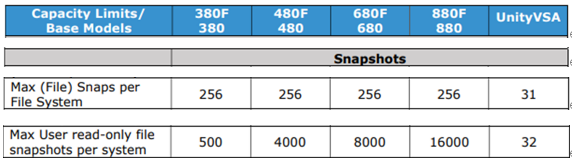
– Det maksimale antallet øyeblikksbilder og det gjeldende antallet øyeblikksbilder for Unity kan kontrolleres med følgende kommando.
svc_storagecheck --list |grep "CheckpointSnaps"
Eksempel på utdata:
https://elabnavigator.dell.com/vault/pdf/EMC_Unity_ESSM.pdf eksempel:
– Det maksimale antallet øyeblikksbilder og det gjeldende antallet øyeblikksbilder for Unity kan kontrolleres med følgende kommando.
svc_storagecheck --list |grep "CheckpointSnaps"
Eksempel på utdata:
svc_storagecheck --list |grep "CheckpointSnaps"
MaxCheckpointSnaps                 : 500
CountCheckpointSnaps               : 500
Prodotti interessati
Dell EMC Unity, Dell EMC Unity 300F, Dell EMC Unity 350F, Dell EMC Unity 400, Dell EMC Unity 400F, Dell EMC Unity 450F, Dell EMC Unity 500, Dell EMC Unity 500F, Dell EMC Unity 550F, Dell EMC Unity 600Prodotti
Dell Unity 450F DC, Dell Unity 300, Dell Unity 300 DC, Dell Unity 350F DC, Dell EMC Unity XT 380, Dell EMC Unity XT 380F, Dell Unity 400 DC, Dell EMC Unity XT 480, Dell EMC Unity XT 480F, Dell EMC Unity 600F, Dell EMC Unity 650F
, Dell EMC Unity XT 680, Dell EMC Unity XT 680F, Dell EMC Unity XT 880, Dell EMC Unity XT 880F, Dell EMC Unity Family |Dell EMC Unity All Flash, Dell EMC Unity Family, Dell EMC Unity Hybrid, Dell Unity Operating Environment (OE), Dell EMC UnityVSA Professional Edition/Unity Cloud Edition
...
Proprietà dell'articolo
Numero articolo: 000216468
Tipo di articolo: Solution
Ultima modifica: 18 mag 2026
Versione: 5
Trova risposta alle tue domande dagli altri utenti Dell
Support Services
Verifica che il dispositivo sia coperto dai Servizi di supporto.