Dell Unity: En orsak till att replikeringsstatus är okänd (kan korrigeras av användaren)
Riepilogo: I den här kunskapsdatabasartikeln beskrivs en av orsakerna till replikeringsstatusen Okänd.
Questo articolo si applica a
Questo articolo non si applica a
Questo articolo non è legato a un prodotto specifico.
Non tutte le versioni del prodotto sono identificate in questo articolo.
Sintomi
Replikeringsstatus visas som Okänd.

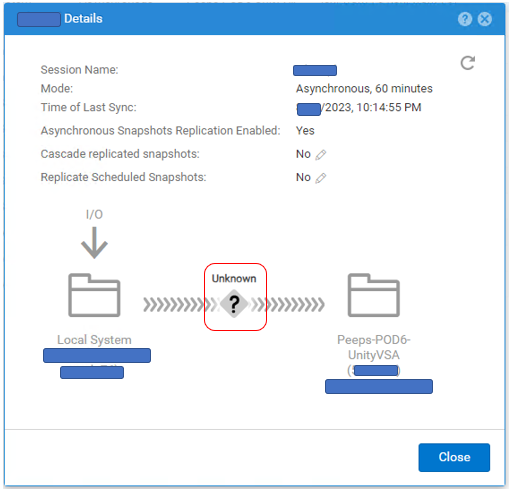
# uemcli -no /prot/rep/session -name XXXXXXXXXX show
1:    ID                   = 1717986919XX_VIRT1615KVBXXX_0000_1717986919XX_VIRT2213XBSXXX_0000
      Name                 = XXXXXXXXXX
      Session type         = file
      Synchronization type = auto
      RPO                  = 1h 00m
      Sync State           = idle
      Health state         = Unknown (0)
      Operational status   = Unknown (0x0)
      Time of last sync    = 2023-MM-DD 02:14:55
      Sync status          =
      Element pairs        = N/A
Causa
Den här händelsen inträffar när följande två villkor uppfylls.
(1) Användarögonblicksbild är inställd på Replikering.
(2) Användarögonblicksbilden har nått sitt maxvärde på målsidan och en ny snapshot kan inte skapas.
(1) Användarögonblicksbild är inställd på Replikering.
(2) Användarögonblicksbilden har nått sitt maxvärde på målsidan och en ny snapshot kan inte skapas.
Risoluzione
Om problemet beror på antalet snapshots följer du stegen nedan för att förbättra replikeringsstatusen.
(1) Ta bort onödiga snapshots på målsidan.
(2) Pausa och återuppta replikeringen.
(1) Ta bort onödiga snapshots på målsidan.
(2) Pausa och återuppta replikeringen.
Informazioni aggiuntive
- Det maximala antalet snapshots som kan skapas beskrivs i supportmatrisen.
https://elabnavigator.dell.com/vault/pdf/EMC_Unity_ESSM.pdf Exempel:
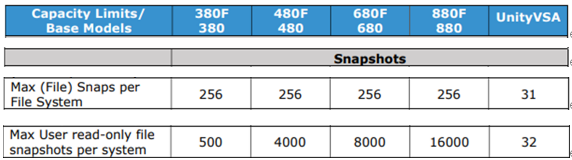
- Det maximala antalet snapshots och det aktuella antalet snapshots för Unity kan kontrolleras med följande kommando.
svc_storagecheck --list |grep "CheckpointSnaps"
Exempel på utdata:
https://elabnavigator.dell.com/vault/pdf/EMC_Unity_ESSM.pdf Exempel:
- Det maximala antalet snapshots och det aktuella antalet snapshots för Unity kan kontrolleras med följande kommando.
svc_storagecheck --list |grep "CheckpointSnaps"
Exempel på utdata:
svc_storagecheck --list |grep "CheckpointSnaps"
MaxCheckpointSnaps                 : 500
CountCheckpointSnaps               : 500
Prodotti interessati
Dell EMC Unity, Dell EMC Unity 300F, Dell EMC Unity 350F, Dell EMC Unity 400, Dell EMC Unity 400F, Dell EMC Unity 450F, Dell EMC Unity 500, Dell EMC Unity 500F, Dell EMC Unity 550F, Dell EMC Unity 600Prodotti
Dell Unity 450F DC, Dell Unity 300, Dell Unity 300 DC, Dell Unity 350F DC, Dell EMC Unity XT 380, Dell EMC Unity XT 380F, Dell Unity 400 DC, Dell EMC Unity XT 480, Dell EMC Unity XT 480F, Dell EMC Unity 600F, Dell EMC Unity 650F
, Dell EMC Unity XT 680, Dell EMC Unity XT 680F, Dell EMC Unity XT 880, Dell EMC Unity XT 880F, Dell EMC Unity Family |Dell EMC Unity All Flash, Dell EMC Unity Family, Dell EMC Unity Hybrid, Dell Unity Operating Environment (OE), Dell EMC UnityVSA Professional Edition/Unity Cloud Edition
...
Proprietà dell'articolo
Numero articolo: 000216468
Tipo di articolo: Solution
Ultima modifica: 18 mag 2026
Versione: 5
Trova risposta alle tue domande dagli altri utenti Dell
Support Services
Verifica che il dispositivo sia coperto dai Servizi di supporto.