"HYPERVISOR_ERROR"-Bluescreen auf Dell Pro Desktop
Riepilogo: Erfahren Sie, was zu tun ist, wenn ein "HYPERVISOR_ERROR"-Bluescreen auf einem Dell Pro Micro QCM1255, Dell Pro Slim QCS1255 oder Dell Pro Tower QCT1255 auftritt.
Questo articolo si applica a
Questo articolo non si applica a
Questo articolo non è legato a un prodotto specifico.
Non tutte le versioni del prodotto sono identificate in questo articolo.
Sintomi
Bei Dell Pro Desktop-PCs mit einer AMD Ryzen 5 8500G-CPU treten möglicherweise "HYPERVISOR_ERROR"-Bluescreens auf. Der Fehler besagt: "Auf Ihrem Gerät ist ein Problem aufgetreten und Sie müssen neu gestartet werden. Wir sammeln nur einige Fehlerinformationen und starten dann für Sie neu."
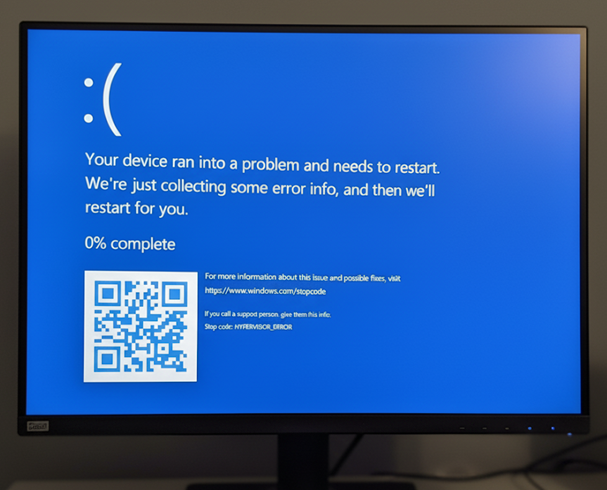
Bei der Verwendung des Computers können auch Probleme mit der Anzeige veralteter Objekte auftreten.
Betroffene Plattformen:
- Dell Pro Webcam QCM1255
- Dell Pro Webcam QCS1255
- Dell Pro Webcam QCT1255
Betroffene BIOS-Version
- v1.0.5
- v1.1.3
- v1.2.1
- v1.3.2
- v1.4.1
- v1.4.2
- v1.5.0
Causa
Fehler beim Energiemanagement des AMD-Prozessors verursachen dieses Problem.
Risoluzione
Das Aktualisieren des BIOS auf Version 1.6.2 oder höher auf dem Computer löst das Problem. Informationen zum Herunterladen und Installieren des BIOS finden Sie im Dell BIOS- und UEFI-Update-Download- und -Installationshandbuch.
Prodotti interessati
Dell Pro Micro QCM1255, Dell Pro Slim QCS1255, Dell Pro Tower QCT1255Proprietà dell'articolo
Numero articolo: 000362072
Tipo di articolo: Solution
Ultima modifica: 23 mag 2026
Versione: 5
Trova risposta alle tue domande dagli altri utenti Dell
Support Services
Verifica che il dispositivo sia coperto dai Servizi di supporto.