Dell Unity: Backing Up Dell Unity Configuration Files
概要: Dell recommends saving the Dell Unity system configuration file to a remote location after every significant configuration change.
この記事は次に適用されます:
この記事は次には適用されません:
この記事は、特定の製品に関連付けられていません。
すべての製品パージョンがこの記事に記載されているわけではありません。
手順
Does Dell provide any recommendations or best practices for backing up Dell Unity configuration files?
Yes. Dell recommends saving the Unity system configuration file to a remote location after every significant configuration change. This practice helps ensure that you always maintain an up-to-date copy of the storage system's configuration settings, which can be valuable for system recovery, troubleshooting, or rebuilding the environment, if required.
Best Practice
- Save the configuration file after any major system modification, such as:
- Network configuration changes
- Storage pool modifications
- User or security configuration updates
- Replication or data protection configuration changes
- Hardware additions or replacements
How to Save the Configuration File in Unisphere
To create and download a backup of the Unity configuration file:
- Log in to Unisphere.
- Go to Service.
- Select Service Tasks.
- Click Save Configuration.
- Select Execute to generate and download the configuration file.
- Store the file in a secure remote location as part of your regular backup and recovery procedures.
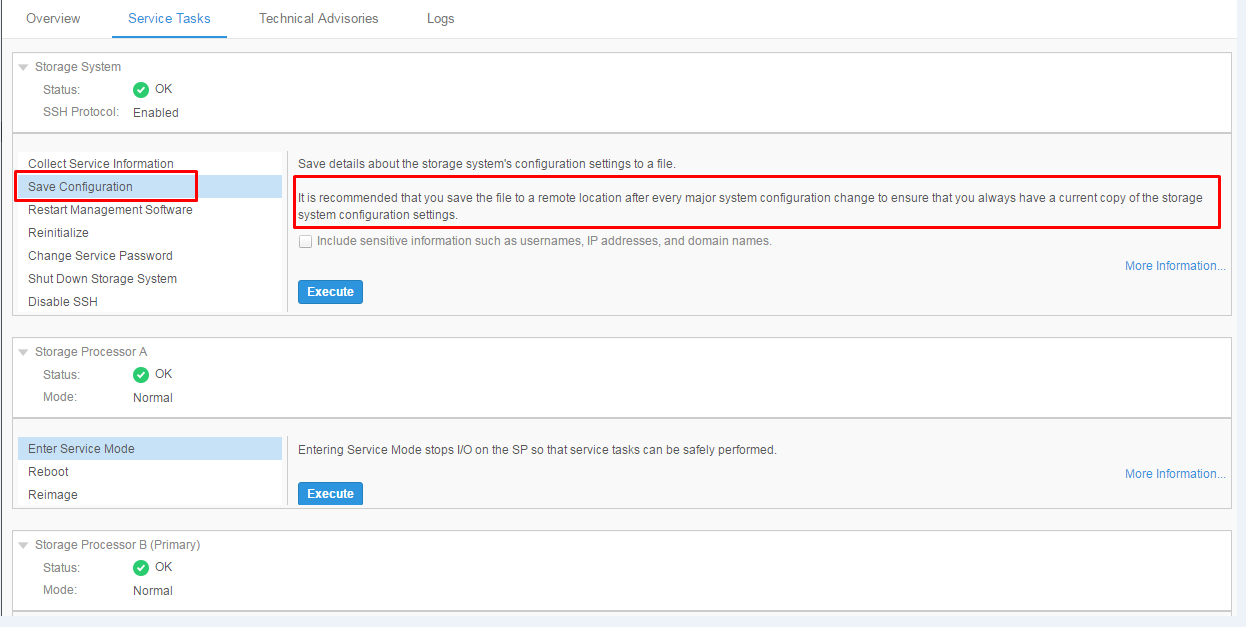
Maintaining current configuration backups ensures that critical system settings can be restored or referenced quickly in the event of a system issue or recovery operation.
対象製品
Dell EMC Unity Family文書のプロパティ
文書番号: 000022810
文書の種類: How To
最終更新: 15 7月 2026
バージョン: 6
質問に対する他のDellユーザーからの回答を見つける
サポート サービス
お使いのデバイスがサポート サービスの対象かどうかを確認してください。