How to Identify the Dell Encryption Enterprise or Dell Encryption Personal Version
概要: Learn how to identify the version of Dell Encryption Enterprise or Dell Encryption Personal by following these instructions.
この記事は次に適用されます:
この記事は次には適用されません:
この記事は、特定の製品に関連付けられていません。
すべての製品パージョンがこの記事に記載されているわけではありません。
手順
Knowing the version of Dell Encryption Enterprise (formerly Dell Data Protection Enterprise Edition) or Dell Encryption Personal (formerly Dell Data Protection Personal Edition) allows users to:
- Identify known issues
- Determine UI differences
- Understand workflow changes
- Verify system requirements
Affected Products:
- Dell Encryption Enterprise
- Dell Encryption Personal
- Dell Data Protection Enterprise Edition
- Dell Data Protection Personal Edition
Affected Operating Systems:
- Windows
Versioning can be determined either through the product user interface (UI) or through the product Installer. Click the appropriate tab for more information.
UI
Note: Dell Encryption Enterprise or Dell Encryption Personal must be installed before identifying the version through the UI.
- Log in to the Windows computer.
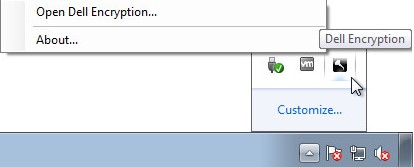
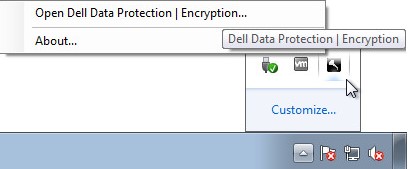
- In the Windows System Tray, right-click the Dell Encryption (formerly Dell Data Protection | Encryption) icon and then select Open Dell Encryption or Open Dell Data Protection | Encryption.
- The following image shows the Dell Encryption option.
- The following image shows the Dell Data Protection Encryption option.
- The following image shows the Dell Encryption option.
- In the product UI, click the question mark icon and then record the version number shown after About Version. The first three numbers are the most important digits to record. In the example, 8.15.0 are the first three numbers.
 Note: The version of your client may differ from the above screenshot.
Installer
Note: For information about downloading the installer, reference How to Download Dell Encryption Enterprise or Dell Encryption Personal.
- Right-click the <INSTALLER> and then select Properties.
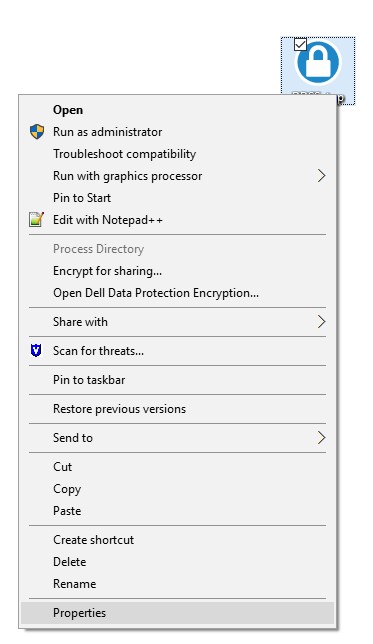 Note: <INSTALLER> =
- Dell Encryption Enterprise =
DDSSetup.exe - Dell Encryption Personal =
DDSSetup.exe - Dell Data Protection Enterprise Edition =
DDPSetup.exe - Dell Data Protection Personal Edition =
DDPSetup.exe
- Dell Encryption Enterprise =
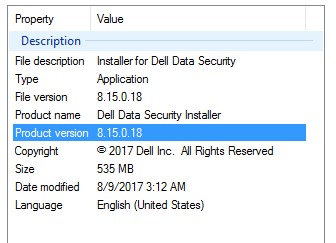
- Click the Details tab.

- Record the Product version. The first three numbers are the most important digits to record. In the example image, 8.15.0 are the first three numbers.
 Note: The version of your client may differ from the above screenshot.
対象製品
Dell Encryption文書のプロパティ
文書番号: 000124591
文書の種類: How To
最終更新: 15 7月 2026
バージョン: 13
質問に対する他のDellユーザーからの回答を見つける
サポート サービス
お使いのデバイスがサポート サービスの対象かどうかを確認してください。