How to Obtain the VMware Carbon Black Cloud Endpoint Activation Code
概要: Learn how to obtain an activation code for VMware Carbon Black Cloud Endpoint for Windows, Mac, or Linux by following these step-by-step instructions.
この記事は次に適用されます:
この記事は次には適用されません:
この記事は、特定の製品に関連付けられていません。
すべての製品パージョンがこの記事に記載されているわけではありません。
手順
The VMware Carbon Black Cloud Endpoint activation code is used to manually install the sensor to the VMware Carbon Black Cloud.
This article discusses how to obtain the activation code.
Affected Products:
- VMware Carbon Black Cloud Endpoint
Affected Operating Systems:
- Windows
- Mac
- Linux
- In a web browser, go to <REGION>.conferdeploy.net.
Note: <REGION> = Region of tenant
- Americas = https://defense-prod05.conferdeploy.net/
- Europe = https://defense-eu.conferdeploy.net/
- Asia Pacific = https://defense-prodnrt.conferdeploy.net/
- Australia and New Zealand = https://defense-prodsyd.conferdeploy.net
- Americas = https://defense-prod05.conferdeploy.net/
- Sign In to the VMware Carbon Black Cloud.

- In the left menu pane, click ENDPOINTS.
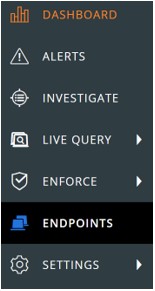 Note: The layout in the example may differ slightly from your environment.
 - In the upper right, select Sensor Options and then click Send installation request.
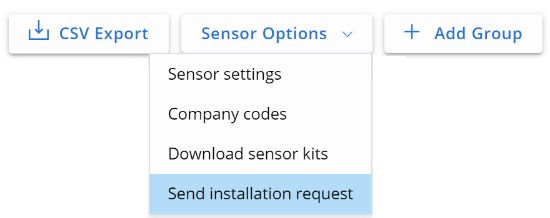
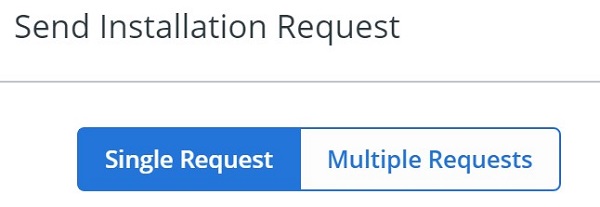
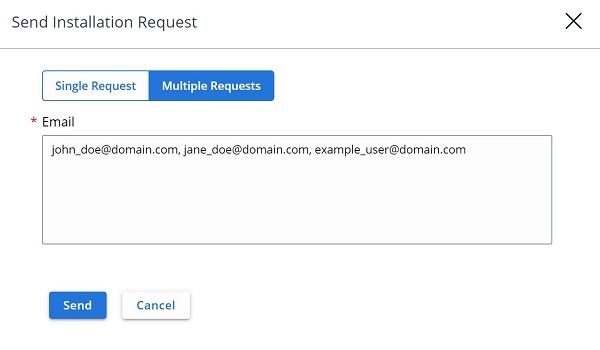
- In the Send Installation Request menu select either:
- Single Request and then go to Step 6
- Multiple Requests and then go to Step 7.
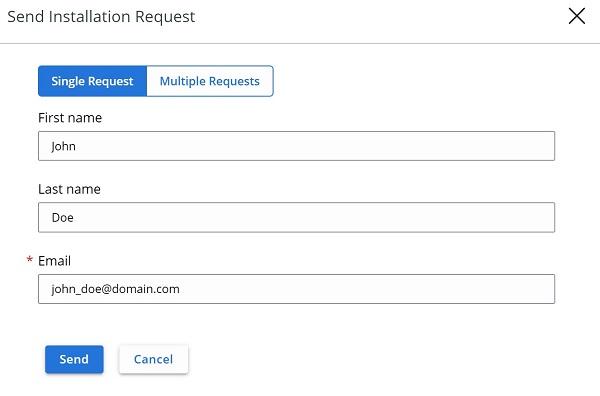
- In the Single Request tab:
- Optionally, populate the user's First name.
- Optionally, populate the user's Last name.
- Populate the user's Email.
- Click Send.
- Go to Step 8.
- In the Multiple Requests tab:
- Populate each user's Email separated by a comma.
- Click Send.
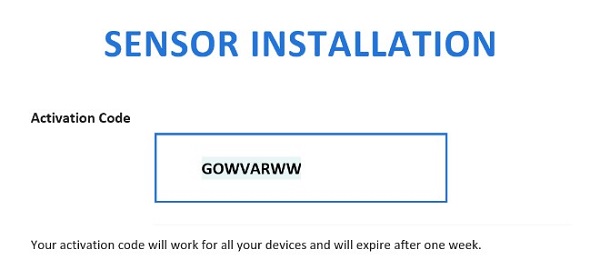
- In the user's email, document the Activation Code.
 Note:
Note:- The email is sent from noreply@carbonblack.com.
- The Activation Code expires after one week.
- The Activation Code can be resent from VMware Carbon Black Cloud, Endpoints, User, and then Take Action.
- The example in the screenshot will differ in your environment.

対象製品
VMware Carbon Black文書のプロパティ
文書番号: 000126084
文書の種類: How To
最終更新: 30 7月 2026
バージョン: 13
質問に対する他のDellユーザーからの回答を見つける
サポート サービス
お使いのデバイスがサポート サービスの対象かどうかを確認してください。