Dell Data Securityのアンインストール中の依存関係エラー
概要: Dell Data Security(旧Dell Data Protection)のアンインストール中に、依存関係エラーが表示されることがあります。
この記事は次に適用されます:
この記事は次には適用されません:
この記事は、特定の製品に関連付けられていません。
すべての製品パージョンがこの記事に記載されているわけではありません。
現象
対象製品:
- Dell Encryption Enterprise
- Dell Data Protection | Enterprise Edition
- Dell Encryption Personal
- Dell Data Protection | Personal Edition
- Dell Encryption External Media
- Dell Data Protection | External Media Edition
- Dell Data Guardian
- Dell Self-Encrypting Drive Manager
- Dell Data Protection | Self-Encrypting Drive Manager
- Dell BitLocker Manager
- Dell Data Protection | BitLocker Manager
- デルのフル ディスク暗号化
- Dell Data Protection | Secure Lifecycle
- Dell Data Protection | Cloud Edition
- Dell Endpoint Security Suite Enterprise
- Dell Endpoint Security Suite Pro
- Dell Threat Defense
- Dell Data Protection | Server Encryption
- Dell Data Protection | Security Tools
影響を受けるバージョン:
- v8.0.0以降
原因
-
解決方法
Dell Encryption Enterpriseをアンインストールすると、次のエラーが表示されることがあります。
[APPLICATION1] は [APPLICATION2] に依存します。[APPLICATION1]をアンインストールしてから、アンインストールを再試行します。
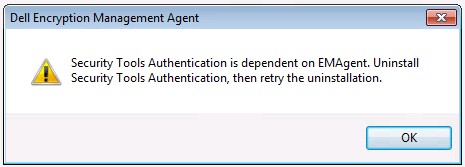
図1: (英語のみ)Dell Encryption Management Agent
注:
- [APPLICATION1]および[APPLICATION2]は、別のDell Encryption Enterpriseアプリケーションに依存しているDell Encryption Enterpriseアプリケーションを表します。
- このエラーは、お使いのエンドポイントでは若干異なる場合があります。
これらのエラーは、依存関係をアンインストールする前にアプリケーションをアンインストールしようとした結果です。すべてのDell Data Securityコンポーネントは、Dell Data Securityアンインストーラーを使用してアンインストールできます。詳細については、「Dell Data Securityアンインストーラーを実行する方法」を参照してください。
サポートに問い合わせるには、「Dell Data Securityのインターナショナル サポート電話番号」を参照してください。
TechDirectにアクセスして、テクニカル サポート リクエストをオンラインで生成します。
さらに詳しい情報やリソースについては、「デル セキュリティ コミュニティー フォーラム」に参加してください。
対象製品
Dell Encryption文書のプロパティ
文書番号: 000129590
文書の種類: Solution
最終更新: 19 4月 2026
バージョン: 14
質問に対する他のDellユーザーからの回答を見つける
サポート サービス
お使いのデバイスがサポート サービスの対象かどうかを確認してください。