Find the BitLocker Key Identifier for a Drive Protected by Dell Encryption BitLocker Manager
概要: This article provides information about locating a BitLocker key identifier for a drive protected by Dell Encryption BitLocker Manager.
この記事は次に適用されます:
この記事は次には適用されません:
この記事は、特定の製品に関連付けられていません。
すべての製品パージョンがこの記事に記載されているわけではありません。
手順
Affected Products:
- Dell Security Management Server Enterprise
- Dell Security Management Server Virtual
Affected Versions:
- v10.2.13 and Later
Note: This can be used to obtain a BitLocker recovery password or key package from the Dell Data Security management server recovery portal.
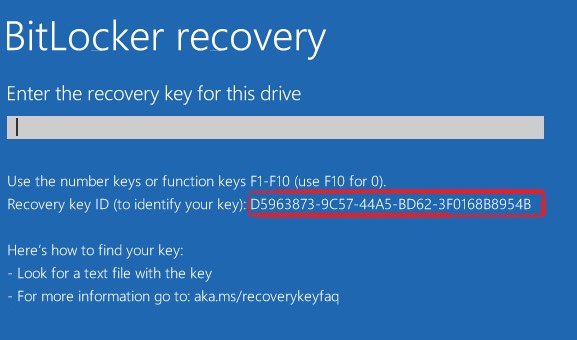
From the BitLocker recovery screen
If your computer is booting to the BitLocker recovery screen, the key identifier is in the highlighted area of the following image.
From within Windows
To locate the key identifier for a drive, partition, or removable drive follow the steps below.
- From the start menu, search for CMD then right-click Command Prompt and click run as administrator.
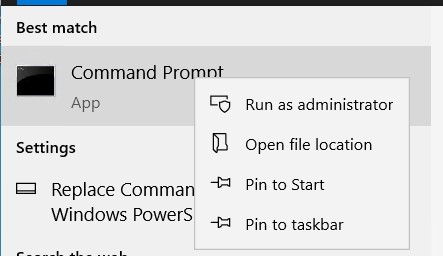
- From the administrator command prompt type
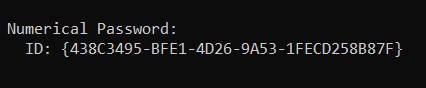
manage-bde -protectors -get <drive letter>:where <drive letter> is the drive letter for the BitLocker protected drive that you want to recover.
 Note: The ID under a numerical password (this is the key identifier for the drive).
 Note: The command above can be run from the recovery image in the event you are unable to log in to windows.
- To download the recovery image, go to the Drivers & Downloads page for Dell Encryption: https://www.dell.com/support/home/product-support/product/dell-data-protection-encryption/drivers
For assistance with retrieving a BitLocker recovery password, or key package using the BitLocker key identifier follow:
- How to Retrieve a BitLocker Recovery Password or Key Package Using the Dell Data Security Recovery Portal
- How to Unlock Bitlocker When It Stops Accepting Recovery Keys
- How to Locate the BitLocker Recovery Key in Your Microsoft Account
- BitLocker is Prompting for a Recovery Key, and You Cannot Locate the Key
対象製品
Dell Encryption文書のプロパティ
文書番号: 000180649
文書の種類: How To
最終更新: 01 7月 2026
バージョン: 22
質問に対する他のDellユーザーからの回答を見つける
サポート サービス
お使いのデバイスがサポート サービスの対象かどうかを確認してください。