「VxRail:ノードの拡張中にNIC構成ページにHTTP障害応答エラーが表示される
概要: 一方のノードの分散仮想スイッチ(DVS)名が、同じクラスター内の他のノードと異なっています。これにより、クラスター情報の不整合が発生し、ページにNIC構成情報が表示されません。
この記事は次に適用されます:
この記事は次には適用されません:
この記事は、特定の製品に関連付けられていません。
すべての製品パージョンがこの記事に記載されているわけではありません。
現象
[NIC Configuration]ページに、ノードの拡張中にhttpエラー応答エラーが表示されます。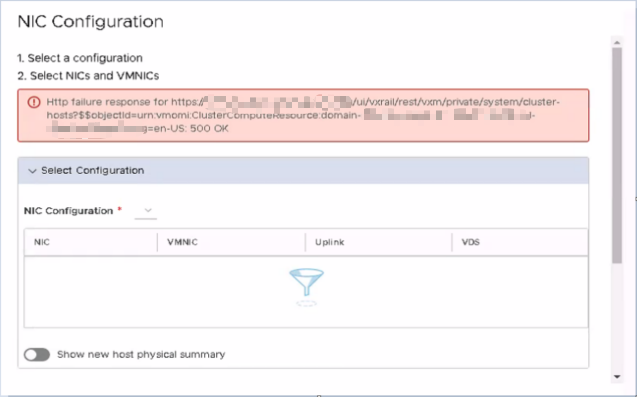
Short.term.log:
2022-07-04-01:03:31 microservice.ms-day2 "2022-07-04 01:03:31,095 [ERROR] <ThreadPoolExecutor-0_49:140246234617600> exp_general_controller.py get() (108): Internal Error During discovering configured hosts pnic info."
2022-07-04-01:03:31 microservice.ms-day2 "Traceback (most recent call last):"
2022-07-04-01:03:31 microservice.ms-day2 "  File ""/home/app/runtime_operations_app/main/controllers/exp_general_controller.py"", line 100, in get"
2022-07-04-01:03:31 microservice.ms-day2 "    hosts_pnic_info = NodeNicService().query_configured_hosts_pnic_info(segment_label)"
2022-07-04-01:03:31 microservice.ms-day2 "  File ""/home/app/runtime_operations_app/main/services/node_nic_service.py"", line 157, in query_configured_hosts_pnic_info"
2022-07-04-01:03:31 microservice.ms-day2 "    config_hosts = self._assemble_configured_hosts_pnic_info(configured_hosts_pnic_info)"
2022-07-04-01:03:31 microservice.ms-day2 "  File ""/home/app/runtime_operations_app/main/services/node_nic_service.py"", line 124, in _assemble_configured_hosts_pnic_info"
2022-07-04-01:03:31 microservice.ms-day2 "    self._update_configured_hosts_pnic_vds_info(config_hosts)"
2022-07-04-01:03:31 microservice.ms-day2 "  File ""/home/app/runtime_operations_app/main/services/node_nic_service.py"", line 87, in _update_configured_hosts_pnic_vds_info"
2022-07-04-01:03:31 microservice.ms-day2 "    cluster_host = list(filter(lambda host:host.hostname == config_host['hostname'], cluster_hosts))[0]"
2022-07-04-01:03:31 microservice.ms-day2 "IndexError: list index out of range"
原因
この問題には、次の 2 つの異なる原因があります。
- 一方のノードのDVS名が、同じクラスター内の他のノードと異なっています。これにより、クラスター情報の不整合が発生し、ページにNIC構成情報が表示されません。
- DVS 名が GQL のホストおよびネットワーク部分とは異なります。
解決方法
原因1: この問題が発生した場合は、VxRail Managerで次のコマンドを実行して、ノードのすべての情報を取得します。このコマンドを実行すると、すべてのクラスター情報が JSON 形式。
curl -k -H "Content-Type: application/json" -X POST -u <username>:<Password> --unix-socket /var/lib/vxrail/nginx/socket/nginx.sock -d '{"query":"query {cluster(moid : \"<mob-ID>\") {host{name hardware{systemInfo{serialNumber}}config{virtualNicManagerInfo{netConfig{nicType selectedVnic}}network{proxySwitch{dvsUuid dvsName hostLag{lagKey lagName uplinkPort{key value}}spec{backing{pnicSpec{pnicDevice uplinkPortKey uplinkPortgroupKey}}}uplinkPort{key value}}}}configManager{networkSystem{networkInfo{netStackInstance{name ipRouteConfig{defaultGateway}}}networkConfig{vnic{device spec{ip{ipAddress subnetMask}distributedVirtualPort{portgroupKey}}}}}}} network{moid name backingType config{key type defaultPortConfig{vlan{vlanId}uplinkTeamingPolicy{uplinkPortOrder{activeUplinkPort standbyUplinkPort inherited}}}distributedVirtualSwitch{name moid}}}}}", "variables":null,"operationName":null}' http://127.0.0.1/rest/vxm/internal/do/v1/network/vds/query
コマンドで、値を以下の解釈で置き換えます。
The value of <username>, <Password>, <mob-ID> should be replaced based on the running cluster information.
The "<mob-ID>" is cluster MoRef ID: vc_mob/content/rootFolder/childEntity/hostFolder/childEntity(domain-xx)
The "<username>, <Password>" is VxRail Manager's root credential
出力の内容をフィルタリングし、 dvsName ホストの値を使用して、他のホストと異なるDVS名を持つホストを識別します。( dvsUuid ホストの値は同じです)
vCenterのホストのDVS名を修正します。
原因2: 次のコマンドを実行し、両方の出力を確認します。 DVS 名前は同じです。
curl -s -k --unix-socket /var/lib/vxrail/nginx/socket/nginx.sock -H "Content-Type: application/json" \
-d "$(cluster_moid=$(curl -s --unix-socket /var/lib/vxrail/nginx/socket/nginx.sock \
http://127.0.0.1/rest/vxm/internal/configservice/v1/configuration/keys/cluster_moid | jq -r .value); \
printf '{"query":"query($moid:ID!){cluster(moid: $moid) { host { hardware { systemInfo { serialNumber } } config { network { proxySwitch { dvsUuid dvsName } } } } network { moid config { distributedVirtualSwitch { name moid } } } }}","variables":{"moid":"%s"}}' "$cluster_moid")" \
http://127.0.0.1/rest/vxm/internal/do/v1/network/vds/query | jq |grep name
curl -s -k --unix-socket /var/lib/vxrail/nginx/socket/nginx.sock -H "Content-Type: application/json" \
-d "$(cluster_moid=$(curl -s --unix-socket /var/lib/vxrail/nginx/socket/nginx.sock \
http://127.0.0.1/rest/vxm/internal/configservice/v1/configuration/keys/cluster_moid | jq -r .value); \
printf '{"query":"query($moid:ID!){cluster(moid: $moid) { host { hardware { systemInfo { serialNumber } } config { network { proxySwitch { dvsUuid dvsName } } } } network { moid config { distributedVirtualSwitch { name moid } } } }}","variables":{"moid":"%s"}}' "$cluster_moid")" \
http://127.0.0.1/rest/vxm/internal/do/v1/network/vds/query | jq |grep dvsName
対象製品
VxRail, VxRail Appliance Series, VxRail Software製品
VxRail, VxRail Software文書のプロパティ
文書番号: 000201531
文書の種類: Solution
最終更新: 10 2月 2026
バージョン: 7
質問に対する他のDellユーザーからの回答を見つける
サポート サービス
お使いのデバイスがサポート サービスの対象かどうかを確認してください。