The Second Monitor Does Not Display After Unplug or Plug the DP Cable in Daisy Chain Mode
概要: This article provides information about the display issue in Daisy Chain Mode.
この記事は次に適用されます:
この記事は次には適用されません:
この記事は、特定の製品に関連付けられていません。
すべての製品パージョンがこの記事に記載されているわけではありません。
現象
The monitor occasionally does not light up with video after unplugging or unplugging the DP cable that is connected to Dock.
原因
Time communication issue between Dock and monitor.
解決方法
- For single Monitor,
- Ensure that the MST option of monitor is set to Off.
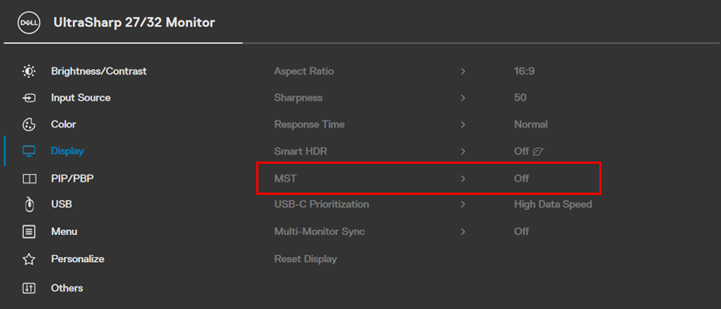
MST OFF
- For Multi-Monitor
- Set the MST option of each monitor to "Off" (same as above)
- Connect each monitor directly to the Dock’s DP port or HDMI port.
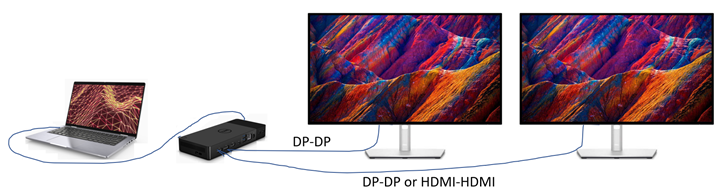
Multi-Monitor Connection
If the customer still prefers to daisy chain second monitor to first monitor (MST = On), set Monitor1 "Auto Select" to Off.
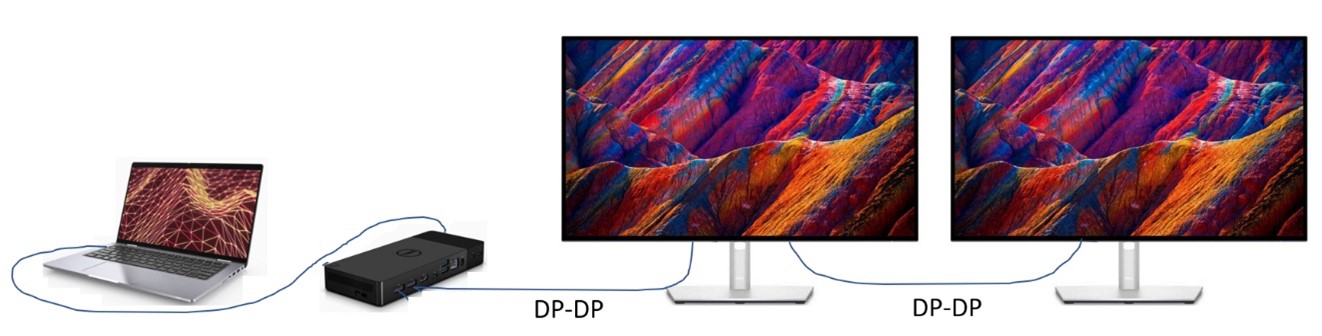
two monitor connection
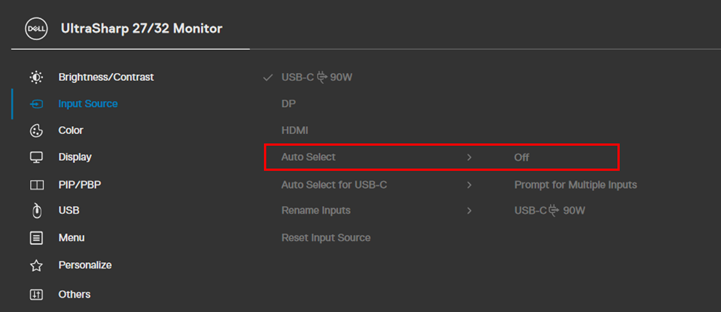
Auto select off.
対象製品
Dell 24 Video Conferencing Monitor C2422HE, Dell P2422HE, Dell P2223HC, Dell P2423DE, Dell P2723DE, Dell P3223DE, Dell U2723QE, Dell U3223QZ, Dell Thunderbolt Dock – WD22TB4文書のプロパティ
文書番号: 000204691
文書の種類: Solution
最終更新: 01 7月 2026
バージョン: 7
質問に対する他のDellユーザーからの回答を見つける
サポート サービス
お使いのデバイスがサポート サービスの対象かどうかを確認してください。