Dell Networking SONiC StaticおよびLACP PortChannel
概要: この文書では、Dell Networking SONiC OSを実行しているスイッチの静的およびLACP PortChannelについて説明します。この文書では、MC-LAGについては説明しません。この文書では、Dell SONiC 4.1を実行しているスイッチを使用します。
この記事は次に適用されます:
この記事は次には適用されません:
この記事は、特定の製品に関連付けられていません。
すべての製品パージョンがこの記事に記載されているわけではありません。
手順
記事の前提条件
この構成では、標準インターフェイスの命名を使用しています。Dell SONiCのさまざまなインターフェイス命名モードの詳細については、 Dell Networking Sシリーズ を参照してください。基本のインターフェイス設定 – SONIC 4.0
この記事では、次のトポロジーを使用しています。
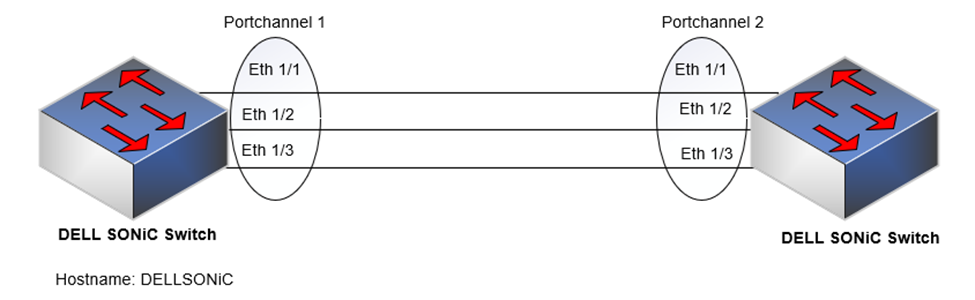
PortChannel、Eth 1/1、1/2、1/3に追加するインターフェイスは、速度、デュプレックス、MTUに対して同じに構成する必要があります。
索引
ポートチャネルとは何ですか?
覚えておく
べきポイント静的ポートチャネルまたは ON モード
LACP PortChannelまたはアクティブ モード
最小リンク
数Mtu
ポートチャネルとは何ですか?
ポート チャネルは、結合チャネル(リンクアグリゲーショングループまたはLAGまたはポートチャネル)を形成するために統合できる1つ以上のリンクのセットです。
PortChannelを作成するメリット
- これにより、冗長性、帯域幅の増加、トラフィックのロード バランシングの向上が実現します。
- ポート チャネルは、メンバー リンクの帯域幅を集約します。
- メンバー ポートに障害が発生した場合、トラフィックは残りのポートにリダイレクトされます。
ポート チャネルのタイプ
PortChannelは、次のいずれかとして構成できます。
- 静的ポートチャネルまたは ON モード
- LACP PortChannelまたはアクティブ モード
覚えておくべきポイント
- ピア側がLLDPをサポートしている場合は、LLDPを使用してリンク接続を確認する
- PortChannelのインターフェイスの最大数は32です。
- PortChannelは、L2スイッチポート モードとL3ルート ポート モードとして構成できます(Ipv4/IPV6アドレスの割り当て)
ポートチャネルにインターフェイスを追加する際に覚えておくべきポイントを以下に示します。
- すべてのメンバーは、同じインターフェイス タイプ(Ethernetなど)である必要があります。
- すべてのメンバー インターフェイスの速度/二重/MTUが同じである必要があります。
- インターフェイスにデフォルト以外のL2/L3構成設定を含めることはできません。説明とシャットダウン コマンド、またはシャットダウン コマンドのみがサポートされています。
- メンバー インターフェイスにIPアドレスまたは固定MACアドレスを追加することはできません。
- インターフェイスは1つのポート チャネルにのみ割り当てることができます。
| 役に立つ情報 |
Lets Cleanup the configuration of Eth 1/1 before adding the interface to portchannel DELLSONiC# show running-configuration interface Eth 1/1 ! interface Eth1/1 mtu 9100 speed 25000 shutdown switchport trunk allowed Vlan 1-4094 Lets execute default interface Eth1/1 DELLSONiC# configure DELLSONiC(config)# default interface Eth 1/1 We can see the interface configuration is defaulted DELLSONiC(config)# do show running-configuration interface Eth 1/1 ! interface Eth1/1 mtu 9100 speed 25000 shutdown DELLSONiC(config)# |
静的ポートチャネルまたは ON モード
静的ポートチャネルまたは ON モードは、ポートチャネルを設定する簡単な方法です。このモードは、接続されているデバイスがLACPをサポートしていない場合に使用できます。静的LAGには、LACPなどのアグリゲーション情報を交換するメカニズムがないため、リンクのいずれかが起動するとパケットの転送が開始されます。
ポートチャネル
へのインターフェイスの追加を設定します。
構成構文
| Configuration |
説明 |
|---|---|
DELLSONiC(config)# interface Ethernet |
インターフェイスを構成します。 |
DELLSONiC(config)# interface range Ethernet |
オプション:インターフェイスの範囲を構成します。 |
DELLSONiC(conf-if-EthernetX)# channel-group |
インターフェイスの下でポート チャネルを定義します。 |
DELLSONiC(conf-if-EthernetX)# no channel-group |
ポートチャネルからインターフェイスを削除します。 |
DELLSONiC(conf-if-EthernetX)# no shutdown |
インターフェイスを有効にします。 |
サンプル設定
Lets Configure Portchannel 1 admin@DELLSONiC:~$ sonic-cli DELLSONiC# configure DELLSONiC(config)# interface PortChannel 1 mode on DELLSONiC(config-if-po1)# no shutdown DELLSONiC(config-if-po1)# exit Lets add interface Eth 1/1 as part of Portchannel 1 DELLSONiC(config)# interface Eth 1/1 DELLSONiC(config-if-Eth1/1)# channel-group 1 DELLSONiC(config-if-Eth1/1)# no shutdown DELLSONiC(config-if-Eth1/1)# exit Lets use interface range command to add interface Eth 1/2 and Eth 1/3 as part of Portchannel 1 DELLSONiC(config)# interface range Eth 1/2-1/3 %Info: Configuring only existing interfaces in range DELLSONiC(config-if-range-eth**)# channel-group 1 DELLSONiC(config-if-range-eth**)# no shutdown DELLSONiC(config-if-range-eth**)# end DELLSONiC# |
コマンド show interface PortChannel show PortChannel summary を使用して、PortChannelのステータスを確認します。
サンプル出力
DELLSONiC# show interface PortChannel 1
PortChannel1 is up, line protocol is up, reason oper-up, mode Static
Hardware is PortChannel, address is XX:XX:XX:XX:XX:XX
Minimum number of links to bring PortChannel up is 1
Mode of IPV4 address assignment: not-set
Mode of IPV6 address assignment: not-set
Graceful shutdown: Disabled
MTU 9100
LineSpeed 75.0GB
Events:
all-links-down at 2023-09-19T17:24:05.257874Z
lacp-fail at 2023-09-19T17:25:15.406803Z
portchannel-up at 2023-09-19T17:25:15.417415Z
Members in this channel: Eth1/1
Members in this channel: Eth1/2
Members in this channel: Eth1/3
Last clearing of "show interface" counters: never
10 seconds input rate 2 packets/sec, 2968 bits/sec, 371 Bytes/sec
10 seconds output rate 0 packets/sec, 0 bits/sec, 0 Bytes/sec
Input statistics:
          1320 packets, 243306 octets
          0 Multicasts, 0 Broadcasts, 1320 Unicasts
          0 error, 28 discarded
Output statistics:
          818 packets, 190127 octets
          0 Multicasts, 0 Broadcasts, 818 Unicasts
          0 error, 0 discarded
Time since last interface status change: 00:03:23 |
DELLSONiC# show PortChannel summary
Flags(oper-status):  D - Down U - Up (portchannel) P - Up in portchannel (members)
----------------------------------------------------------------------------------------------------------------------------
Group               PortChannel                   Type                Protocol          Member Ports
----------------------------------------------------------------------------------------------------------------------------
1                   PortChannel1   (U)            Eth                 NONE                 Eth1/1(P)
                                                                                           Eth1/2(P)
Eth1/3(P) |
LACP PortChannelまたはアクティブ モード
ポート チャネルは、結合チャネル(リンクアグリゲーショングループまたはLAGまたはポートチャネル)を形成するために統合できる1つ以上のリンクのセットです。
LACP(Link Aggregate Control Protocol)は、リンク間のピア交換(LACPDU)を使用して、さまざまなリンクの集計機能を継続的に決定し、特定のシステム ペア間で達成可能な最大レベルのアグリゲーション機能を継続的に提供します。
PortChannel
構成構文の構成
| Configuration |
説明 |
|---|---|
admin@DELLSONiC:~$ sonic-cli |
DELL MF-CLIへのログイン |
DELLSONiC# configure terminal |
設定モードに入ります。 |
DELLSONiC(config)# interface PortChannel |
PortChannelをLACPアクティブ ポートチャネルとして構成します。 |
sonic(config)# interface PortChannel mode active |
(オプション)PortChannelをLACPアクティブポートチャネルとして設定します。アクティブ モードを指定できます。(デフォルト) |
DELLSONiC(conf-if-poX)# no shutdown |
PortChannelを解除します。 |
DELLSONiC(conf-if-poX)#exit |
PortChannelを終了します。 |
ポートチャネルにインターフェイスを追加します。
構成構文
| Configuration |
説明 |
|---|---|
DELLSONiC(config)# interface Ethernet |
インターフェイスを構成します。 |
DELLSONiC(config)# interface range Ethernet |
オプション:インターフェイスの範囲を構成します。 |
DELLSONiC(conf-if-EthernetX)# channel-group |
インターフェイスの下でポート チャネルを定義します。 |
DELLSONiC(conf-if-EthernetX)# no channel-group |
ポートチャネルからインターフェイスを削除します。 |
DELLSONiC(conf-if-EthernetX)# no shutdown |
インターフェイスを有効にします。 |
サンプル設定
Lets Configure Portchannel 1 admin@DELLSONiC:~$ sonic-cli DELLSONiC# configure DELLSONiC(config)# interface PortChannel 1 DELLSONiC(config-if-po1)# no shutdown DELLSONiC(config-if-po1)# exit Lets add interface Eth 1/1 as part of Portchannel 1 DELLSONiC(config)# interface Eth 1/1 DELLSONiC(config-if-Eth1/1)# channel-group 1 DELLSONiC(config-if-Eth1/1)# no shutdown DELLSONiC(config-if-Eth1/1)# exit Lets use interface range command to add interface Eth 1/2 and Eth 1/3 as part of Portchannel 1 DELLSONiC(config)# interface range Eth 1/2-1/3 %Info: Configuring only existing interfaces in range DELLSONiC(config-if-range-eth**)# channel-group 1 DELLSONiC(config-if-range-eth**)# no shutdown DELLSONiC(config-if-range-eth**)# end DELLSONiC# |
コマンド show interface PortChannel show PortChannel summary を使用して、PortChannelのステータスを確認します。
サンプル出力
DELLSONiC# show interface PortChannel 1
PortChannel1 is up, line protocol is up, reason oper-up, mode LACP
Hardware is PortChannel, address is XX:XX:XX:XX:XX:XX
Minimum number of links to bring PortChannel up is 1
Mode of IPV4 address assignment: not-set
Mode of IPV6 address assignment: not-set
Fallback: Disabled
Graceful shutdown: Disabled
MTU 9100
LineSpeed 75.0GB
Events:
all-links-down at 2023-09-19T16:19:23.406682Z
lacp-fail at 2023-09-19T16:37:02.782825Z
portchannel-up at 2023-09-19T16:37:42.564118Z
LACP mode ACTIVE interval SLOW priority 65535 address XX:XX:XX:XX:XX:XX
Members in this channel: Eth1/1(Selected)
LACP Actor port 1  address XX:XX:XX:XX:XX:XX key 1
LACP Partner port 1  address XX:XX:XX:XX:XX:XX key 1
Members in this channel: Eth1/2(Selected)
LACP Actor port 2  address XX:XX:XX:XX:XX:XX key 1
LACP Partner port 2  address XX:XX:XX:XX:XX:XX key 1
Members in this channel: Eth1/3(Selected)
LACP Actor port 3  address XX:XX:XX:XX:XX:XX key 1
LACP Partner port 3  address XX:XX:XX:XX:XX:XX key 1
Last clearing of "show interface" counters: never
10 seconds input rate 0 packets/sec, 0 bits/sec, 0 Bytes/sec
10 seconds output rate 0 packets/sec, 0 bits/sec, 0 Bytes/sec
Input statistics:
          107 packets, 20173 octets
          0 Multicasts, 0 Broadcasts, 107 Unicasts
          0 error, 16 discarded
Output statistics:
          209 packets, 34421 octets
         0 Multicasts, 0 Broadcasts, 209 Unicasts
          0 error, 0 discarded
Time since last interface status change: 00:02:04 |
DELLSONiC# show PortChannel summary
Flags(oper-status):  D - Down U - Up (portchannel) P - Up in portchannel (members)
----------------------------------------------------------------------------------------------------------------------------
Group               PortChannel                   Type                Protocol          Member Ports
----------------------------------------------------------------------------------------------------------------------------
1                   PortChannel1   (U)            Eth                 LACP                 Eth1/1(P)
                                                                                           Eth1/2(P)
Eth1/3(P) |
最小リンク数
最小リンク数を設定して、コマンドmin-linksを使用してポート チャネルを起動できます。デフォルト値は0です。
構成例
admin@DELLSONiC:~$ sonic-cli DELLSONiC# configure DELLSONiC(config)# interface PortChannel 1 DELLSONiC(config-if-po1)# min-links 2 DELLSONiC(config-if-po1)# end DELLSONiC# |
サンプル出力
DELLSONiC# show PortChannel summary
Flags(oper-status):  D - Down U - Up (portchannel) P - Up in portchannel (members)
----------------------------------------------------------------------------------------------------------------------------
Group               PortChannel                   Type                Protocol          Member Ports
----------------------------------------------------------------------------------------------------------------------------
1                   PortChannel1   (U)            Eth                 LACP                 Eth1/1(P)
                                                                                           Eth1/2(P)
Eth1/3(P |
ポートEth 1/2を考慮すると、Eth 1/3リンクがダウンします。Eth 1/1はUPです。1つのリンクのみがアップしており、最小リンクが2であるため、PortChannel 1はダウンします。
ポートチャネル1がダウンしており、最小リンクである理由が分かります。
サンプル出力
DELLSONiC# show interface status (Output grepped for brevity) -------------------------------------------------------------------------------------------------------------------------------------- Name Description Oper Reason AutoNeg Speed MTU Alternate Name -------------------------------------------------------------------------------------------------------------------------------------- Eth1/1 - up oper-up off 25000 9100 Ethernet0 Eth1/2 - down admin-down off 25000 9100 Ethernet1 Eth1/3 - down admin-down off 25000 9100 Ethernet2 PortChannel1 - down min-links - 75000 9100 - |
Mtu
ポートチャネル インターフェイスでMTUを設定できます。以下は、PortChannelでMTUを設定する前に知っておかなければならない重要なポイントです。
- ポート チャネルMTUを設定する前に、ポート チャネルに割り当てられたインターフェイスでMTUを設定します。
- PortChannelのデフォルトMTUは9100です。
- ポート チャネルのすべてのメンバーは、同じMTU値を持つ必要があります。
- タグ付きVLANを持つメンバー インターフェイスには、パケット タグを考慮するために、タグ付けされていないメンバーよりも4バイト大きいリンクMTUが必要です。
- ポート チャネル メンバー インターフェイスのMTUがポート チャネルMTU以上であることを確認します。
- システムは、ポート チャネルまたはポート チャネルのMTUとして構成されている最小MTU値を選択します。
例
ポート チャネルに、リンクMTUが1522、IP MTUが1500、タグなしメンバーがリンクMTUが1518、IP MTUが1500のタグ付きメンバーが含まれているとします。
ポート チャネルのリンクMTUは1518バイトを超えることはできません。また、そのIP MTUは1500バイトを超えることはできません。
メモ:
|
サンプル出力
PortChannelのMTUを1500に変更してみましょう(デフォルトは9100)。
DELLSONiC# configure DELLSONiC(config)# interface PortChannel 1 DELLSONiC(config-if-po1)# mtu 1500 DELLSONiC(config-if-po1)# end DELLSONiC# |
サンプル出力
DELLSONiC# show interface PortChannel 1
PortChannel1 is up, line protocol is up, reason oper-up, mode LACP
Hardware is PortChannel, address is XX:XX:XX:XX:XX:XX
Minimum number of links to bring PortChannel up is 1
Mode of IPV4 address assignment: not-set
Mode of IPV6 address assignment: not-set
Fallback: Disabled
Graceful shutdown: Disabled
MTU 1500
LineSpeed 75.0GB
Events:
all-links-down at 2023-09-19T16:50:29.006155Z
lacp-fail at 2023-09-19T16:50:30.833807Z
portchannel-up at 2023-09-19T16:50:30.83887Z
LACP mode ACTIVE interval SLOW priority 65535 address XX:XX:XX:XX:XX:XX
Members in this channel: Eth1/1(Selected)
LACP Actor port 1  address XX:XX:XX:XX:XX:XX key 1
LACP Partner port 1  address XX:XX:XX:XX:XX:XX key 1
Members in this channel: Eth1/2(Selected)
LACP Actor port 2  address XX:XX:XX:XX:XX:XX key 1
LACP Partner port 2  address XX:XX:XX:XX:XX:XX key 1
Members in this channel: Eth1/3(Selected)
LACP Actor port 3  address XX:XX:XX:XX:XX:XX key 1
LACP Partner port 3  address XX:XX:XX:XX:XX:XX key 1
Last clearing of "show interface" counters: never
10 seconds input rate 0 packets/sec, 0 bits/sec, 0 Bytes/sec
10 seconds output rate 0 packets/sec, 0 bits/sec, 0 Bytes/sec
Input statistics:
          274 packets, 59031 octets
          0 Multicasts, 0 Broadcasts, 274 Unicasts
          0 error, 19 discarded
Output statistics:
          385 packets, 78115 octets
          0 Multicasts, 0 Broadcasts, 385 Unicasts
          0 error, 0 discarded
Time since last interface status change: 00:01:18 |
対象製品
Enterprise SONiC Distribution, PowerSwitch E3200-ON Series, PowerSwitch N3200-ON, PowerSwitch S5212F-ON, PowerSwitch S5224F-ON, PowerSwitch S5232F-ON, PowerSwitch S5248F-ON, PowerSwitch S5296F-ON, PowerSwitch Z9264F-ON, PowerSwitch Z9332F-ON
, PowerSwitch Z9432F-ON
...
文書のプロパティ
文書番号: 000217739
文書の種類: How To
最終更新: 28 9月 2023
バージョン: 3
質問に対する他のDellユーザーからの回答を見つける
サポート サービス
お使いのデバイスがサポート サービスの対象かどうかを確認してください。