How to Modify Dell Data Security Uninstaller Values for Forensic Key Download
概要: This article explains how to modify the Dell Data Security Uninstaller values for forensic key download using two registry entries.
この記事は次に適用されます:
この記事は次には適用されません:
この記事は、特定の製品に関連付けられていません。
すべての製品パージョンがこの記事に記載されているわけではありません。
手順
Affected Products:
- Dell Encryption
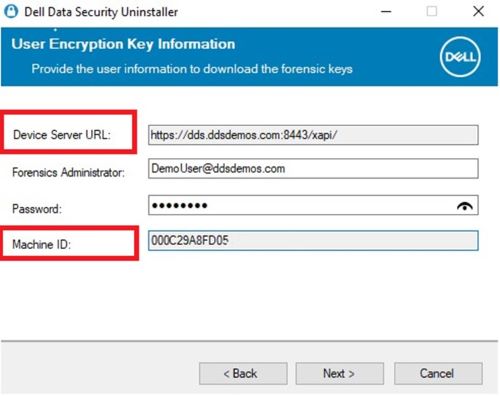
The Device Server URL and Machine ID are pulled through the registry when selecting Encryption Removal Agent - Download Keys from Server.
Warning: The next step is a Windows Registry edit:
- Back up the Registry before proceeding, reference How to Back Up and Restore the Registry in Windows
.
- Editing the Registry can cause the computer to become unresponsive on the next reboot.
- Contact Dell Data Security International Support Phone Numbers for assistance if you have concerns about performing this step.
To change these values, modify the following registry key at the following locations:
- Device Server URL:
HKLM\SYSTEM\CurrentControlSet\Services\CMGShield REG_SZ: ServletURL - Machine ID:
HKLM\SYSTEM\CurrentControlSet\Services\CMGSHIELD REG_SZ: MCID
対象製品
Dell Encryption文書のプロパティ
文書番号: 000218564
文書の種類: How To
最終更新: 15 7月 2026
バージョン: 7
質問に対する他のDellユーザーからの回答を見つける
サポート サービス
お使いのデバイスがサポート サービスの対象かどうかを確認してください。