Alienware OLED Gaming Monitors Image Does Not Fill the Entire Viewing Area
概要: Learn why the image on the Alienware OLED Gaming Monitors does not fill the entire Viewing Area.
この記事は次に適用されます:
この記事は次には適用されません:
この記事は、特定の製品に関連付けられていません。
すべての製品パージョンがこの記事に記載されているわけではありません。
現象
The image on the Alienware OLED Gaming Monitors does not fill the entire Viewing Area.
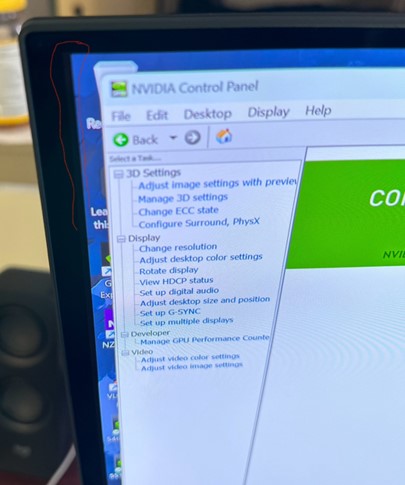
Affected Monitors:
- Alienware 27 240Hz QD-OLED Gaming Monitor AW2726DM
- Alienware 27 280Hz QD-OLED Gaming Monitor AW2725D
- Alienware 27 360Hz QD OLED Gaming Monitor AW2725DF
- Alienware 27 4K QD-OLED Gaming Monitor AW2725Q
- Alienware 32 4K QD OLED Gaming Monitor AW3225QF
- Alienware 34 240Hz QD-OLED Gaming Monitor AW3425DW
- Alienware 34 280Hz QD-OLED Gaming Monitor AW3426DW
- Alienware 34 Curved OLED Monitor AW3423DW
- Alienware 34 Curved QD OLED Gaming Monitor AW3423DWF
- Alienware 39 5K OLED Gaming Monitor AW3926QW
原因
This is working as designed for an OLED panel. There are eight dummy pixels between the Active Area and the Viewing Area as shown in the image below. These pixels are required to accommodate the Pixel Shift function so that the image does not get clipped.
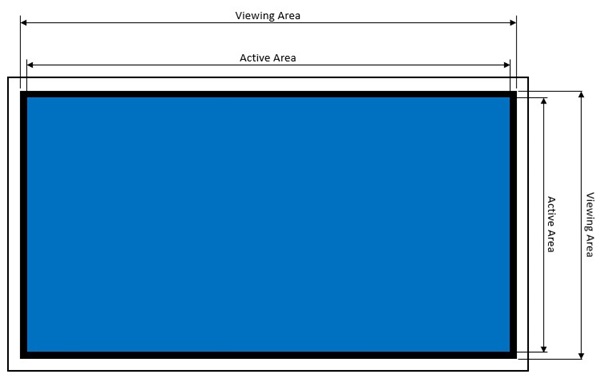
Note: Pixel shift is a function that moves the pixels of the screen to prevent image retention on OLED panels. See the Alienware OLED Monitor User Guide, Troubleshooting section for more information. See this article on how to find the User Guide for your monitor: Manuals and Documentation for your Dell Product.
解決方法
This is working as designed.
対象製品
Alienware 27 280Hz QD-OLED Gaming Monitor AW2725D, Alienware 27 360Hz QD OLED Gaming Monitor AW2725DF, Alienware 27 4K QD-OLED Gaming Monitor AW2725Q, Alienware 27 240Hz QD-OLED Gaming Monitor AW2726DM, Alienware 32 4K QD OLED Gaming Monitor AW3225QF
, Alienware 34 Curved OLED Monitor AW3423DW, Alienware 34 Curved QD OLED Gaming Monitor AW3423DWF, Alienware 34 240Hz QD-OLED Gaming Monitor AW3425DW, Alienware 34 280Hz QD-OLED Gaming Monitor AW3426DW, Alienware 39 5K OLED Gaming Monitor AW3926QW
...
文書のプロパティ
文書番号: 000222059
文書の種類: Solution
最終更新: 14 7月 2026
バージョン: 11
質問に対する他のDellユーザーからの回答を見つける
サポート サービス
お使いのデバイスがサポート サービスの対象かどうかを確認してください。