VxRail: Not Able to Proceed with next While Entering the Credentials During the Upgrade
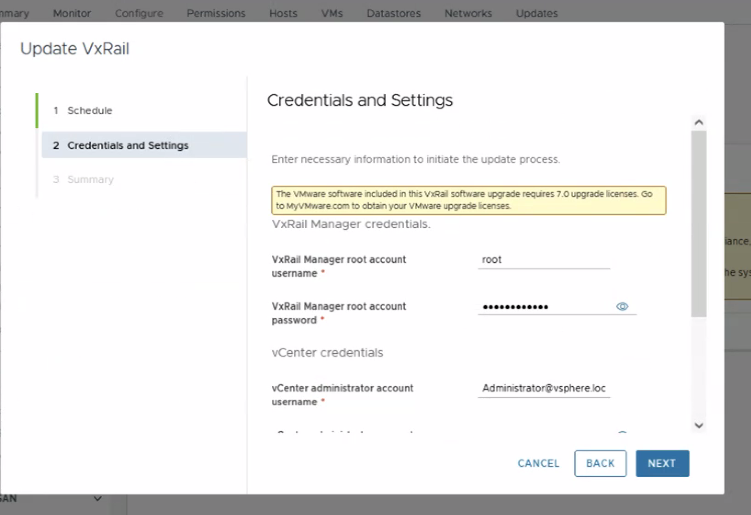
概要: Not able to proceed with next while entering the credentials and settings during an upgrade due to an invalid management account password.
この記事は次に適用されます:
この記事は次には適用されません:
この記事は、特定の製品に関連付けられていません。
すべての製品パージョンがこの記事に記載されているわけではありません。
現象
.
原因
Invalid vCenter management account password:
From lcm-web.log:
2024-04-surrogate [INFO] <125> ValidateServiceImpl.java validateLcmUpgrad
eSpec() (309): Validate vCenter Server Management Account result is: MGMT_INVALID_PASSWORD
From lcm-web.log:
2025-05-16T14:01:01.075Z <c76b71c79bf0b8fb9fe02230ace9ac83> surrogate [INFO] <156> ValidateServiceImpl.java validateLcmUpgradeSpec() (305): Management account username: [XXXXXXXX]
2025-05-16T14:01:01.078Z <c76b71c79bf0b8fb9fe02230ace9ac83> surrogate [ERROR] <156> LCMUtilService.java managementAccountValidatePassword() (983): Management password is too long.
解決方法
Update the vCenter management account password from vSphere in: Administrator --> Users and groups --> edit the user password
Change the vCenter management account password as per kb: VxRail: How to Query or Update the Management Account In VxRail Version 7.0.x and 8.0.x
If the error includes "Management password is too long", the customer should also review their password standards and adjust the size of the new password accordingly.
Example of a valid password: VxRailTest123!
After changing the password, the warning might still appear, yet proceeding next should work and continue with the upgrade.
対象製品
VxRail, VxRail Appliance Series, VxRail Software文書のプロパティ
文書番号: 000224481
文書の種類: Solution
最終更新: 29 7月 2026
バージョン: 4
質問に対する他のDellユーザーからの回答を見つける
サポート サービス
お使いのデバイスがサポート サービスの対象かどうかを確認してください。