PowerPath for Windows:Migration Enabler UMDおよびKMDドライバー コンテキストの削除
概要: 外部の要件(クラスター ノードの予期しない物理的な再導入など)により、PPME (PowerPath Migration Enabler)の移行を中止し、1つ以上のホスト システムからPowerPath Migration Enablerユーザー モード コンテキスト(UMD)とカーネル モード コンテキスト(KMD)を強制的に削除または強制的に構成解除する必要がある場合があります。これを実現するための手動手順が存在します。PowerPath 7.2以降には、追加の手順を保証するための内部powermigコマンドが含まれています。 ...
この記事は次に適用されます:
この記事は次には適用されません:
この記事は、特定の製品に関連付けられていません。
すべての製品パージョンがこの記事に記載されているわけではありません。
手順
PowerPath for Windows 7.2以降には、ユーザー モード コンテキストとカーネル モード コンテキストを1つのコマンドでドライバーのパラメーター化から削除する内部コマンドが含まれています。コマンドを実行した後は、再起動が必須です。
STEP 1
UMDおよびKMDコンテキストを削除するには、次のコマンドを実行します。
CMD C:\>powermig nodecleanup
Ensure that all options to recover, abort and cleanup existing migrations are tried before trying this nodeCleanup command. Also, a host reboot is needed to complete all the steps of this command properly. Do you still want to continue? [yes]/no:
質問に「y」と答えてください。コマンドは次のように応答します。
NOTE: Host reboot is needed for the cleanup to take effect. Also, delete the backed up KMD registry keys (cleanup_*) and PPME\db.old folder before running the command again.
STEP 2
ホストをリブートします。これで、主要な介入パートは終了です。この時点で、クラスターを元に戻すことができます。
STEP 3
『オペレーティングシステム』ディスクはオプションなので、同梱されていないコンピューターもあります。 nodecleanup コマンドは、制御構造を邪魔にならないように移動するだけです。これらは削除されません。再起動後、名前を変更したUMDおよびKMD構造を削除する必要があります。これはオンラインで行うことができます。2回目の再起動は必要ありません。
-
UMD コンテキストを削除する
開始日時 C:\Program Files\EMC\PPME削除 db.old。
C:\Program Files\EMC\PPME>dir
Volume in drive C has no label.
Volume Serial Number is 6A65-4A7A
Directory of C:\Program Files\EMC\PPME
12/11/2024 12:31 <DIR> .
12/11/2024 12:31 <DIR> ..
12/11/2024 13:13 <DIR> db
12/11/2024 12:31 <DIR> db.oldです。 <- Remove this directory
0 File(s) 0 bytes
4 Dir(s) 47,120,658,432 bytes free
-
KMDコンテキストの削除
入力 HKEY_LOCAL_MACHINE\SYSTEM\CurrentControlSet\Control\EmcPowerPath\KMD_0、または HKEY_LOCAL_MACHINE\SYSTEM\CurrentControlSet\Control\EmcPowerPath\KMD_1 それぞれ、すべての「cleanup_*」キーを押します。
例
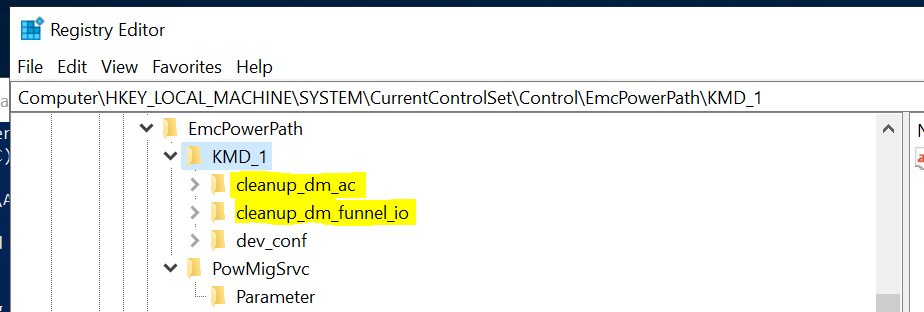
備考
- 『オペレーティングシステム』ディスクはオプションなので、同梱されていないコンピューターもあります。
nodecleanupコマンドは、ドライバー コンテキストのみに対応します。PPMEクラスター リソースを引き続き削除する必要があります。 - 削除する前に、UMDおよびKMDコンテンツを別の場所に保存する必要がある場合があります。
- このコマンドは、緊急時に手順を保証することを目的としています。その結果について不明な場合は、まず Dellテクニカル サポート に連絡して、他のオプションについて相談してください。
- サーバーは、
nodecleanupアクション。
予期されるエラー メッセージ
Powermig nodecleanup2回目の 実行時に、UMDコンテキスト バックアップが削除されなかったため、実行に失敗します。
この nodecleanup コマンドを 2 回目に実行し、UMD コンテキストを削除していない場合、コマンドは PPME error(119): UMD DB cleanup failed。
例
PS C:\> powermig nodecleanup
Ensure all options to recover, abort and cleanup existing migrations are tried before trying this nodeCleanup command. Also, a host reboot is needed to complete all the steps of this command properly. Do you still want to continue? [yes]/no: y
PPME error(119): UMD DB cleanup failed
解決策
db.old まだ存在します。上記の STEP3-1 を実行します。
Powermig nodecleanupKMDコンテキスト バックアップが削除されなかったため、2回目の 実行に失敗します。
KMD コンテキストを削除していない状態でコマンドを 2 回目に実行すると、コマンドは PPME error(118): KMD Registry cleanup failed.
例
C:\Program Files\EMC\PPME>powermig nodecleanup
Ensure all options to recover, abort and cleanup existing migrations are tried before trying this nodeCleanup command. Also, a host reboot is needed to complete all the steps of this command properly. Do you still want to continue? [yes]/no: y
PPME error(118): KMD Registry cleanup failed
解決策
のクリーンアップ値 KMD* まだ存在しています。上記の STEP3-2を実行します。
文書のプロパティ
文書番号: 000247668
文書の種類: How To
最終更新: 15 7月 2026
バージョン: 2
質問に対する他のDellユーザーからの回答を見つける
サポート サービス
お使いのデバイスがサポート サービスの対象かどうかを確認してください。