Dell Command Update AMDX-skabelonupload mislykkes i Microsoft Intune
概要: Denne artikel indeholder oplysninger om fejl, der opstår under upload af Dell Command | Opdatering (DCU) . ADMX-skabelon til Microsoft Intune.
この記事は次に適用されます:
この記事は次には適用されません:
この記事は、特定の製品に関連付けられていません。
すべての製品パージョンがこの記事に記載されているわけではありません。
現象
Berørte produkter:
- Dell Command | Update
Status viser Upload mislykkedes , når du forsøger at importere Dell Command | Update ADMX-skabelon til Microsoft Intune.
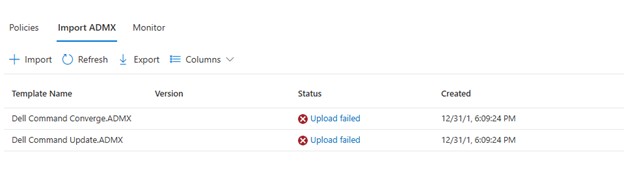
Hvis du klikker på Overførsel mislykkedes, vises:
ADMX file: Dell Command Update.ADMX
State: failed
Last modified date: xx/xx/xxxx
Error Details: ADMX file referenced not found NamespaceMissing:Dell.Policies. Please upload it first.
原因
Basen Dell.ADMX og Dell.ADML skabelonfiler skal uploades først, før en applikationsspecifik AMDX kan uploades.
解決方法
ADMX-skabelonerne kan udtrækkes fra Dell Command | Update installationspakke. Upload Dell.ADMX og Dell.ADML filer først. Derefter uploades Dell Command Update.ADMX og Dell Command Update.ADML Fuldføres korrekt.
Bemærk: Du kan finde flere oplysninger om, hvordan du udpakker skabelonerne fra installationspakken, under Sådan får du adgang til . AMDX og . ADML-filer til brug med Dell Command Update.
対象製品
Dell Command | Update文書のプロパティ
文書番号: 000290019
文書の種類: Solution
最終更新: 15 7月 2026
バージョン: 5
質問に対する他のDellユーザーからの回答を見つける
サポート サービス
お使いのデバイスがサポート サービスの対象かどうかを確認してください。