Dell Command Update AMDX Template Upload Fails in Microsoft Intune
概要: This article provides information about failure occurring while uploading Dell Command | Update (DCU) .ADMX template to Microsoft Intune.
この記事は次に適用されます:
この記事は次には適用されません:
この記事は、特定の製品に関連付けられていません。
すべての製品パージョンがこの記事に記載されているわけではありません。
現象
Affected Products:
- Dell Command | Update
Status shows Upload failed when attempting to import the Dell Command | Update ADMX template to Microsoft Intune.
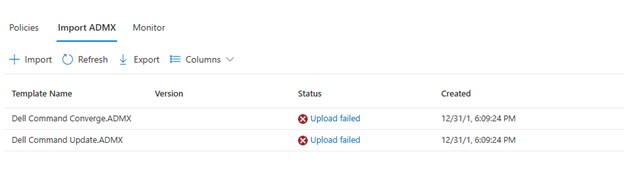
Clicking Upload failed, displays:
ADMX file: Dell Command Update.ADMX
State: failed
Last modified date: xx/xx/xxxx
Error Details: ADMX file referenced not found NamespaceMissing:Dell.Policies. Please upload it first.
原因
The base Dell.ADMX and Dell.ADML template files must be uploaded first before any application specific AMDX can be uploaded.
解決方法
The ADMX templates can be extracted from the Dell Command | Update installation package. Upload the Dell.ADMX and Dell.ADML files first. Then uploading the Dell Command Update.ADMX and Dell Command Update.ADML completes successfully.
Note: For more information about how to extract the templates from the installation package, reference How To Access .AMDX and .ADML Files for Use with Dell Command Update.
対象製品
Dell Command | Update文書のプロパティ
文書番号: 000290019
文書の種類: Solution
最終更新: 15 7月 2026
バージョン: 5
質問に対する他のDellユーザーからの回答を見つける
サポート サービス
お使いのデバイスがサポート サービスの対象かどうかを確認してください。