PowerProtect Data Manager: False RootCA Certificate Expiration Alert Banner
概要: PowerProtect Data Manager displays an alert banner in the UI warning that a certificate is due to expire in less than 30 days. The certificate has already been renewed and shows a valid expiration date. ...
この記事は次に適用されます:
この記事は次には適用されません:
この記事は、特定の製品に関連付けられていません。
すべての製品パージョンがこの記事に記載されているわけではありません。
現象
- The PowerProtect Data Manager UI displays an alert banner stating:
"The certificate on rootCA expires in less than 30 days."

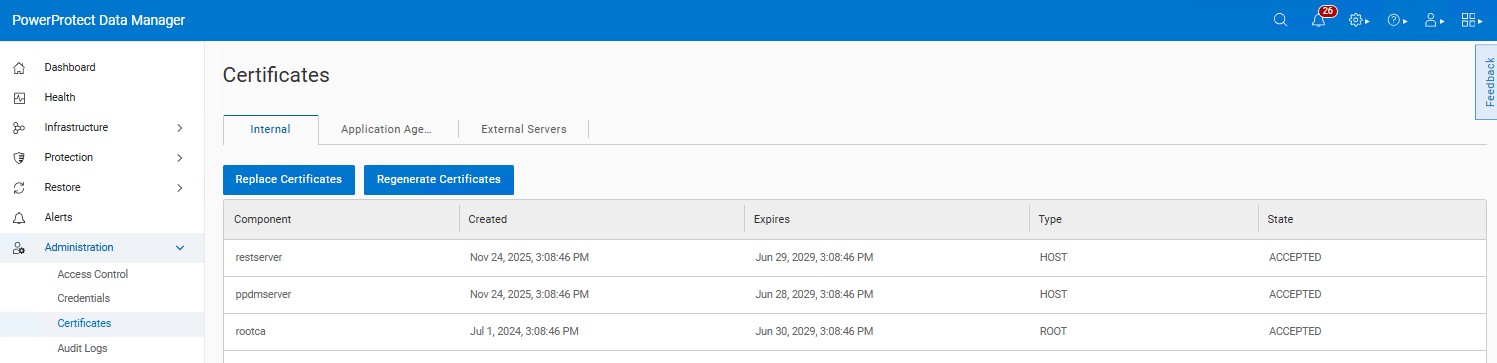
- The certificate has already been renewed and shows an expiration date well into the future.
- No expired certificates are listed under Administration → Certificates.
原因
There is a known issue in PowerProtect Data Manager versions 19.18 and 19.19. The logic checks only for the existence of the CERT0006 alert with a "30 days" argument and does not exclude alerts are already acknowledged. As a result, the warning banner continues to appear even after the alert is acknowledged and the certificate is renewed.
解決方法
The issue is addressed in the PowerProtect release 19.20.0-18. Install the latest PowerProtect Data Manager release to resolve the symptoms. If required, contact Dell Support for assistance or any further questions. The newest available releases are available on the PowerProtect Data Manager Drivers & Downloads product page page.
If the certificate listed under Administration → Certificates shows a valid expiration date and no expired certificates are present, it is safe to ignore the warning banner.
製品
Data Protection Suite Series, PowerProtect Data Manager文書のプロパティ
文書番号: 000364880
文書の種類: Solution
最終更新: 22 7月 2026
バージョン: 3
質問に対する他のDellユーザーからの回答を見つける
サポート サービス
お使いのデバイスがサポート サービスの対象かどうかを確認してください。