PowerFlex:パスワードがBase64エンコードされていない場合にバックアップからのPFMPのリストアに失敗する
概要: PowerFlex Managerプラットフォーム(PFMP)のリストア中に、スクリプトはbase64でエンコードされた形式のCIFSパスワードと暗号化パスワードを想定しているため、プロセスが中止されます。プレーンなパスワードを指定すると、障害が発生します。
この記事は次に適用されます:
この記事は次には適用されません:
この記事は、特定の製品に関連付けられていません。
すべての製品パージョンがこの記事に記載されているわけではありません。
現象
バックアップからPowerFlex Managerをリストアする場合、パスワードは base64エンコード 形式である必要があります。
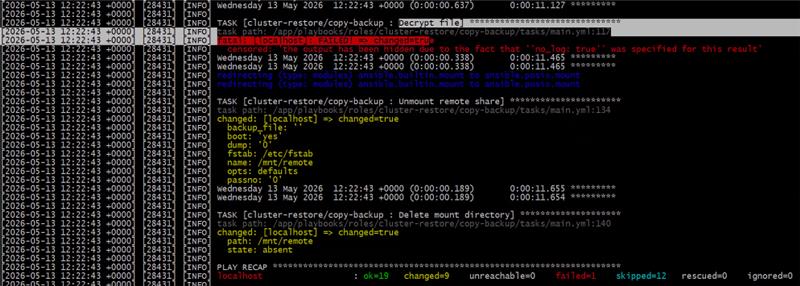
暗号化パスワードが間違っている、または正しくエンコードされていない場合のエラー例
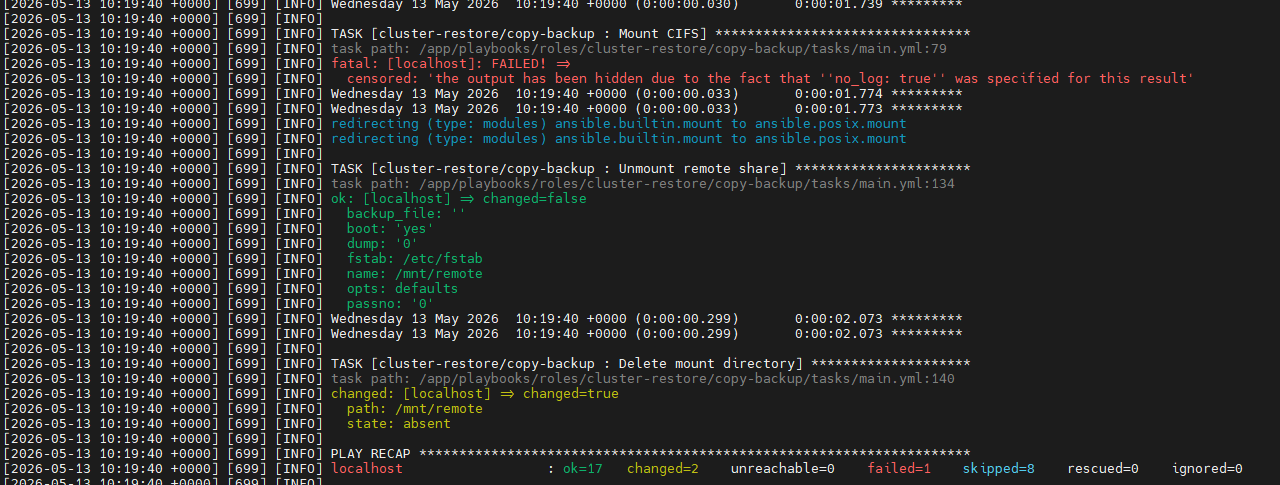
CIFSパスワードが間違っている、または正しくエンコードされていない場合のエラー例
原因
ユーザーは、次の手順でエンコードされていないパスワードを入力しました
Please enter CIFS password(base64 encoded). Press enter to skip if username is not required:

Please enter encryption password for backup file (base64 encoded):
解決方法
次のコマンドを実行して、パスワードをbase64エンコード形式にエンコードします。
echo -n 'MyPassword' | base64Mypasswordをエンコードするパスワードに置き換えます
Make sure to:
- パスワードは2つの単一引用符(' ')で囲みます
- echoコマンドで引数-nを使用して、末尾の改行を回避します
Example:

この例では、パスワードは cGFzc3dvcmQ= にエンコードされています。
リストア スクリプトを再実行し、要求された場合は、プレーン パスワードではなく、新しいエンコードされたパスワードを使用するようにしてください
Please enter CIFS password(base64 encoded). Press enter to skip if username is not required: cGFzc3dvcmQ=

Please enter encryption password for backup file (base64 encoded): cGFzc3dvcmQ=
その他の情報
PowerFlex Managerをリストアする完全な手順については、『 Dell PowerFlex Manager 4.8.x User Guide 』のガイドを参照してください。コピーも以下にリストされています。
- PowerFlex Managerのリストア
PowerFlex Managerをリストアすると、ユーザーが作成したデータが、バックアップ ファイルに保存されている以前の構成に戻されます。バックアップからリストアするには、PowerFlex Managerの外部でスクリプトを実行する必要があります。ユーザー インターフェイスは、バックアップからリストアする機能をサポートしていません。
必要条件
リストア手順を開始する前に、次の前提条件を満たしている必要があります。
- リストア クラスターは、PowerFlexのバージョンとKubernetesのバージョンがまったく同じである必要があります。
- リストア クラスターは、まったく同じIPアドレスと構成を持つ必要があります。
クラスター構成は、バックアップが実行されたクラスター構成と同じである必要があります。
- すべてのKubernetesノードのIPアドレスが同じである必要があります。
- すべてのKubernetesノードには同じ名前を付ける必要があります。
- すべてのLoadBalancerのIPアドレスが同じである必要があります。
このタスクについて
注意:以前の構成をリストアすると、PowerFlex Managerが再起動し、リストア先のバックアップ ファイルの後に作成されたデータが削除されます。実行中のジョブも終了できます。
手順
- PowerFlex Managerプラットフォーム インストーラーが最初に実行されたノードにログインします。
- インストーラー バンドルに含まれているリストア スクリプトを実行します。
./restore_backup.sh- スクリプトの実行を完了するために、必要に応じて詳細を入力します。
SSHのユーザー名とパスワードを入力するように求められます。さらに、パスワードがすべてのノードで同じかどうかを指定し、バックアップファイルの場所とファイルの暗号化されたパスワードも指定するように求められます。CIFSのユーザー名とパスワードの入力を求められる場合もあります。匿名アクセスを許可するCIFS共有では、CIFS認証情報が必要でない場合があります。注:パスワードは base64 エンコード形式である必要があります。
パスワードをbase64にエンコードするには、次のコマンドを使用します。
echo -n 'MyPassword' | base64エンコードするパスワードであるMypasswordを置き換え、パスワードを2つのシングルqoutesの間に入れてください。
Example:
echo -n 'example' | base64
ZXhhbXBsZQ==
リストア スクリプトの実行を完了するには、リストア処理を既存のクラスターと新しいクラスターのどちらで実行するかを指定する必要があります。
リストア スクリプトの実行例を示すスニペットを次に示します。
[root@sheetal-installer scripts]# ./restore_backup.sh

/usr/local/lib/python3.8/site-packages/paramiko/transport.py:236: CryptographyDeprecationWarning: Blowfish has been deprecated "class": algorithms.Blowfish, Installation logs are available at <Bundle root>/PFMP_Installer/logs/ directory. More detailed logs are available at <Bundle root>/atlantic/logs/ directory. PFMP Installer is about to reset a PFMP cluster based on the configuration specified in the PFMP_Config.json.

Please enter the ssh username for the nodes specified in the PFMP_Config.json[root]:root

Are passwords the same for all the cluster nodes[Y]?:Y

Please enter the ssh password for the nodes specified in the PFMP_Config.json. Password:

Please enter backup file location - Example CIFS: \\1.2.3.4\Lab\backup\file.tgz

Please enter CIFS username. Press enter to skip if username is not required:administrator

Please enter CIFS password(base64 encoded). Press enter to skip if username is not required: UmFpZDR1cyE=

Please enter encryption password for backup file (base64 encoded): UmFpZDR1cyE=

Perform restore on existing cluster? Please enter yes/y or no/n :
結果
リストア プロセスは、リストアが完了するまでステータス情報を出力します。
対象製品
PowerFlex rack, ScaleIO文書のプロパティ
文書番号: 000464562
文書の種類: Solution
最終更新: 18 5月 2026
バージョン: 3
質問に対する他のDellユーザーからの回答を見つける
サポート サービス
お使いのデバイスがサポート サービスの対象かどうかを確認してください。