PowerEdge 17th Generation Servers with Delta Power Supplies may not show correctly in iDRAC UI and SEL logging after AC cycle
概要: PowerEdge 17th Generation Servers with Delta Power Supplies may not show correctly in iDRAC UI and SEL logging after AC cycle.
この記事は次に適用されます:
この記事は次には適用されません:
この記事は、特定の製品に関連付けられていません。
すべての製品パージョンがこの記事に記載されているわけではありません。
現象
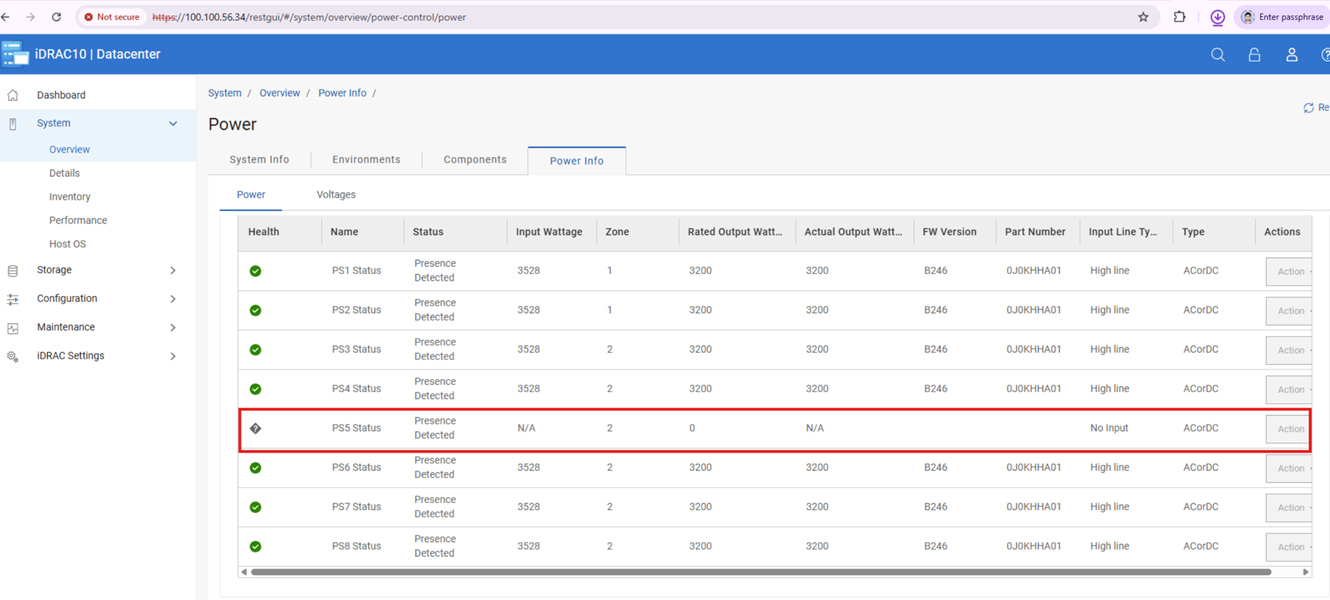
Post-AC cycle affected Delta 17G Power Supplies may function but display blank iDRAC telemetry, firmware, and Dell Part numbers of fields. However, performing another AC or virtual AC cycle after this state occurs triggers incorrect configuration or capacity mismatch errors in the SEL.
原因
After an AC or virtual AC cycle, iDRAC UI may miss power supply info and SEL may log PSU configuration or capacity mismatches (PWR2265/PWR2267/UEFI0059).
We identified that is Power Supplies limitation caused the loss of communication in a corner case, leading to the bus hang.
解決方法
Do not replace any hardware, this issue is not a hardware failure and can be resolved with Power Supply firmware updates.
Note: If a PSU mismatch occurs, unplug AC power and reseat the PSU after 2 minutes. Once remediated, update PSU firmware in line with the following information.
The following chart lists the Dell Part Numbers (DPN) and Firmware Version required to resolve this issue.
| Vendor | Wattage | Dell Part Number | Firmware Version |
| Delta | 3200 W | JNF12 | 1916 |
| J0KHH | BC46 | ||
| Y9NXM | C021 | ||
| 2400 W | 9KK0M | BC2B | |
| 1800 W | GF1GT | 192A | |
| 1500 W | GRD17 | BC31 | |
| DM12N | BC36 | ||
| 1400 W | 8HCRH | BC28 | |
| 1100 W | KMJFC | BC35 | |
| 49FWD | BC2C | ||
| 800 W | 8YNWG | BC2D | |
| R98X5 | BC2E |
The above firmware versions are available on each system model’s download page from the Dell Support site.
対象製品
Rack Servers, XE Servers, XR Servers文書のプロパティ
文書番号: 000471893
文書の種類: Solution
最終更新: 05 6月 2026
バージョン: 1
質問に対する他のDellユーザーからの回答を見つける
サポート サービス
お使いのデバイスがサポート サービスの対象かどうかを確認してください。