PowerFlex 4.8: How to enable Stringent Certificate Feature
概要: Many users have CA policies that prohibit IP addresses in the certificate SAN (Subject Alternative Name) and only FQDNs (Fully Qualified Domain Names) are allowed. The lack of IP addresses in the certificate conflicts with PowerFlex Manager logic when it comes to the zipper or yum repositories that we use. PowerFlex 4.8 has a new feature to support stringent rules for certificates. This is a new security mode within package manager. Now, when creating a custom certificate or the Powerflex appliance certificate, the customer can choose between Standard and Stringent modes. The Standard Mode doesn't require DNS, but includes IPs and FQDNs, and the Stringent mode in which PowerFlex Manager converts the ingress IPS to FQDNs and then builds the repo URLs. ...
この記事は次に適用されます:
この記事は次には適用されません:
この記事は、特定の製品に関連付けられていません。
すべての製品パージョンがこの記事に記載されているわけではありません。
手順
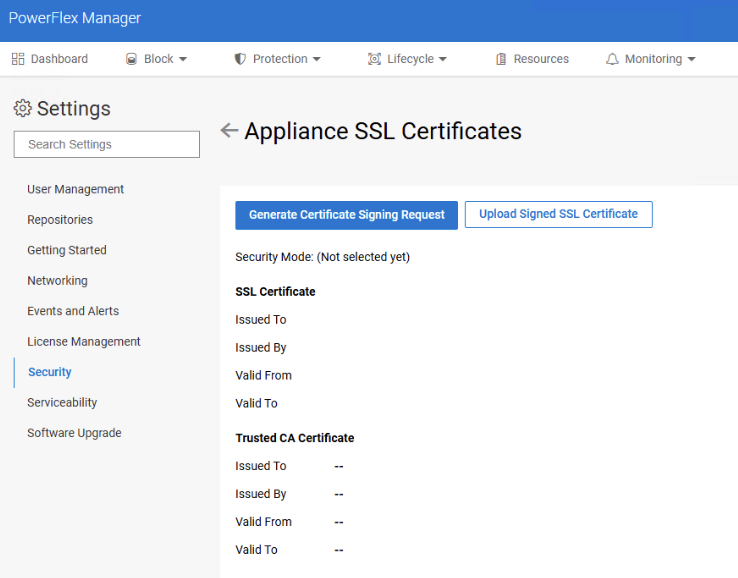
1) Access PowerFlex Manager UI> Settings> Security> Appliance SSL Cetificate
2) Select the option "Generate Certificate Signing Request"
In the Appliance SSL Certificate, the "Security Mode" line will show if a customer is already using Stringent or Standard mode.
3) On the pop up, choose "Stringent" as the Security Level

4) Add the DNS Hostname details:
NOTE: It is always recommended to include one DNS per entry; however, if this is not possible, the Management DNS can be used for the Data entries as well. If there are physically isolated OOB networks, a DNS entry on the OOB network is needed to resolve the FQDN to the OOB ingress IP.
Note 2: Once the CSR is generated, do not deviate from what is in the "Subject Alternative Name" (SAN) Section; otherwise, the system will show an error when trying to upload the signed certificate in the "Upload SSL certificate" section.

5) Upload the sign certificate. See article Powerflex 4.X: How to Sign and Upload a Chain of SSL Certificates to PFMP
6) You can review the DNS hostnames associated with the certificate:

対象製品
PowerFlex rack, ScaleIO文書のプロパティ
文書番号: 000479321
文書の種類: How To
最終更新: 14 7月 2026
バージョン: 1
質問に対する他のDellユーザーからの回答を見つける
サポート サービス
お使いのデバイスがサポート サービスの対象かどうかを確認してください。