Microsoft Active Directory Federation Services Single Sign-On End-of-Life
概要: Learn about Microsoft Active Directory Federation Services (ADFS) Single Sign-On (SSO) End-of-Life (EOL) and transition to Dell Identity SSO (DI SSO).
この記事は次に適用されます:
この記事は次には適用されません:
この記事は、特定の製品に関連付けられていません。
すべての製品パージョンがこの記事に記載されているわけではありません。
手順
Affected Products:
- Wyse Management Suite Cloud
Overview
ADFS based SSO for Wyse Management Suite (WMS) will reach EOL in August 2026 (2608). All customers currently using ADFS SSO must transition to DI SSO before this deadline. Early migration is strongly recommended to minimize disruption and ensure a smooth transition.
DI SSO provides a modern, centralized identity and access management framework for WMS, enabling secure authentication, integration with external Identity Providers (IdP), and support for industry-standard protocols such as SAML 2.0 and OpenID Connect (OIDC).
Failure to migrate prior to the EOL date will result in loss of SSO functionality for ADFS-based configurations.
Terminology
- ADFS: Microsoft-based federation service used for enabling SSO across enterprise applications.
- SSO: Authentication method that allows users to access multiple applications with a single set of credentials.
- Dell Identity (DI): Dell’s centralized identity platform used for authentication, user management, and SSO across Dell applications.
- DI SSO: SSO solution powered by Dell Identity, supporting SAML 2.0 and OIDC for secure federation with customer Identity Providers.
- IdP: External identity system (for example, Microsoft Entra ID, Okta) responsible for authenticating users.
- SAML 2.0 / OIDC: Industry-standard protocols used to exchange authentication and authorization data between systems.
Key Changes and Deadlines
Key Changes
- ADFS SSO is being deprecated and fully removed from WMS.
- Customers should:
- Remove existing ADFS configuration in WMS.
- Implement Dell Identity SSO using supported protocols (SAML 2.0 or OIDC).
Deadlines
- 2608 (August 2026): ADFS SSO End-of-Life
- Post-EOL:
- ADFS-based login will no longer function
- Only Dell Identity SSO or supported alternatives (for example, Microsoft Entra via DI) will be available
Next Steps
Customers should begin migration planning immediately and complete the following:
- Assess Current State - Identify tenants using ADFS SSO
- Clean Up ADFS Configuration
- Go to Portal Administration > Active Directory > ADFS Configuration
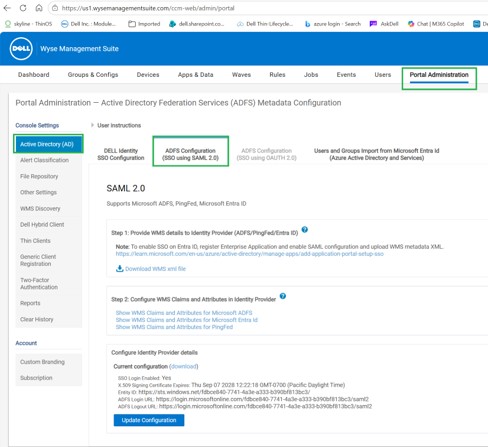
- Remove existing IdP details to prevent conflicts
- Enable DI SSO: Detailed steps can be found in the WMS 2605 Administrator Guide
対象製品
Wyse Management Suite文書のプロパティ
文書番号: 000486786
文書の種類: How To
最終更新: 08 7月 2026
バージョン: 1
質問に対する他のDellユーザーからの回答を見つける
サポート サービス
お使いのデバイスがサポート サービスの対象かどうかを確認してください。