Dell AIOps Plugin fails to upload inventory data - transfer failed because services are busy.
概要: AIOps tenant portal is missing or showing old inventory data for a managed device. Reviewing the transfer log from the Dell AIOps plugin page within the OpenManage Enterprise console shows the inventory transfer log as failed. The status message shows 'Data transfer failed because the services are busy.' ...
この記事は次に適用されます:
この記事は次には適用されません:
この記事は、特定の製品に関連付けられていません。
すべての製品パージョンがこの記事に記載されているわけではありません。
現象
Managed devices within the AIOps tenant portal shows no or incomplete inventory data when managed through the OpenManage Enterprise connector.
Reviewing the transfer log status from within the Dell AIOps plugin Transfer Log page shows the inventory logs in a failed state. All other transfer logs (Health and Alerts) have completed successfully.

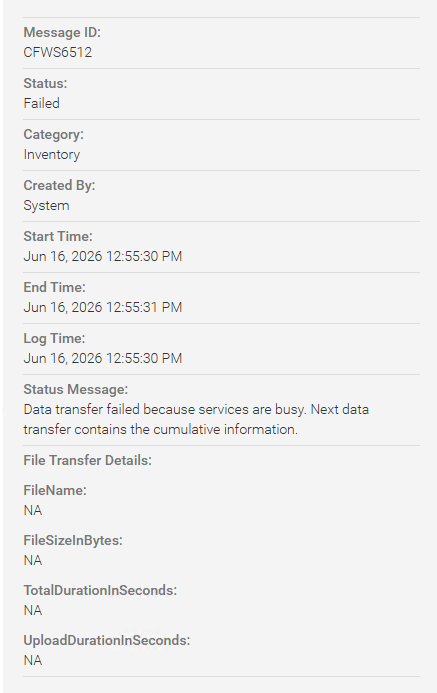
Downloading and extracting the console log bundle (Monitor - Troubleshoot - Logs) shows the following error in the data forwarding service log (ConsoleLogs-xxxxxxxxxxxxxxxx\dataforwardingservice\):
[WARN ] 2026-05-07 02:19:26.226 [RxCachedThreadScheduler-7887] - getDeviceInventoryChangesetAsJson: Time taken to get data from core.device_inventory_get_inventory_changeset_as_json : 823 ms.

[ERROR] 2026-05-07 02:19:26.226 [RxCachedThreadScheduler-7887] - InventoryVerticle:INVENTORY: processChangeSetData: Cause:io.reactivex.exceptions.CompositeException: 2 exceptions occurred. .

[ERROR] 2026-05-07 02:19:26.226 [RxCachedThreadScheduler-7887] - InventoryVerticle: processForwarding: Failed.Cause:
Exception states an invalid input syntax for timestamp:
Caused by: io.vertx.pgclient.PgException: { "message": "invalid input syntax for type timestamp: \"\"", "severity": "ERROR", "code": "22007", "where": "SQL statement \"with\n        _pre_group_input_arrays(device_id, inventory_types, identifier, inventory_time, sync_type) as

.

PL/pgSQL function device_inventory_get_inventory_changeset_as_json(integer[],character varying[],character varying[],timestamp without time zone[],integer[],integer[]) line 162 at SQL statement", "file": "datetime.c", "line": "3755", "routine": "DateTimeParseError" }
原因
For some managed 17G devices running iDRAC firmware 1.30.10.xx, the inventory data being returned was incomplete. This leads to unexpected results when the AIOps plugin would request inventory data.
Some incomplete inventory data includes, but is not limited to:
- Memory missing vendor information.
- BOSS NVME firmware version and manufacturer date missing.
- Kiokia NVMe drives manufacture date missing.
- QLogic FC card missing part and serial number information as well as vendor and description information.
- Network functions and transceiver data missing.
解決方法
Dell recommends updating the 17G iDRAC firmware to the latest release, version 1.30.20.10 or higher. After updating the firmware, the device inventory data will be updated, and the AIOps inventory logs will transfer successfully.
対象製品
OpenManage Enterprise Dell AIOps文書のプロパティ
文書番号: 000487640
文書の種類: Solution
最終更新: 14 7月 2026
バージョン: 1
質問に対する他のDellユーザーからの回答を見つける
サポート サービス
お使いのデバイスがサポート サービスの対象かどうかを確認してください。