Data Domain - Unable to SSO PowerProtect DD System Manager from DPC Console "System Management."
요약: Unable to SSO PowerProtect DD System Manager UI from Data Protection Central (DPC) Console Every time when tried to open the DD System Manager from DPC Console - "System Management," it gave the following Error "You do not have any roles assigned in DD System Manager. Contact your DD administrator." ...
이 문서는 다음에 적용됩니다.
이 문서는 다음에 적용되지 않습니다.
이 문서는 특정 제품과 관련이 없습니다.
모든 제품 버전이 이 문서에 나와 있는 것은 아닙니다.
증상
Unable to SSO PowerProtect DD System Manager UI from Data Protection Central (DPC) Console
When trying to open the DD System Manager from DPC Console - "System Management," it gave the following Error:
"You do not have any roles assigned in DD System Manager. Please contact your DD administrator." 원인
The User Groups created on PowerProtect DD System Manager UI under Administration - Access - Authentication - Single Sign-On (SSO) were the below two User Groups.
DPC Group Domain Role
------------- --------- -----
admin dpc.local admin
administrator dpc.local admin
------------- --------- -----
With the above User Groups having names - "admin" and "administrator," DPC is unable to SSO to the Data Domain.
This is causing the error: "You do not have any roles assigned in DD System Manager. Contact your DD administrator." The naming is not correct for the User Groups.
해결
To fix this issue, the User Groups "Admin and "Administrator" must be deleted and a new User Group with name "dp-admin" must be created on the PowerProtect DD System Manager UI under - Administration - Access - Authentication - Single Sign-On (SSO) with Domain Name as "dpc.local" and Management Role as "Admin." Please see the screenshot below for this setting done when creating the new User Group under SSO. And then Click OK.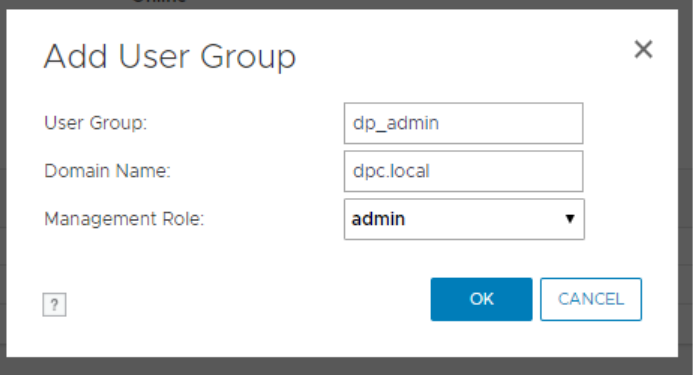
NOTE: If you are on an IDPA/PowerProtect DP appliance using the internal LDAP (ipdauser account), you have to add a second group with the following:
User Group:       dp_admin
Domain Name:      idpa.local
Management Role:  admin
Then try to SSO from the DPC Console, and you should be able to open DD UI System Manager from the DPC Console without any errors and without entering login credentials.
해당 제품
Data Domain제품
Data Domain, Data Protection Central, DD OS문서 속성
문서 번호: 000173331
문서 유형: Solution
마지막 수정 시간: 14 4월 2025
버전: 4
다른 Dell 사용자에게 질문에 대한 답변 찾기
지원 서비스
디바이스에 지원 서비스가 적용되는지 확인하십시오.