Driver Detection Not Available During Drivers Scan for Computers with SupportAssist and Dell Command Update Installed
요약: Customers are unable to run Automated Drivers Scan and results in "Driver Detection Not Available" which is an issue with Dell Command | Update.
이 문서는 다음에 적용됩니다.
이 문서는 다음에 적용되지 않습니다.
이 문서는 특정 제품과 관련이 없습니다.
모든 제품 버전이 이 문서에 나와 있는 것은 아닙니다.
증상
Affected Products:
- Dell Command | Update
When running Automated Drivers Scan, a customer gets a Driver Detection Not Available message which is due to a No Available Catalog error. This can occur when the SupportAssist and Dell Command | Update are installed on the computer.
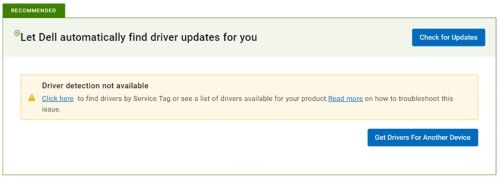
Figure 1: (English Only) Drive detection not available
원인
Error is observed only when the below condition is fulfilled (all three conditions should be present):
- Applicable only if SupportAssist and Dell Command | Update are both installed on the machine (Open Control Panel from Start Menu > Click Programs > Search Dell SupportAssist).
- The computer has Dell Command | Update v4.5 or earlier and updating to v4.6 or later (Open Control Panel from Start Menu > Click Programs > Search Dell Command Update).
- Dell Command | Update must have an offline catalog that is configured (Open Dell Command | Update application > Settings (right top of the application) > General:
- The default Source Location (dell.com) is cleared.
- Location is configured to offline catalog.
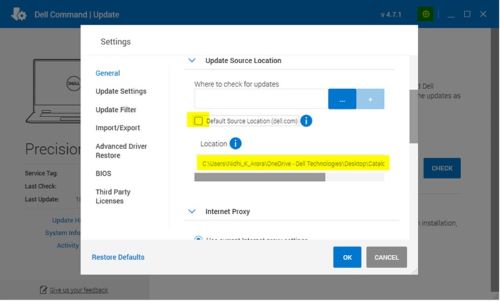
Figure 2: (English Only) Dell Command | Update Settings
해결
- Remove offline catalog location updated.
- Check Default Source Location (dell.com) and click OK.
- Update to the latest Dell Command | Update version.
Or
- Uninstall the existing Dell Command | Update version (which should be 4.5 or earlier).
- Install the latest Dell Command | Update version from Dell.com.
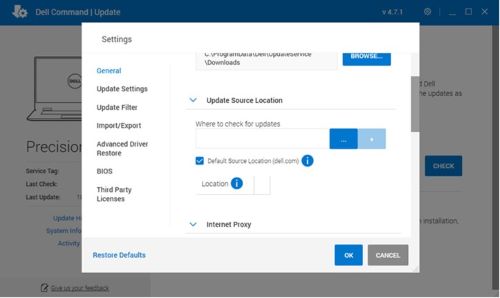
Figure 3: (English Only) Dell Command | Update Settings
해당 제품
Dell Command | Update문서 속성
문서 번호: 000207301
문서 유형: Solution
마지막 수정 시간: 16 9월 2025
버전: 5
다른 Dell 사용자에게 질문에 대한 답변 찾기
지원 서비스
디바이스에 지원 서비스가 적용되는지 확인하십시오.