NVP vProxy: VM backups from stand-alone ESXi fail with "Received an HTTP code: 400...."
요약: The NetWorker VMware Protection (NVP) vProxy appliance is deployed on a stand-alone VMware ESXi hypervisor (7.0U3) host. All VM backups immediately fail with the message "Failed to create BackupVmSession resource. Error logging to CIS host, not fetching guestOSImage details" ...
이 문서는 다음에 적용됩니다.
이 문서는 다음에 적용되지 않습니다.
이 문서는 특정 제품과 관련이 없습니다.
모든 제품 버전이 이 문서에 나와 있는 것은 아닙니다.
증상
A stand-alone ESXi host was added to NetWorker (no vCenter server).
The ESXi host is at version 7.0U3.
vProxy version is at 4.3.0-46.
The ESXi host was added using root account and "deployed in cloud" option (required):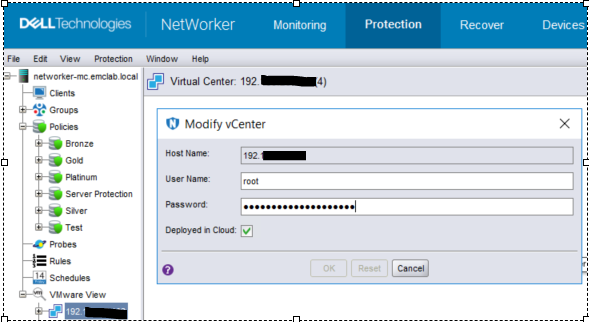
Figure 1: Screenshot of Modify vCenter page
VM backup action immediately fails with the following error message in the action log: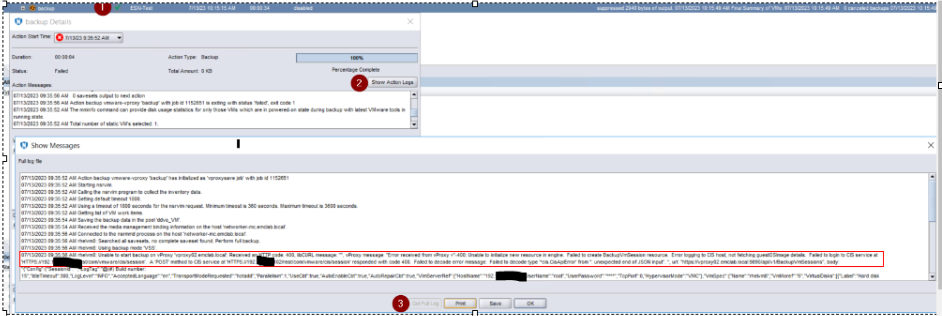
Figure 2: Back up action failure message in Action log
Error message:
07/13/2023 09:35:56 AM rhelvm8: Unable to start backup on vProxy 'vproxy02.emclab.local': Received an HTTP code: 400, libCURL message: "", vProxy message: "Error received from vProxy ="-400: Unable to initialize new resource in engine. Failed to create BackupVmSession resource. Error logging to CIS host, not fetching guestOSImage details. Failed to login to CIS service at 'HTTPS://192.xxx.xx.xxx/rest/com/vmware/cis/session'. A 'POST' method to CIS service at 'HTTPS://192.xxx.xx.xxx/rest/com/vmware/cis/session' responded with code 400. Failed to decode error message: Failed to decode type '*cis.CisApiError' from '': unexpected end of JSON input". ", url: "https://vproxy02.emclab.local:9090/api/v1/BackupVmSessions",
원인
vProxy error in message handling
The message "Error logging to CIS host not fetching guestOSImage details" should be handled as a warning and allow backups to proceed; however, it is being treated as a failure and stops backups from running.
해결
A temporary workaround is to downgrade to vProxy 4.3.0-41.
This issue is expected to be addressed in an upcoming vProxy release. Check https://www.dell.com/support/home/product-support/product/networker-family/drivers for availability.
해당 제품
NetWorker제품
NetWorker Family, NetWorker Series문서 속성
문서 번호: 000215790
문서 유형: Solution
마지막 수정 시간: 10 4월 2024
버전: 7
다른 Dell 사용자에게 질문에 대한 답변 찾기
지원 서비스
디바이스에 지원 서비스가 적용되는지 확인하십시오.