Avamar: VM image backups fail "No Proxy" because VM lacks a hard disk
Podsumowanie: Avamar VM image backups fail with "No Proxy" error because the VM lacks any hard disk.
Ten artykuł dotyczy
Ten artykuł nie dotyczy
Ten artykuł nie jest powiązany z żadnym konkretnym produktem.
Nie wszystkie wersje produktu zostały zidentyfikowane w tym artykule.
Objawy
The Activity Monitor in the Avamar UI shows 'No Proxy'.
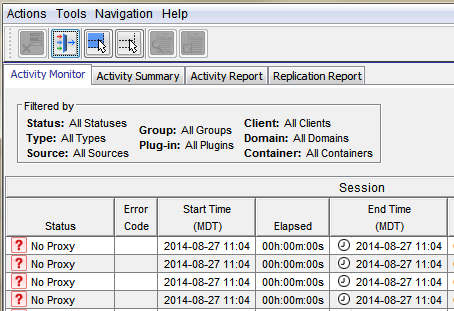
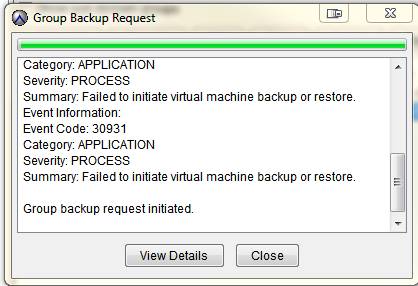
On-demand VMware Image backup fails with the following:
Category: APPLICATION
Severity: PROCESS
Summary: Failed to initiate virtual machine backup or restore.
Event Information:
Event Code: 30931
Category: APPLICATION
Severity: PROCESS
Summary: Failed to initiate virtual machine backup or restore.
If a group backup request is initiated:
Przyczyna
The VM itself has no Hard Disks. This usually affects one or a couple of VMs.
Rozwiązanie
- Open vCenter
- Find the VM that is failing with 'No Proxy'
- Edit the VM settings and verify if there are any Hard Disks
- If there are no Hard Disks, check with the VM Administrator and contact VMware support. If a backup of the VM is no longer required, retire the VM object in Avamar.
Dodatkowe informacje
The following articles discuss issues which have the same generic "No Proxy" error.
- Avamar VM image backups fail with "No Proxy" because no proxy servers are configured to protect the datastore holding the client’s VMDKs
- Avamar VM image backups fail with "No Proxy" error due to interrupted vCenter connection
- Avamar VM image backups fails with "No Proxy" error due to the VM not having any hard disks
- Avamar VM image backups fail with "No Proxy" because the proxy is powered off in vCenter
- Avamar VM image backups fail with "No Proxy" error due to proxies not resolving in DNS
Produkty, których dotyczy problem
AvamarProdukty
AvamarWłaściwości artykułu
Numer artykułu: 000035426
Typ artykułu: Solution
Ostatnia modyfikacja: 05 lut 2025
Wersja: 4
Znajdź odpowiedzi na swoje pytania u innych użytkowników produktów Dell
Usługi pomocy technicznej
Sprawdź, czy Twoje urządzenie jest objęte usługą pomocy technicznej.