OptiPlex 7070 Ultra: Visual guide to your computer
Podsumowanie: This article is a visual guide to the external ports and features on the various form factors of the Dell OptiPlex 7070 Ultra desktop.
Ten artykuł dotyczy
Ten artykuł nie dotyczy
Ten artykuł nie jest powiązany z żadnym konkretnym produktem.
Nie wszystkie wersje produktu zostały zidentyfikowane w tym artykule.
Objawy
The following article provides a visual guide to your OptiPlex 7070 Ultra Computer and lists the external ports and features of your PC.
 Note: For a more detailed description of each location, please go to the system manuals at www.dell.com/support
Table of Contents:
Front View

(Figure.1 Front View)
Rear View
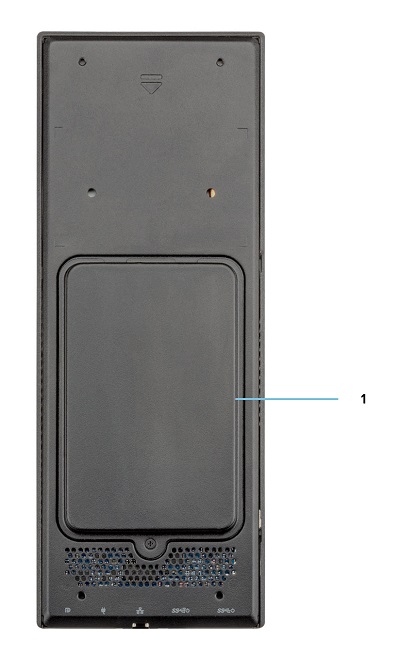
(Figure.2 Rear View)
| 1 | Hard Drive Bay |
Top View
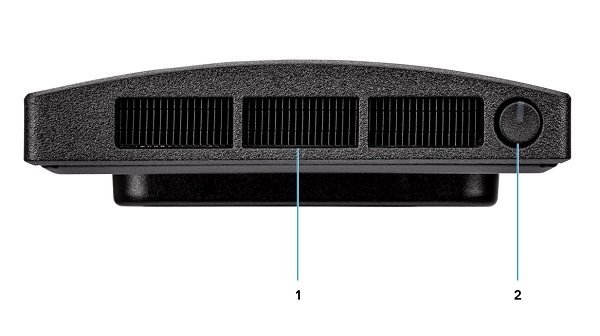
(Figure.3 Top View)
| 1 | Fan Vent | 2 | Power Button and Power LED |
Bottom View

(Figure.4 Bottom View)
| 1 | USB 3.1 Gen1 Type-A Connector w/SmartPower | 2 | USB 3.1 Gen2 Type-A Connector w/SmartPower |
| 3 | Network Ethernet (NIC) Connector | 4 | Power Adapter Connector |
| 5 | USB 3.1 Gen2 Type-C Connector w/DisplayPort Alt Mode/PowerDelivery |
Left-Hand Side View

(Figure.5 Left-Hand Side View)
| 1 | Service Tag Location | 2 | Universal Audio Connector |
| 3 | Vent | 4 | Hard Drive Status LED |
| 5 | USB 3.1 Gen2 Type-C Connector w/DisplayPort Alt Mode | 6 | USB 3.1 Gen2 Type-A w/PowerShare |
Right-Hand Side View
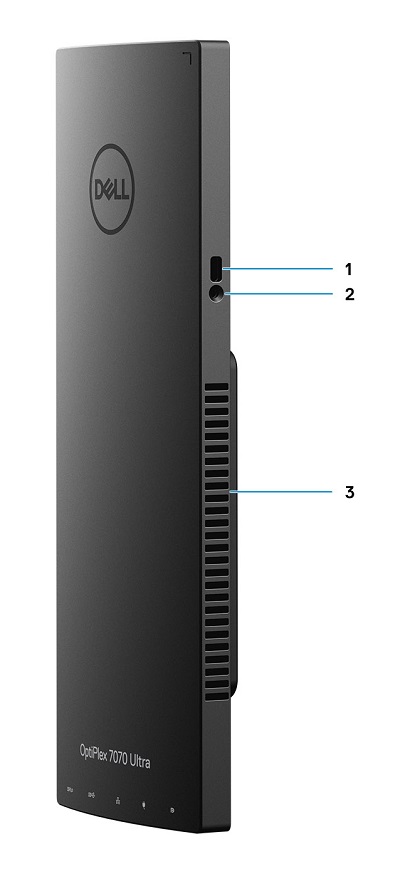
(Figure.6 Right-Hand Side View)
| 1 | Kensington Lock Slot | 2 | Security Screw Hole |
| 3 | Vent |
Additional Info:
- OptiPlex 7070 Ultra Online Manuals and Documents
- OptiPlex 7070 Ultra Customer replaceable unit (CRU) teardown guide
Przyczyna
N/A
Rozwiązanie
N/A
Produkty, których dotyczy problem
OptiPlex 7070 UltraWłaściwości artykułu
Numer artykułu: 000138519
Typ artykułu: Solution
Ostatnia modyfikacja: 29 wrz 2023
Wersja: 7
Znajdź odpowiedzi na swoje pytania u innych użytkowników produktów Dell
Usługi pomocy technicznej
Sprawdź, czy Twoje urządzenie jest objęte usługą pomocy technicznej.