Avamar VM image backups fail with "No Proxy" error due to interrupted vCenter connection
Resumo: Avamar VM image backups fail with "No Proxy" error due to interrupted vCenter connection.
Este artigo aplica-se a
Este artigo não se aplica a
Este artigo não está vinculado a nenhum produto específico.
Nem todas as versões do produto estão identificadas neste artigo.
Sintomas
The Activity Monitor in the Avamar UI shows 'No Proxy'.

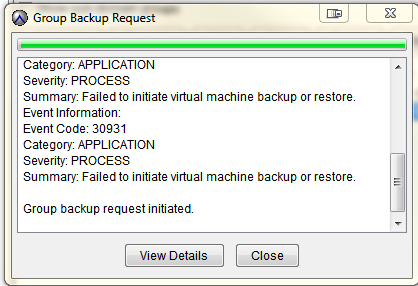
On-demand VMware Image backup fails with the following:
Category: APPLICATION
Severity: PROCESS
Summary: Failed to initiate virtual machine backup or restore.
Event Information:
Event Code: 30931
Category: APPLICATION
Severity: PROCESS
Summary: Failed to initiate virtual machine backup or restore.
If a group backup request is initiated:
Causa
There was an interruption to the connection with vCenter.
This usually affects backups for all VM clients.
This usually affects backups for all VM clients.
Resolução
- Check that Avamar can connect to the vCenter
- Go to Administration window and click on vCenter root domain
- Click on the vCenter client connection object and edit the client
- Verify the Avamar server IP or Hostname is valid
- Verify the vCenter user account that Avamar uses is valid
- Click OK to verify Avamar connect to vCenter
- Look at also restarting the MCS service on the Avamar server to clear any vCenter connection caching issues if the connection to vCenter was interrupted due to vCenter maintenance or network outage.
Mais informações
The following articles discuss issues which have the same generic "No Proxy" error.
- Avamar VM image backups fail with "No Proxy" because no proxy servers are configured to protect the datastore holding the client’s VMDKs
- Avamar VM image backups fails with "No Proxy" error due to an interruption to the vCenter connection
- Avamar VM image backups fails with "No Proxy" error due to the VM not having any hard disks
- Avamar VM image backups fail with "No Proxy" because the proxy is powered off in vCenter
- Avamar VM image backups fail with "No Proxy" error due to proxies not resolving in DNS
Produtos afetados
AvamarProdutos
AvamarPropriedades do artigo
Número do artigo: 000033587
Tipo de artigo: Solution
Último modificado: 14 ago. 2023
Versão: 3
Encontre as respostas de outros usuários da Dell para suas perguntas.
Serviços de suporte
Verifique se o dispositivo está coberto pelos serviços de suporte.