PowerVault ME4: Unable to add a new host to an existing host group.
Resumo: Prior to GT280R006-01, Using the GUI wizard a user would be able to add a new host to an existing host group but the new host would not acquire volume mappings of the group. This is a GUI bug and is fixed in GT280R006-01. The fix would not allow a host to be added to the host group prior to performing mappings that are consistent with the group. GT280R006-01 if a user is unable to add a new host to a host group then it is because the new host is not mapped to the same "volume, lun number and port numbers" as the host group. ...
Este artigo aplica-se a
Este artigo não se aplica a
Este artigo não está vinculado a nenhum produto específico.
Nem todas as versões do produto estão identificadas neste artigo.
Sintomas
Simulation steps for reference (prior to GT280R006-01):
* Created a host group with one host in it and map volume/s (LUNs) to the host group.
* Created a host group with one host in it and map volume/s (LUNs) to the host group.

* Add 2nd host to the host group using host setup wizard.

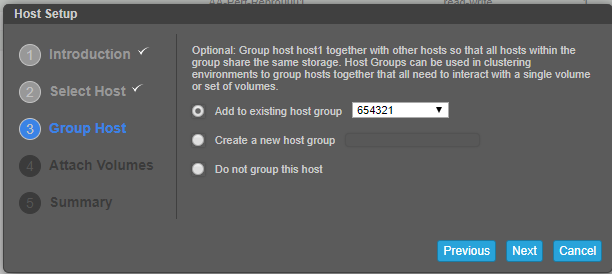

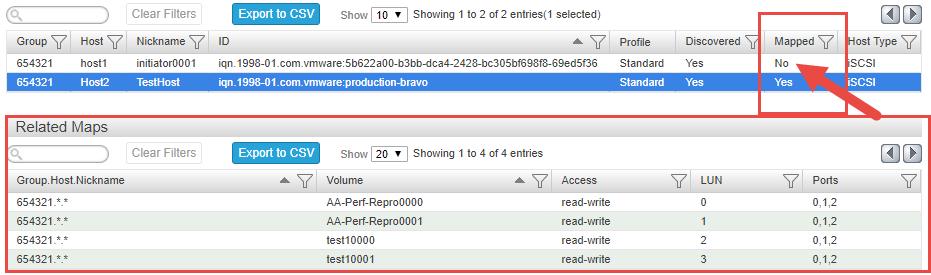
*Multiple disk rescans on the newly added host will not show the mapped LUN’s. Found the following in the WBI.
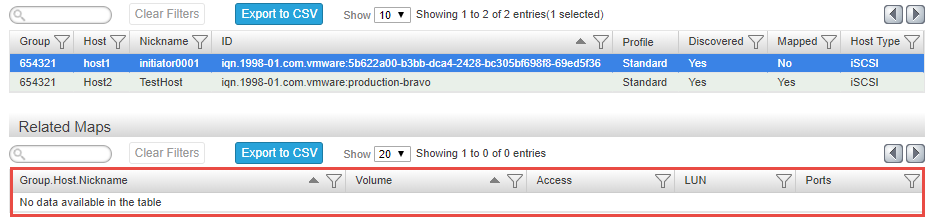
*Removing ‘host1’ from the host group and adding via right click > add to host group, receive the following error. Same in CLI.

Suspect a problem with the wizard not validating the host add to an existing group with mappings.
A few other things we ran into:
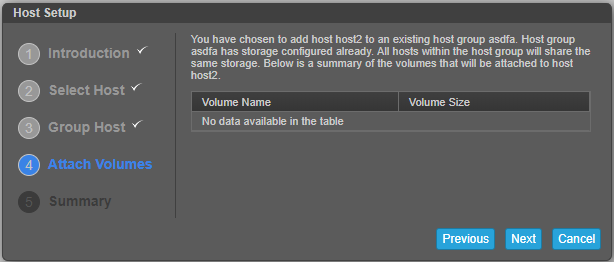
* Mapping a host to a host group mapped with volume groups, the wizard displays no volumes.

Causa
The ME4 is designed to allow a new host to a host group only if the new host is mapped with the same volume, lun numbers, and port numbers of the other host members of the host group.
This is not a bug.
This is not a bug.
Resolução
Follow the below steps manually to successfully add a new host to an existing host group, do not use the wizard :
Can be done either via GUI or CLI :
1. Create initiator. Name the initiator. Repeat this step until all initiators are created for the new host.
From GUI - select hosts > Action > create initiators. From CLI - use the command "create host initiators intiators_IDs hostname"
2. Add these initiators to the host. Name the host.
From GUI - Select the initiators and click "Add to host" from the Action menu. Name the host.
From CLI - Already done in step one.
3. Map the volume/volumes of the host group to the new host. The mappings should be ditto same as the host group including the lun numbers and the port numbers.
From GUI - select "mappings" > Action > Map in GUI
From CLI - use the command - map volume volume_name1 initiator initiator_nicknames ports 0,1,etc lun lun_number
4. Add host to host group.
From GUI - Select the host > action > add to host group. Select the host group from drop-down and click OK.
From CLI - use the command - "add host-group-members hosts host_name hostgroup_name_to-add-to"
Mais informações
NA
Vídeos
NA
Produtos afetados
Dell EMC PowerVault ME4012, Dell EMC PowerVault ME4024, Dell EMC PowerVault ME4084Propriedades do artigo
Número do artigo: 000064997
Tipo de artigo: Solution
Último modificado: 20 dez. 2022
Versão: 6
Encontre as respostas de outros usuários da Dell para suas perguntas.
Serviços de suporte
Verifique se o dispositivo está coberto pelos serviços de suporte.