Dell Data Security Shield Modes
Resumo: This article discusses the Dell Data Security (formerly Dell Data Protection) shield modes.
Este artigo aplica-se a
Este artigo não se aplica a
Este artigo não está vinculado a nenhum produto específico.
Nem todas as versões do produto estão identificadas neste artigo.
Sintomas
Affected Products:
- Credant Mobile Guardian
- Dell Encryption Enterprise
- Dell Data Protection | Enterprise Edition
- Dell Encryption External Media
- Dell Data Protection | External Media Edition
- Dell Encryption Personal
- Dell Data Protection | Personal Edition
- Dell Data Protection | Security Tools
- Dell Encryption Enterprise for Server
- Dell Data Protection | Server Edition
Affected Platforms:
- Windows
Policy-based Dell Data Security (formerly Dell Data Protection) software use a shield mode identifier for product classification.
Causa
Warning:
- Shield mode is determined at the time of product installation and cannot be modified manually.
- Shield mode is only used to troubleshoot product type or status.
Resolução
The shield modes for Dell Data Security products are:
| ID | Mode | Product |
|---|---|---|
| 0 | Unknown/ Uninitialized | Not Initialized/ Unprovisioned1 |
| 1 | Enterprise Mode | Dell Encryption Enterprise \ Dell Data Protection Enterprise Edition Shield |
| 2 | Stand Alone Mode | Credant Mobile Guardian |
| 3 | Enterprise EME Only Mode | Dell Encryption External Media \ Dell Data Protection | External Media Edition |
| 4 | Locally Managed Mode | Dell Encryption Personal \ Dell Data Protection | Personal Edition |
| 5 | Essentials Mode | Dell Data Protection | Security Tools2 |
| 6 | Server Encryption Mode | Dell Encryption Enterprise for Server \ Dell Data Protection | Server Encryption |
| 7 | Saas Mode | Dell Encryption Enterprise Shield |
1All Dell Data Protection products remain unprovisioned until activated.
2Essential Mode only occurs on installations of Dell Data Protection | Security Tools.
To locate the Shield Mode:
Warning: Takes you into the Windows Registry:
- Editing the Registry can cause the computer to become unresponsive on the next reboot.
- Contact Dell Data Security International Support Phone Numbers for assistance if you have concerns about performing this step.
- Right-click the Windows Start Menu and then select Run.
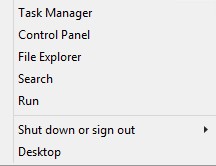
Figure 1: (English Only) Run
- In the Run user interface (UI), type regedit and then press OK.
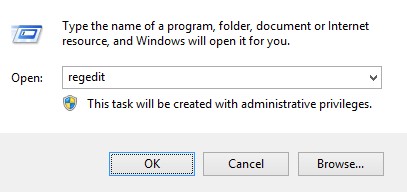
Figure 2: (English Only) Type regedit
- Go to HKEY_LOCAL_MACHINE\SOFTWARE\Credant\CMGShield.
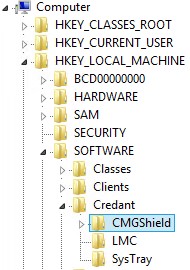
Figure 3: (English Only) CMGShield
- Locate DWORD key SM.
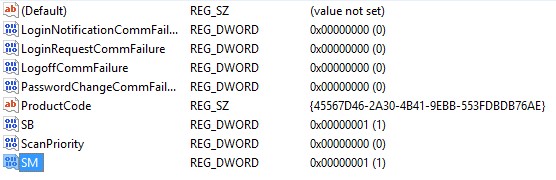
Figure 4: (English Only) SM
Note: In the example, the SM key is set for 1. This identifies the shield mode enterprise edition.
To contact support, reference Dell Data Security International Support Phone Numbers.
Go to TechDirect to generate a technical support request online.
For additional insights and resources, join the Dell Security Community Forum.
Produtos afetados
Dell EncryptionPropriedades do artigo
Número do artigo: 000132837
Tipo de artigo: Solution
Último modificado: 19 abr. 2026
Versão: 11
Encontre as respostas de outros usuários da Dell para suas perguntas.
Serviços de suporte
Verifique se o dispositivo está coberto pelos serviços de suporte.