PowerStore: Heath Check package check for asymmetric ICM connections fails
Resumo: System health check detected incorrect asymmetric intracluster management (ICM) connections.
Este artigo aplica-se a
Este artigo não se aplica a
Este artigo não está vinculado a nenhum produto específico.
Nem todas as versões do produto estão identificadas neste artigo.
Sintomas
System Health may display failure of the symmetric ICM connection check with one of the following messages:
- "ICM connection: Nodea: DOWN, nodeb: UP (KB#000203115)"
- "ICM connection: nodea: UP, nodeb: DOWN (KB#000203115)"
This health check may occur in one of the following scenarios:
- Running a System Check using PowerStore Manager (UI) with the Run System Check option
- Running a System Check using PowerStore Manager (UI) with the Run Upgrade Extensions option (PowerStoreOS 2.1.x only)
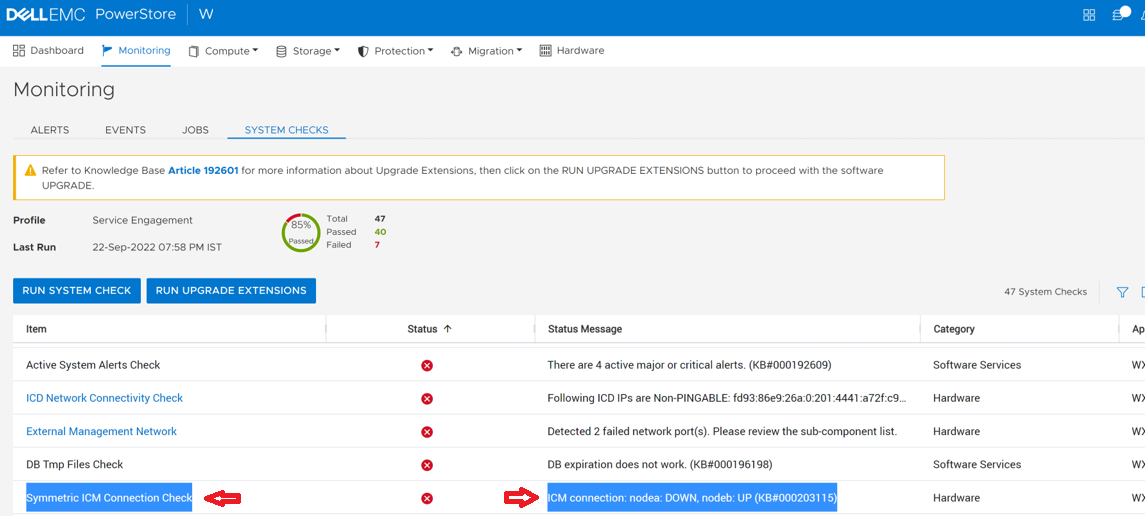
- Running the System Health Service Script (svc_health_check) using an SSH connection:
[SVC:root@ABCDEF-A ~]$ svc_health_check run -rhc symmetric_icm_connection -p Upgrade_Extensions
Name                   Location Status     Description
Symmetric ICM Connec.. node_b   FAILED     ICM connection: nodea: DOWN, nodeb:
                                           UP (KB#000203115)
When this issue exists, the NDU fails.
Causa
The above message indicates that one node has an ICM connection while the other node does not have an ICM connection.
Resolução
Do not proceed with NDU or maintenance operations if this condition is detected.
To resolve this issue, ensure that all ports and cables are connected properly, and all related alerts are resolved. If the issue persists, contact technical support for assistance. Reference KB #000203115 for expedited attention and resolution.
To resolve this issue, ensure that all ports and cables are connected properly, and all related alerts are resolved. If the issue persists, contact technical support for assistance. Reference KB #000203115 for expedited attention and resolution.
Mais informações
For more information about System Health Checks, see KB 000198084 PowerStore: How to use the System Check feature or KB 000192601 PowerStore: How to Check the Health of the Cluster Before Software Upgrade Using Pre-Upgrade Health Check and System Check.
Produtos afetados
PowerStorePropriedades do artigo
Número do artigo: 000203115
Tipo de artigo: Solution
Último modificado: 13 jun. 2025
Versão: 5
Encontre as respostas de outros usuários da Dell para suas perguntas.
Serviços de suporte
Verifique se o dispositivo está coberto pelos serviços de suporte.