日志收集器示例脚本
Resumo: 本文提供了 Windows 操作系统的日志收集器脚本示例。
Este artigo aplica-se a
Este artigo não se aplica a
Este artigo não está vinculado a nenhum produto específico.
Nem todas as versões do produto estão identificadas neste artigo.
Instruções
IT 专业人员可能必须从一台或多台计算机提取日志文件,以诊断问题。这最好通过远程管理工具完成,但也可以通过脚本编制来完成。本文的“附件”部分提供了示例日志收集器,用户可以运行它或对其进行修改以满足大多数需求。
脚本详细信息:
- Only uses Windows Command Line and PowerShell commands
- Does not install software
- Does not change registry values
- Stores files in a temp folder until the creation of a .zip file with all logs
C:\Users\<Current User>\AppData\Roaming\- Temp folder deleted upon creation of the .zip file
- Open Source
提醒:戴尔技术支持无法协助客户处理或修改此脚本。此脚本展示的示例是:无法在其环境中安装管理工具的客户使用命令行和 PowerShell 可以完成的操作。
- 下载日志收集器
- 下载您选择的日志收集器文件。
- 转到本文的附件部分以下载文件。
- 为确保下载的完整性,用户可以验证校验和值:
- MD5:
ca64304df8746ab341c654084fd113d9 - SHA1:
03475dcb0c882102fe9f07267a2aac0353b39613 - SHA-256:
70424626d3b182a82a5877a91fec5b84f562dbf78059e86b34f6946d81242a89
- MD5:
- 下载您选择的日志收集器文件。
- 将日志收集器解压到可访问的位置
- 关闭所有不必要的应用程序。
- 关闭应用程序可减少日志中可能必须筛选的额外数据。
- 复制要调查的问题。
- 用户应记录复制的问题或错误的日期和时间。
- 运行日志收集器。
- 如果可能,以管理员身份运行日志收集器。
- 收集完成后,日志文件将被保存到脚本的运行文件夹中。
- 日志收集需要花费 5 到 15 分钟,具体取决于日志大小和系统规格。
- 最多可以在脚本的运行文件夹中生成两个日志文件。
- 系统始终会创建主日志文件,其文件名格式为 Model#_ServiceTag_Date_Time.zip
- 如果收集了内存转储,则系统会创建包含这些转储的另一个 .zip 文件 (Dumps_Model#_ServiceTag_Date_Time.zip)
- 查看日志
- 使用记录的日期和时间,查看相关日志,以帮助找出问题的原因。
- 用户可以使用 Microsoft 的 Windows 文档了解有关各种日志的更多信息。
- 收集器如何工作?
- 日志收集器使用 Windows 命令行和 PowerShell 命令来创建日志文件,并将其存储在临时文件夹中。然后此文件夹将被压缩为 .zip 文件,临时文件将被删除。
- 我能否根据公司的需求使用此日志收集器?
- 是的,此脚本被视为开源脚本。
- Dell 是否会帮助我自定义此收集器以满足我的需求?
- 不。此收集器作为示例提供。希望为其环境自定义收集器的客户应查看 Microsoft 文档,学习修改此文件或创建自己的文件。
- 我是否能够决定与戴尔共享哪些数据?
- 是的,日志收集器不会向戴尔或其他方自动传输任何数据。在上传/发送电子邮件之前,用户可以删除 .zip 文件中他们不想与戴尔共享的任何日志。完整列表可在本文档的“日志参考”部分中找到。
-
提醒:用户应谨慎操作,避免删除戴尔可能需要用于调查问题的任何文件。
- 日志收集器需要多长时间才能运行?
- 收集器运行所需的时间平均为 5-15 分钟。该事件因日志大小以及 CPU、内存和硬盘 (HDD) 或固态硬盘 (SSD) 的速度而有很大差异。
- 我可以在非 Dell 计算机上使用此日志收集器吗?
- 日志收集器可以在非 Dell 计算机上运行,但对于特定于 Dell 应用程序和设置,可能有空文件或缺少字段。
- Dell 是否可以提供任何其他诊断或管理工具?
- 是的,客户可以使用 Dell SupportAssist 和 Dell Client Command Suite 来管理他们的计算机并收集诊断数据。客户可以了解如何运行戴尔在线诊断测试。
- 用于处理我的数据的 Dell 数据隐私政策是什么?
- 请查看隐私中心主页。
- Lite 版和 Advanced 版发生了什么变化?
- 从 2.3 版本开始,Lite 版的内容与在不使用管理员权限下运行的 Advanced 版完全相同,因此我们现在只发布一个版本。
- 在我解压文件后,
.cmd文件显示为记事本图标,并且双击时会在记事本中打开- IT 管理员可以更改用于运行
.cmd和其他脚本文件的默认应用程序。 - 建议用户在命令行中运行该文件,使其以脚本形式执行。
- 为什么我不能将它作为
.bat文件来运行?- Windows 针对
.cmd和.bat文件使用两种不同的解释器,这涉及上下文与安全性方面的差异。 - 日志收集器已使用
.cmd进行了全面测试。 - 日志收集器尚未针对
.bat进行测试。
- Windows 针对
- IT 管理员可以更改用于运行
- OS_Refresh_Upgrade
.txt文件包含哪些内容?- 此文件包含对系统进行的所有 Windows 操作系统升级和刷新的列表。
- 系统重置是彻底的数据擦除,将会清除该数据。
| 收集的日志 | ZIP 日志路径 | 所使用的命令 | 是否需要管理员权限 | 命令类型 | Microsoft/戴尔参考 URL | 2.3 版本更改 |
|---|---|---|---|---|---|---|
| 应用程序事件日志 | \Logs\OperatingSystem\Event Logs\application_eventlog.evtx |
wevtutil epl Application /q:"*[System[(Level<=5)]]" application_eventlog.evtx |
否 | 命令行 | https://learn.microsoft.com/windows/win32/wes/windows-event-log  |
0 |
| Appx 软件包列表 | \Logs\Application\installed_appx.txt |
Get-AppxPackage | Select PackageFullName | Sort PackageFullName |
是 | PowerShell | https://learn.microsoft.com/powershell/module/appx/get-appxpackage?view=windowsserver2022-ps |
0 |
| 可用睡眠状态列表 | \Logs\Power\available_sleepstates.txt |
powercfg /a |
否 | 命令行 | https://learn.microsoft.com/windows-hardware/design/device-experiences/powercfg-command-line-options |
0 |
| 电池报告 | \Logs\Power\Battery_Report.html |
powercfg /batteryreport /output Battery_Report.html /duration 14 |
是 | 命令行 | https://learn.microsoft.com/windows-hardware/design/device-experiences/powercfg-command-line-options |
0 |
| BCD 信息 | \Logs\OperatingSystem\bcd.txt |
bcdedit |
是 | 命令行 | https://learn.microsoft.com/windows-server/administration/windows-commands/bcdedit |
0 |
| BitLocker 保护程序列表 | \Logs\Security\bitlocker_PCRs.txt |
manage-bde %SYSTEMDRIVE% -protectors -get -type TPM |
是 | PowerShell | https://learn.microsoft.com/windows-server/administration/windows-commands/manage-bde |
0 |
| BitLocker 状态 | \Logs\Security\bitlocker_status.txt |
manage-bde -status |
是 | PowerShell | https://learn.microsoft.com/windows-server/administration/windows-commands/manage-bde |
0 |
| 宽带适配器列表 | \Logs\Network\broadband_adapter.txt |
netsh mbn show interfaces |
否 | 命令行 | https://learn.microsoft.com/windows-server/networking/technologies/netsh/netsh-contexts |
0 |
| 已配置的唤醒定时器的列表 | \Logs\Power\waketimers.txt |
powercfg /waketimers |
是 | 命令行 | https://learn.microsoft.com/windows-hardware/design/device-experiences/powercfg-command-line-options |
0 |
| Dell Client Device Manager | \Logs\Dell\Dell_DCDM\* |
XCOPY /s /y /q /F %SYSTEMDRIVE%\ProgramData\dell\ClientDeviceManager\Logs . |
是 | 命令行 | 什么是 Dell Client Device Manager | |
| Dell Command Update 日志 | \Logs\Dell\Dell_Command_Update\* |
XCOPY /s /y /q /F %SYSTEMDRIVE%\ProgramData\Dell\UpdateService\Log . XCOPY /s /y /q /F %SYSTEMDRIVE%\ProgramData\Dell\UpdateService\UpdatePackage\Log . XCOPY /s /y /q /F %SYSTEMDRIVE%\ProgramData\Dell\UpdateService\Scheduler\*.dat . XCOPY /s /y /q /F %SYSTEMDRIVE%\ProgramData\Dell\UpdateService\Clients\CommandUpdate\*.log . XCOPY /s /y /q /F %SYSTEMDRIVE%\ProgramData\Dell\"Bradbury API Sub Agent"\*.log . XCOPY /s /y /q /F %SYSTEMDRIVE%\"Program Files (x86)"\Dell\UpdateService\Log . |
是 | 命令行 | Dell Command | Update | 0 |
| Dell Core Services | \Logs\Dell\Dell_Core_Service\* |
XCOPY /s /y /q /F %SYSTEMDRIVE%\ProgramData\dell\CoreServices.Client\*.log |
是 | 命令行 | 什么是 Dell Core Services | |
| Dell Data Migrate 日志(目标) | \Logs\Dell\Dell_Data_Migrate_Destination\(Various files) |
XCOPY /s /I /y /q /F %SYSTEMDRIVE%\ProgramData\Dell\SupportAssist\CDM\Logs . |
是 | 命令行 | https://www.dell.com/support/manuals/data-assistant/migrate_1.0_ug/ | 0 |
| Dell Data Migrate 日志(源) | \Logs\Dell\Dell_Data_Migrate_Source\(Various Files) |
XCOPY /s /y /q /F %SYSTEMDRIVE%\ProgramData\DDA\logs\ . |
是 | 命令行 | https://www.dell.com/support/manuals/data-assistant/migrate_1.0_ug/introduction?guid=guid-28c0bb91-e84d-4118-99ee-e5500769b170& | 0 |
| Dell Digital Delivery 日志 | \Logs\Dell\Dell_Digital_Delivery\ |
XCOPY /s /y /q /F %SYSTEMDRIVE%\ProgramData\dell\D3\Resources\Logs\ |
是 | 命令行 | https://www.dell.com/support/contents/article/product-support/self-support-knowledgebase/software-and-downloads/download-center/dell-digital-delivery | 0 |
| Dell Display and Peripheral Manager | \Logs\Dell\Dell_DDPM\* |
XCOPY /s /y /q /F %USERPROFILE%\AppData\Local\DELL\"Dell Display and Peripheral Manager"\Log . |
是 | 命令行 | 适用于 Windows 的 Dell Display and Peripheral Manager | |
| 戴尔出厂加载信息 | \Logs\Dell\FactoryLoad\dell.sdr |
XCOPY /y /q /F %SYSTEMDRIVE%\dell.sdr |
否 | 命令行 | https://learn.microsoft.com/windows-server/administration/windows-commands/xcopy |
0 |
| Dell Optimizer 戴尔智能调优软件日志 | \Logs\Dell\Dell_Optimizer\* |
XCOPY /s /I /y /q /F %SYSTEMDRIVE%\ProgramData\Dell\"UUE Components"\UUEComponents.log .\UUE_Components XCOPY /s /I /y /q /F %SYSTEMDRIVE%\ProgramData\Dell\"UUE Components"\UUEComponents.01.log .\UUE_Components XCOPY /s /I /y /q /F %SYSTEMDRIVE%\ProgramData\Dell\"UUE Components"\UUEComponents.02.log .\UUE_Components XCOPY /s /I /y /q /F %SYSTEMDRIVE%\ProgramData\Dell\Dell.Digital.Delivery.Service.SubAgent\Dell.Digital.Delivery.Service.SubAgent.log . XCOPY /s /I /y /q /F %SYSTEMDRIVE%\ProgramData\Dell.UserMode\DellOptimizer\Console\%USER_GUID%\DellOptimizerConsole.log . XCOPY /s /I /y /q /F %SYSTEMDRIVE%\ProgramData\Dell.UserMode\DellOptimizer\Systray\%USER_GUID%\DellOptimizerSysTrayConsole.log . XCOPY /s /I /y /q /F %SYSTEMDRIVE%\ProgramData\Dell\Dell.Digital.Delivery.Service.SubAgent\Resources\SQLite\D3V2.sqlite . |
是 | 命令行 | https://learn.microsoft.com/windows-server/administration/windows-commands/xcopy |
1 |
| 戴尔软件 — 注册表策略列表 | \Logs\Dell\Dell_SW_Policy.txt |
REG QUERY HKLM\SOFTWARE\DELL\UpdateService\Service /s |
是 | |||
| 戴尔可信设备 | \Logs\Dell\Dell_TrustedDevice\TrustedDevice_EventLog.csv |
Get-WinEvent -FilterHashtable @{LogName='Dell Trusted Device'; StartTime=(Get-Date).AddMonths(-6)} | Select-Object TimeCreated, LevelDisplayName, LogName, Id, ProviderName, Message | Export-Csv |
否 | PowerShell | 什么是戴尔可信设备 | |
| Dell Update Package 日志 | \Logs\Dell\Dell_Update_Package\* |
XCOPY /s /y /q /F %SYSTEMDRIVE%\ProgramData\Dell\UpdatePackage\Log . |
否 | 命令行 | Dell Command | Update | 0 |
| 详细的驱动程序报告 | \Logs\Driver\driver_details.txt |
Get-WmiObject Win32_PnPSignedDriver | select * |
否 | PowerShell | https://learn.microsoft.com/previous-versions/windows/desktop/legacy/aa394354(v=vs.85) |
0 |
| DirectX 诊断日志 | \Logs\Graphics\DXdiag.txt |
dxdiag.exe /t DXdiag.txt |
否 | 命令行 | https://support.microsoft.com/windows/open-and-run-dxdiag-exe-dad7792c-2ad5-f6cd-5a37-bf92228dfd85 |
0 |
| 驱动程序列表 | \Logs\Driver\driver_list.txt |
Get-WmiObject Win32_PnPSignedDriver| select devicename, driverversion, driverdate | Sort-Object devicename |
否 | PowerShell | https://learn.microsoft.com/previous-versions/windows/desktop/legacy/aa394354(v=vs.85) |
0 |
| 驱动程序存储列表 | \Logs\Driver\driver_store.txt |
dism /online /get-drivers /all /format:table |
是 | 命令行 | https://learn.microsoft.com/windows-hardware/manufacture/desktop/what-is-dism?view=windows-11 |
0 |
| 处于错误状态的驱动程序 | \Logs\Driver\error_state_drivers.txt |
Pnputil /enum-devices /problem /ids |
否 | 命令行 | https://learn.microsoft.com/windows-hardware/drivers/devtest/pnputil |
1 |
| 能源报告 | \Logs\Power\energy.html |
powercfg /energy /output energy.html |
是 | 命令行 | https://learn.microsoft.com/windows-hardware/design/device-experiences/powercfg-command-line-options |
0 |
| 组策略对象 | \Logs\OperatingSystem\GPO_List.html |
start /min gpresult /H GPO_List.html |
否 | 命令行 | https://learn.microsoft.com/windows-server/administration/windows-commands/gpresult |
0 |
| 已安装应用的列表 | \Logs\Application\installed_apps.txt |
Get-ItemProperty HKLM:\Software\Microsoft\Windows\CurrentVersion\Uninstall\* | Select-Object DisplayName, DisplayVersion, Publisher, InstallDate | Sort-Object InstallDate |
否 | PowerShell | https://learn.microsoft.com/powershell/module/microsoft.powershell.management/get-itemproperty?view=powershell-7.3 |
0 |
| IP 配置 | \Logs\Network\ipconfig_all.txt |
ipconfig /all |
否 | 命令行 | https://learn.microsoft.com/windows-server/administration/windows-commands/ipconfig |
0 |
| 上次唤醒触发器 | \Logs\Power\lastwake.txt |
powercfg /lastwake |
否 | 命令行 | https://learn.microsoft.com/windows-hardware/design/device-experiences/powercfg-command-line-options |
0 |
| 内存转储(完整内核) | \Logs\MemoryDumps\memory.dmp |
XCOPY /y /q /F %SYSTEMROOT%\memory.dmp |
否 | 命令行 | https://learn.microsoft.com/en-us/windows-server/administration/windows-commands/xcopy |
0 |
| 内存转储 (Minidump) | \Logs\MemoryDumps\*.dmp |
XCOPY /s /I /y /q /F %SYSTEMROOT%\minidump\*.dmp |
是 | 命令行 | https://learn.microsoft.com/windows-server/administration/windows-commands/xcopy |
0 |
| 内存转储(状态/详细信息) | \Logs\Operating System\DumpStatus.txt |
IF EXIST %SYSTEMROOT%\memory.dmp
|
是 | 命令行 | https://learn.microsoft.com/windows-server/administration/windows-commands/if |
0 |
| 内存信息 | \Logs\System\Memory_Info.txt |
Get-WmiObject Win32_PhysicalMemory | Format-Table Tag, Banklabel, Devicelocator, @{Name = 'Capacity, GB'; Expression = {$_.Capacity/1GB}}, Speed, Manufacturer, Partnumber, Serialnumber |
否 | PowerShell | ||
| Microsoft 系统信息 (MSinfo32) | \Logs\OperatingSystem\msinfo32.nfo |
start msinfo32 /nfo msinfo32.nfo |
否 | 命令行 | https://support.microsoft.com/topic/description-of-microsoft-system-information-msinfo32-exe-tool-10d335d8-5834-90b4-8452-42c58e61f9fc |
0 |
| 显示器信息 | \Logs\Graphics\monitor.txt |
Get-CimInstance -Namespace root\wmi -ClassName WmiMonitorID | ForEach-Object {if ($_.UserFriendlyNameLength -gt 0) {($_.ManufacturerName -ne 0 | foreach {[char]$_}) + [char] 10 + 'InstanceName: ' + ($_.InstanceName) + [char] 10 + ($_.UserFriendlyName -ne 0 | foreach {[char]$_}) + [char] 10 + 'Serial: ' + ($_.SerialNumberID -ne 0 | foreach {[char]$_}) + [char] 10 + 'ProdCodeID: ' + ($_.ProductCodeID -ne 0 | foreach {[char]$_}) + [char] 10 + 'WeekOfManufacture:' + $_.WeekOfManufacture + [char] 10 + 'YearOfManufacture:' + $_.YearOfManufacture + [char] 10 + 'DisplayActive:' + $_.Active + [char] 10 -join ''} else{($_.ManufacturerName -ne 0 | foreach {[char]$_}) + [char] 10 + 'InstanceName: ' + ($_.InstanceName) + [char] 10 + ('No Model (Likely Internal LCD)') + [char] 10 + 'Serial: ' + ($_.SerialNumberID -ne 0 | foreach {[char]$_}) + [char] 10 + 'ProdCodeID: ' + ($_.ProductCodeID -ne 0 | foreach {[char]$_}) + [char] 10 + 'WeekOfManufacture:' + $_.WeekOfManufacture + [char] 10 + 'YearOfManufacture:' + $_.YearOfManufacture + [char] 10 + 'DisplayActive:' + $_.Active + [char] 10 -join ''}} |
否 | 否 | https://learn.microsoft.com/windows/win32/wmicoreprov/wmimonitorid |
0 |
| 网络适配器高级属性日志 | \Logs\Network\net_adapter_adv_properties.txt |
Get-NetAdapterAdvancedProperty |
否 | PowerShell | https://learn.microsoft.com/powershell/module/netadapter/get-netadapteradvancedproperty?view=windowsserver2022-ps |
0 |
| 操作系统版本和安装日期 | \Logs\LogCollectorStatus.txt |
(Get-WMIObject -class Win32_ComputerSystem | Select-Object Model| Format-List | Out-string).Trim(); (Get-WMIObject -class Win32_OperatingSystem | Select-Object Caption, Version| Format-List| Out-string).Trim(); (Write-Output 'OS Install Date:').Trim(); ((Get-Item 'C:\Windows\system.ini').CreationTime | Out-String).Trim()
|
否 | PowerShell | https://learn.microsoft.com/windows/win32/cimwin32prov/win32-operatingsystem |
0 |
| Ping 测试 | \Logs\Netwrok\Ping_Test.txt |
ping localhost ping www.dell.com |
否 | 命令行 | https://learn.microsoft.com/windows-server/administration/windows-commands/ping |
|
| 即插即用设备列表 | \Logs\Operating System\pnp_devices.txt |
Get-CimInstance Win32_PnPEntity |
否 | PowerShell | https://learn.microsoft.com/windows/win32/cimwin32prov/win32-pnpentity |
0 |
| 电源请求 | \Logs\Power\power_requests.txt |
powercfg /requests |
是 | 命令行 | https://learn.microsoft.com/windows-hardware/design/device-experiences/powercfg-command-line-options |
0 |
| 电源方案详细信息 | \Logs\Power\powerschemes.txt |
powercfg /query |
否 | 命令行 | https://learn.microsoft.com/windows-hardware/design/device-experiences/powercfg-command-line-options |
0 |
| 电源方案列表 | \Logs\Power\power_schemes.html |
powercfg /list |
否 | 命令行 | https://learn.microsoft.com/windows-hardware/design/device-experiences/powercfg-command-line-options |
0 |
| 进程列表 | \Logs\OperatingSystem\ processes.txt |
Get-WmiObject -Class Win32_Service | Select-Object -Property Name, ProcessID |
否 | PowerShell | https://learn.microsoft.com/powershell/module/scheduledtasks/get-scheduledtask?view=windowsserver2022-ps |
0 |
| 预配程序包 | \Logs\Application\installed_provisioning_packages.txt |
Get-ProvisioningPackage |
否 | PowerShell | https://learn.microsoft.com/powershell/module/provisioning/get-provisioningpackage?view=windowsserver2022-ps |
0 |
| 计划任务列表 | \Logs\OperatingSystem\taskscheduler.txt |
Get-ScheduledTask | Where State -ne "Disabled" | Get-ScheduledTaskInfo |
否 | PowerShell | https://learn.microsoft.com/powershell/module/scheduledtasks/get-scheduledtask?view=windowsserver2022-ps |
0 |
| 服务编号 | Part of File Name |
Get-CimInstance -ClassName Win32_BIOS -Property SerialNumber | Select-Object -ExpandProperty SerialNumber |
否 | PowerShell | https://learn.microsoft.com/windows/win32/cimwin32prov/win32-bios |
0 |
| 服务编号和基板 ID | \Logs\System\System_Board.txt |
$b=Get-WmiObject Win32_BaseBoard;$p=$b.SerialNumber.Split('/');$raw=$p[$p.Length-2];$cn=$raw.Substring(0,2);$rest=$raw.Substring(2);$cn+'-'+$b.Product+'-'+$rest.Substring(0,5)+'-'+$rest.Substring(5,3)+'-'+$rest.Substring(8) |
否 | PowerShell | https://www.dell.com/support/manuals/data-assistant/migrate_1.0_ug/introduction?guid=guid-28c0bb91-e84d-4118-99ee-e5500769b170 | 1 |
| 服务列表 | \Logs\OperatingSystem\services.txt |
Get-Service | Sort Status |
否 | PowerShell | https://learn.microsoft.com/powershell/module/microsoft.powershell.management/get-service?view=powershell-7.3 |
0 |
| 睡眠研究报告 | \Logs\Power\sleepstudy.html |
powercfg /sleepstudy /output sleepstudy.html |
是 | 命令行 | https://learn.microsoft.com/windows-hardware/design/device-experiences/powercfg-command-line-options |
0 |
| 启动进程列表 | \Logs\Application\startup_processes.txt |
Get-CimInstance Win32_StartupCommand | Select-Object Name, command, Location, User | Format-List |
否 | PowerShell | https://learn.microsoft.com/windows/win32/cimwin32prov/win32-startupcommand |
0 |
| 存储设备列表 | \Logs\Storage\Disk_Drives.txt |
Get-CimInstance -ClassName Win32_DiskDrive | select * | Format-List |
否 | PowerShell | https://learn.microsoft.com/windows/win32/cimwin32prov/win32-diskdrive |
0 |
| 存储卷 | \Logs\Storage\Disk_Volumes.txt |
Get-CimInstance -ClassName Win32_DiskPartition | Format-List |
否 | PowerShell | https://learn.microsoft.com/windows/win32/cimwin32prov/Win32-DiskPartition |
0 |
| 系统型号 | Part of File Name |
Get-WMIObject -class Win32_ComputerSystem | Select-Object -ExpandProperty Model |
否 | PowerShell | https://learn.microsoft.com/windows/win32/cimwin32prov/win32-computersystem |
0 |
| TPM 信息 | \Logs\Security\tpm.txt |
get-tpm |
是 | PowerShell | https://learn.microsoft.com/powershell/module/trustedplatformmodule/get-tpm?view=windowsserver2022-ps |
0 |
| USB 设备列表 | \Logs\USB\usb_devices.txt |
gwmi Win32_USBControllerDevice |%%{[wmi]($_.Dependent)} | Sort Manufacturer,Name,Description,DeviceID | Ft -GroupBy Manufacturer Name,Description,Service,DeviceID |
否 | PowerShell | https://learn.microsoft.com/windows/win32/cimwin32prov/win32-usbcontrollerdevice |
0 |
| 视频适配器详细信息 | \Logs\Graphics\video.txt |
Get-WmiObject win32_videocontroller | select * |
否 | PowerShell | https://learn.microsoft.com/windows/win32/cimwin32prov/win32-videocontroller |
0 |
| 视频分辨率详细信息 | \Logs\Graphics\video.txt |
Get-WmiObject win32_videocontroller | select caption, CurrentHorizontalResolution, CurrentVerticalResolution, CurrentRefreshRate, DriverVersion |
否 | PowerShell | https://learn.microsoft.com/windows/win32/cimwin32prov/win32-videocontroller |
0 |
| 已唤醒设备的列表 | \Logs\Power\device_wake_armed.html |
powercfg -devicequery wake_armed |
否 | 命令行 | https://learn.microsoft.com/windows-hardware/design/device-experiences/powercfg-command-line-options |
0 |
| Windows 系统事件日志 | \Logs\OperatingSystem\Event Logs\system_eventlog.evtx |
wevtutil epl System /q:"*[System[(Level<=5)]]" system_eventlog.evtx |
否 | 命令行 | https://learn.microsoft.com/windows/win32/wes/windows-event-log |
0 |
| Windows Systeminfo 日志 | \Logs\LogCollectorStatus.txt |
Systeminfo |
否 | 命令行 | https://learn.microsoft.com/windows-server/administration/windows-commands/systeminfo |
0 |
| Windows 更新列表 | \Logs\OperatingSystem\WindowsUpdateLog.txt |
Get-WindowsUpdateLog |
否 | PowerShell | https://learn.microsoft.com/powershell/module/windowsupdate/get-windowsupdatelog?view=windowsserver2022-ps |
0 |
| Windows Update 日志 | \Logs\OperatingSystem\hotfixes.txt |
Get-hotfix |
否 | PowerShell | https://learn.microsoft.com/powershell/module/microsoft.powershell.management/get-hotfix?view=powershell-7.3 |
0 |
| 有线网络列表 | \Logs\Network\current_wired_network_interfaces.txt |
netsh lan show interfaces |
否 | 命令行 | https://learn.microsoft.com/windows-server/networking/technologies/netsh/netsh-contexts |
0 |
| 有线网络配置文件 | \Logs\Network\wired_profiles.txt |
netsh lan show profiles |
否 | 命令行 | https://learn.microsoft.com/windows-server/networking/technologies/netsh/netsh-contexts |
0 |
| 有线网络设置 | \Logs\Network\wired_settings.txt |
netsh lan show settings |
否 | 命令行 | https://learn.microsoft.com/windows-server/networking/technologies/netsh/netsh-contexts |
0 |
| 无线报告 | \Logs\Network\wlan-report-latest.html
|
netsh wlan show wlanreport duration=30 && copy /y %ProgramData%\microsoft\windows\wlanreport\wlan-report-latest.html . && copy /y %ProgramData%\Microsoft\Windows\wlanreport\wlan-report-latest.cab . |
是 | 命令行 | https://learn.microsoft.com/windows-server/networking/technologies/netsh/netsh-contexts |
0 |
| Windows 升级/刷新 | \Logs\OperatingSystem\windows_upgrade_history |
get-itemproperty -path 'HKLM:\SYSTEM\Setup\Source OS*' | SELECT PSChildName, Productname, ReleaseId, DisplayVersion, CurrentBuild |
PowerShell | https://learn.microsoft.com/powershell/module/microsoft.powershell.management/get-itemproperty?view=powershell-7.4 |
1 | |
| 显示流压缩 | Logs\Graphics\Display_Stream_Compression_status.txt |
REG QUERY HKLM\SYSTEM\CurrentControlSet\Control\Class /s /v DPMstDscDisable > Display_Stream_Compression_status.txt |
否 | PowerShell | https://learn.microsoft.com/windows-server/administration/windows-commands/reg-query |
1 |
| PCIe 设备生成和链路速度 | \Logs\System\PCIe_Device_Info.txt |
(Get-WMIObject Win32_Bus -Filter 'DeviceID like "PCI%%"').GetRelated('Win32_PnPEntity') | foreach { [pscustomobject][ordered]@{Name = $_.Name; ExpressSpecVersion=$_.GetDeviceProperties('DEVPKEY_PciDevice_ExpressSpecVersion').deviceProperties.data;MaxLinkSpeed=$_.GetDeviceProperties('DEVPKEY_PciDevice_MaxLinkSpeed').deviceProperties.data; MaxLinkWidth=$_.GetDeviceProperties('DEVPKEY_PciDevice_MaxLinkWidth').deviceProperties.data; CurrentLinkSpeed=$_.GetDeviceProperties('DEVPKEY_PciDevice_CurrentLinkSpeed').deviceProperties.data; CurrentLinkWidth=$_.GetDeviceProperties('DEVPKEY_PciDevice_CurrentLinkWidth' ).deviceProperties.data} | Where MaxLinkSpeed } | Format-Table -AutoSize; |
否 | PowerShell | https://learn.microsoft.com/powershell/module/microsoft.powershell.management/get-wmiobject?view=powershell-5.1 |
1 |
| BIOS 设置 | \Logs\System\BIOS_Settings.txt |
Get-CimInstance -Namespace root\dcim\sysman\biosattributes -ClassName EnumerationAttribute | Select-Object AttributeName, CurrentValue, Defaultvalue, PossibleValue |
是 | PowerShell | https://learn.microsoft.com/powershell/module/cimcmdlets/get-ciminstance?view=powershell-7.4 |
1 |
| Dell Command 忽略列表 | \Logs\Dell\Dell_Command_Update\Update_Ignore_List.txt |
REG QUERY HKLM\SOFTWARE\DELL\UpdateService\Service\IgnoreList /s /v InstalledUpdateJson |
否 | PowerShell | https://learn.microsoft.com/windows-server/administration/windows-commands/reg-query |
1 |
| Dell Optimizer 戴尔智能调优软件设置 | \Logs\Dell\Dell_Optimizer\user_settings.txt |
do-cli /get |
否 | 命令行 | https://www.dell.com/support/manuals/dell-optimizer/dell-optimizer-4.0_ug/command-line-interface-for-dell-optimizer?guid=guid-a82481c9-8abf-4a15-9f2b-6011e36c6b19& |
1 |
- 运行收集器后未创建日志文件
- 原因:
- 当前正在从 .zip 文件内运行日志收集器
- 解决方案:
- 运行之前,务必先从 .zip 文件中解压日志收集器脚本
- 原因:
- ZIP 处理过程中发现错误
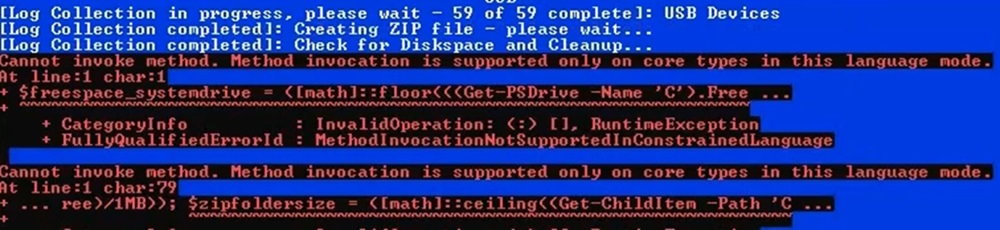
- 在 .zip 处理过程中,用户可能会遇到以下错误。如果 Windows PowerShell 设置为在受限模式
- 临时解决方法:
- 用户可以在出现错误消息期间停止日志收集器,并从 %appdata%\ServiceTag 收集日志
- 用户可以暂时将模式从 ConstrainedLanguage 更改为 FullLanguage 来运行日志收集器
- 针对此问题,计划在日志收集器的下一个版本中提供长期解决方法和通知。
- 示例错误:
- 在 .zip 处理过程中,用户可能会遇到以下错误。如果 Windows PowerShell 设置为在受限模式
- Windows Defender 抛出 SmartScreen 警告/错误
- 原因:
- Windows Defender 和其他安全应用程序的设计机制是将无法识别的脚本识别为可疑项。
- 解决方案:
- 以管理员身份运行日志收集器
- 调整 Defender 的设置以允许日志收集器运行
- Windows SmartScreen 文档
- 原因:
- Windows Defender/安全软件标识为木马程序
- 原因:
- Windows Defender 和其他安全应用程序的设计机制是将无法识别的脚本识别为可疑项。
- 解决方案:
- 以管理员身份运行日志收集器
- 调整安全设置以允许日志收集器运行
- 原因:
- 无法通过按“N”键来停止 GPResult 日志创建
- 原因:
- 必须拥有管理员访问权限才能停止正在运行的进程
- 解决方案:
- 右键单击日志收集器,然后选择“以管理员身份运行”
- 原因:
Produtos afetados
Dell All-in-One, Dell Pro Max Micro, Dell Pro Max Slim, Dell Pro Max Tower, Dell Pro Micro, Inspiron, OptiPlex, Vostro, XPS, Dell Monitors, Dell Plus Monitors, Dell Plus, Dell Pro, Dell Pro Max, Inspiron, Latitude, Vostro, XPS, Fixed Workstations
, Mobile Workstations
...
Produtos
Dell Pro Slim, Dell Pro Tower, Dell Slim, Dell Tower, Dell Pro Plus Monitors, Dell Pro Plus, Dell Pro Premium, Dell Pro RuggedAnexos
Propriedades do artigo
Número do artigo: 000203831
Tipo de artigo: How To
Último modificado: 14 jul. 2026
Versão: 30
Encontre as respostas de outros usuários da Dell para suas perguntas.
Serviços de suporte
Verifique se o dispositivo está coberto pelos serviços de suporte.