CloudLink: Cloudlink Agent becomes unresponsive due to memory leak.
Summary: CloudLink agent crashes due to a memory leak found in 7.1.1 and 7.1.2. KMIP clients are not affected.
Acest articol se aplică pentru
Acest articol nu se aplică pentru
Acest articol nu este legat de un produs specific.
Acest articol nu acoperă toate versiunile de produs existente.
Symptoms
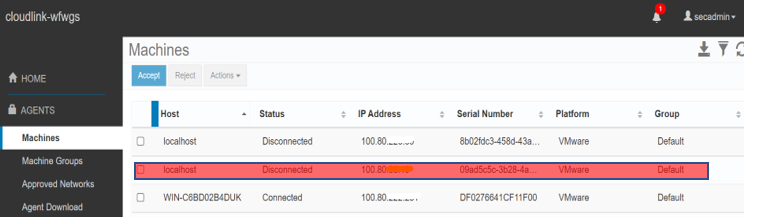
The agent will disconnect from CLC due to a memory leak. During this, admin operations such as adding new disks, removing disks, replace keys can not be performed since the agent is down. I/O operations will not be impacted since the disks already have the keys.
OS logs:
Multisession logs show agent session being closed after service crash:

OS logs:
Linux:
After svmd service crash on Linux an entry in /var/log can be seen on RHEL or CentOS showing out of memory error.
After svmd service crash on Linux an entry in /var/log can be seen on RHEL or CentOS showing out of memory error.
Windows:
In case of Windows, any crash will be logged in Windows Event Viewer logs. As service may automatically start on Windows with default recovery settings, the agent will attempt reconnection to CloudLink server.
In case of Windows, any crash will be logged in Windows Event Viewer logs. As service may automatically start on Windows with default recovery settings, the agent will attempt reconnection to CloudLink server.
On Cloudlink Center web UI the agent shows disconnected after service crash:
Multisession logs show agent session being closed after service crash:
Cause
CloudLink upgraded 3rd party TLS library used on the Agent to its latest version for security compliance. The newer version of the library has modified message-exchange flow, which leads to allocating memory in Agent code in a loop.
Resolution
Resolution:
A restart of the CloudLink agent service is required to start the service again.
Permanent fix:
This issue is fixed in CloudLink 7.1.3.
A restart of the CloudLink agent service is required to start the service again.
- On Linux: Agent service can be restarted manually after the crash. There is no data loss since the encrypted disk remains encrypted. Command to restart the agent service is service svmd restart.
- On Windows: After the crash, Windows will restart the service automatically if service recovery settings are set to restart the service (default). There is no data loss since the encrypted disk remains encrypted.
Permanent fix:
This issue is fixed in CloudLink 7.1.3.
Additional Information
Linux OS:
For example, in a system with 2GB memory, the Agent service crashes after 5 days when the memory consumption grows nearly 1.6 GBs in size with an average 300 MBs leak per day.
Windows OS:
For example, in a system with 4GB memory, the Agent service's memory consumption grows and reaches around 1.9 GBs in size. It is expected to crash when it reaches around 3GB with an average of 400 MBs leak per day.
For example, in a system with 2GB memory, the Agent service crashes after 5 days when the memory consumption grows nearly 1.6 GBs in size with an average 300 MBs leak per day.
Windows OS:
For example, in a system with 4GB memory, the Agent service's memory consumption grows and reaches around 1.9 GBs in size. It is expected to crash when it reaches around 3GB with an average of 400 MBs leak per day.
Produse afectate
CloudLink SecureVM, CloudLinkProprietăți articol
Article Number: 000197219
Article Type: Solution
Ultima modificare: 13 May 2026
Version: 4
Găsiți răspunsuri la întrebările dvs. de la alți utilizatori Dell
Servicii de asistență
Verificați dacă dispozitivul dvs. este acoperit de serviciile de asistență.