Avamar: How to Recall Backups That Were Migrated to Data Domain Cloud Tier
Summary: How to recall backups that were migrated to Data Domain Cloud Tier.
Instructions
How to recall backups that were migrated to Data Domain Cloud Tier.
Note: The following procedure is used in two scenarios:
- CLI Restore: When a Command-Line Interface (CLI) restore is required.
- User interface Restore with CLI Backup: When a UI restore must be performed, but the backup data is stored in the Data Domain Cloud Tier.
-
Find the list of backups on the Cloud Tier that are required for the restore.
-
Perform manual Recall for the identified backups.
-
Verify that the recall is complete, and the required backup pieces are on the active tier.
-
Proceed with Restore as usual.
- Find the list of backups required for the restore
The MCGUI Backup and Restore Manage tab can be used to locate the backups that must be recalled. See the calendar and the date and time column for the full database backup plan to restore, along with subsequent backups containing the necessary archive log or transaction logs for the wanted point-in-time restoration.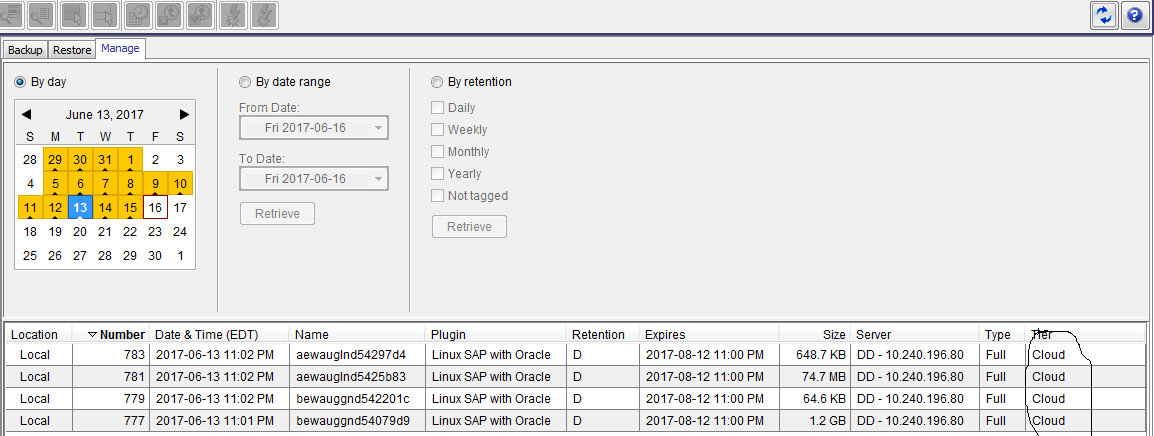
- Perform manual recall for the identified label numbers
On the Avamar server, run the following command to do the recall:
avtier --operation=restore --hfsaddr=<Server-Name> --hfsport=27000 --path=/<Domain-Name>/<Client-Name> --labelnum=<Label-Num> --permanent-recall=true
By default avtier logs generate in the following path: /usr/local/avamar/var/client/
Example: The previous image contains backups with Label Number 777, 779, 781 and 783 in Cloud tier. The following commands perform the recall from Cloud to the Active Tier:
avtier --operation=restore --hfsaddr=ave75 --hfsport=27000 --path=/clients/sap --labelnum=777 --permanent-recall=true
avtier --operation=restore --hfsaddr=ave75 --hfsport=27000 --path=/clients/sap --labelnum=779 --permanent-recall=true
avtier --operation=restore --hfsaddr=ave75 --hfsport=27000 --path=/clients/sap --labelnum=781 --permanent-recall=true
avtier --operation=restore --hfsaddr=ave75 --hfsport=27000 --path=/clients/sap --labelnum=783 --permanent-recall=true
- Verify that all required backups are on the active tier.
Once the recall is complete the Tier column for each recalled Label Number changes from Cloud to Active.
The following example shows that Label Numbers 777,779,781 and 783 are now in the Active Tier.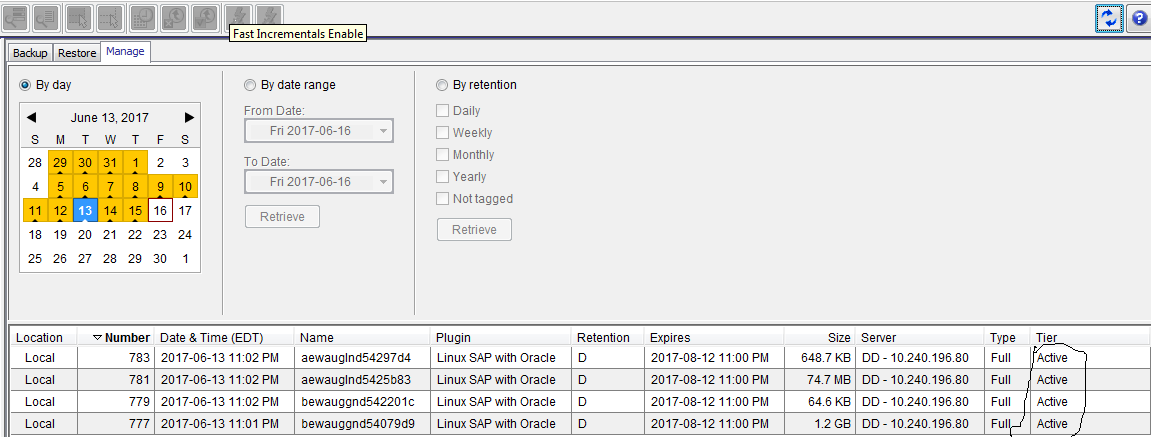
- Proceed with restore as usual
Proceed with restore as usual. Details for the restore procedure are available in the respective plug-in User Guide.