VPLEX: Management Server is Not Accessible over SSH or Browser
Summary: This article talks to the issue where the SSH access to the VPLEX management server fails. This article provides the workaround steps to resolve this issue.
Symptoms
Affected Hardware:
VPLEX VS2
Issue:
Trying to access the VPLEX Management server over SSH fails with a connection timeout error:
[root@zzz ~]# ssh xx.x.xxx.xx
ssh: connect to host port 22: connection timed out
However, the ping to the VPLEX Management server is successful:
[root@zzz ~]# ping xx.x.xxx.xx
PING xx.x.xxx.xx (xx.x.xxx.xx) 56(84) bytes of data.
64 bytes from xx.x.xxx.xx: icmp_seq=1 ttl=64 time=0.788 ms
64 bytes from xx.x.xxx.xx: icmp_seq=2 ttl=64 time=0.148 ms3
Cause
This issue could be due to a process stop responding or that the free space to accept the connection buffer was full, and it was Rejecting the connection. The kernel was excessively low on memory, and the network driver was unable to allocate a page for a received packet. The packet is dropped, and everything should recover in short. The kernel cannot clean the cache. It is found that SSD went bad based on the high counts for attributes such as Raw_Read_Error_Rate, Seek_Error_Rate, so on.
Resolution
Workaround:
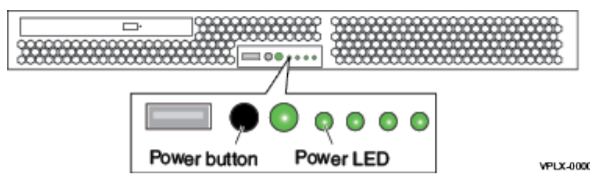
A hard reboot for the management server is required to resolve this issue and get the SSH connection back.
To hard reboot the management server:
- Hold down the power button until the power turns off (LEDs turn off).
- Press the power button again to power on.
Allow couple of minutes for the server to boot up then try to connect to it again.