PowerStore: Test Connection fails for SupportAssist in direct connect mode
Сводка: The "TEST CONNECTION" button in the UI did not perform the connectivity check through proxy server when the proxy server is configured. It always checks the direct connection between PowerStore and the Dell backend server. If the PowerStore does not have direct access to the Dell backend server, the test fails when SupportAssist is working through proxy server. ...
Данная статья применяется к
Данная статья не применяется к
Эта статья не привязана к какому-либо конкретному продукту.
В этой статье указаны не все версии продуктов.
Симптомы
The SupportAssist with proxy server is configured, it works perfectly since logs get uploaded to cloudIQ and support can access the array remotely.
But the client may receive a following error when clicking the "TEST CONNECTION" button in the UI.
Verify for address: <Proxy server IP> and Port: <Proxy server port> failed. Reason is timedout
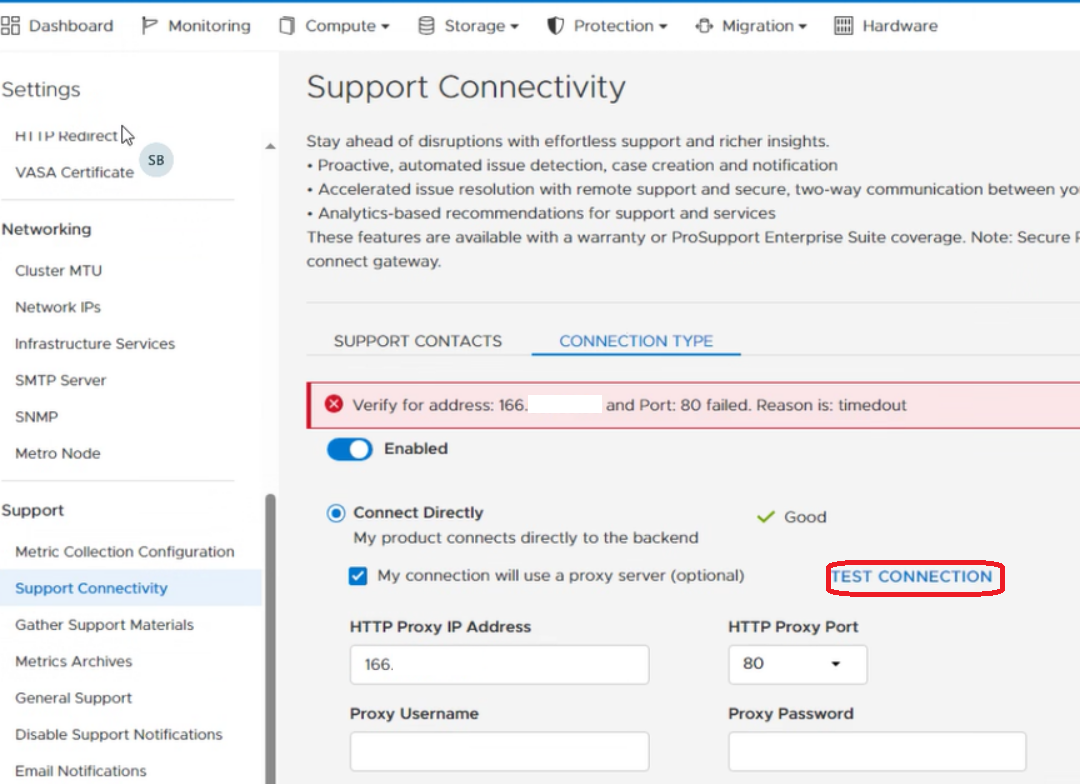
Причина
PowerStore Engineering confirmed a code issue where the TEST CONNECTION button in the UI ignores proxy server settings. If PowerStore is not able to reach out to the Dell backend server directly, the TEST CONNECTION check fails.
Разрешение
The error can be safely ignored since it does not accurately reflect the state of SupportAssist.
The issue is fixed in PowerStoreOS 4.1.0.0.
Затронутые продукты
PowerStoreСвойства статьи
Номер статьи: 000223786
Тип статьи: Solution
Последнее изменение: 14 Apr 2025
Версия: 3
Получите ответы на свои вопросы от других пользователей Dell
Услуги технической поддержки
Проверьте, распространяются ли на ваше устройство услуги технической поддержки.