OptiPlex 3000 Thin Client Secondary SSD Not Displayed in Boot Menu
Zhrnutie: User who purchase a Dell OptiPlex 3000 Thin Client unit with eMMC storage, and then install an SSD drive may not see the added storage in the F12 One-time Boot Menu.
Tento článok sa vzťahuje na
Tento článok sa nevzťahuje na
Tento článok nie je viazaný na žiadny konkrétny produkt.
V tomto článku nie sú uvedené všetky verzie produktov.
Symptómy
Affected Products:
- OptiPlex 3000 Thin Client
An additional SSD drive will fail to appear in the F12 One-Time Boot Menu, after installation in an OptiPlex 3000 Thin Client.
Príčina
Note: The OptiPlex 3000 Thin Client onboard storage and SSD devices are mutually exclusive.
Riešenie
The user must alter the enabled storage option in the system BIOS settings.
- Power on the computer and press F2 to enter BIOS setup.
- Select Storage on the left menu.
- Choose the M.2 PCIe SSD in the drop-down menu under Port Enablement.

Figure 1: (English Only) Dell BIOS
- Select the APPLY CHANGES button and press OK to save the change.
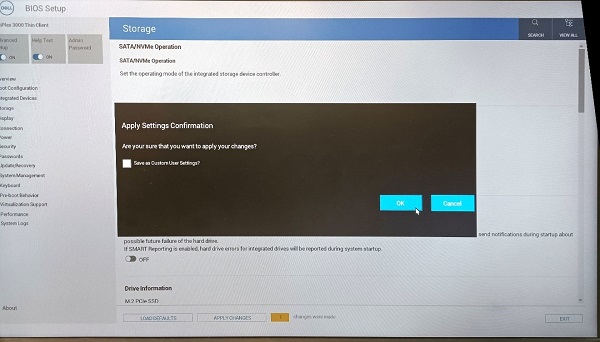
Figure 2: (English Only) Apply Changes and Press OK
- Select the EXIT button to exit BIOS setup.
Dotknuté produkty
OptiPlex 3000 Thin ClientVlastnosti článku
Číslo článku: 000196679
Typ článku: Solution
Dátum poslednej úpravy: 22 apr 2025
Verzia: 6
Nájdite odpovede na svoje otázky od ostatných používateľov spoločnosti Dell
Služby podpory
Skontrolujte, či sa na vaše zariadenie vzťahujú služby podpory.