Intune Fails to Deploy Dell Optimizer Version 4.2.2 When Downloaded from the Microsoft Store
Zhrnutie: Information about Intune not deploying Dell Optimizer version 4.2.2 if it is downloaded from the Microsoft Store.
Tento článok sa vzťahuje na
Tento článok sa nevzťahuje na
Tento článok nie je viazaný na žiadny konkrétny produkt.
V tomto článku nie sú uvedené všetky verzie produktov.
Symptómy
App Does Not Have a Valid Latest Package Version Error
Intune shows an error message, "The selected app does not have a valid latest package version" (Figure 1).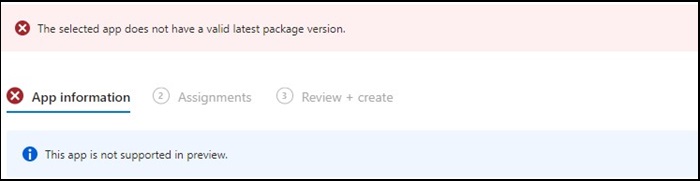
Figure 1
Note: Available exclusively on select Dell Latitude, Precision, OptiPlex, and Rugged PCs.
Príčina
Dell Optimizer did not pass the Intune verification that requires apps to install on all hardware (Dell and non-Dell).
Riešenie
Manually Deploy Dell Optimizer
As a workaround, IT Admin can try the following to manually deploy Dell Optimizer through Intune.
- Download the Dell Optimizer installer from Dell.com
- Follow the below instructions:
- Install the software using this command:
Install command: Dell-Optimizer-Application_xxxxx_WIN_x.x.x.x_A00.EXE /passthrough /silent /InstallDotNet=true /FACTORY=TRUE

Note: To uninstall, use the following command:
Uninstall command: Dell-Optimizer-Application_xxxxx_WIN_x.x.x.x_A00.EXE /passthrough /silent /remove
Dotknuté produkty
Alienware, Inspiron, OptiPlex, Vostro, XPS, G Series, G Series, Alienware, Inspiron, Latitude, Vostro, XPS, Fixed Workstations, Mobile WorkstationsVlastnosti článku
Číslo článku: 000224821
Typ článku: Solution
Dátum poslednej úpravy: 17 júl 2025
Verzia: 7
Nájdite odpovede na svoje otázky od ostatných používateľov spoločnosti Dell
Služby podpory
Skontrolujte, či sa na vaše zariadenie vzťahujú služby podpory.